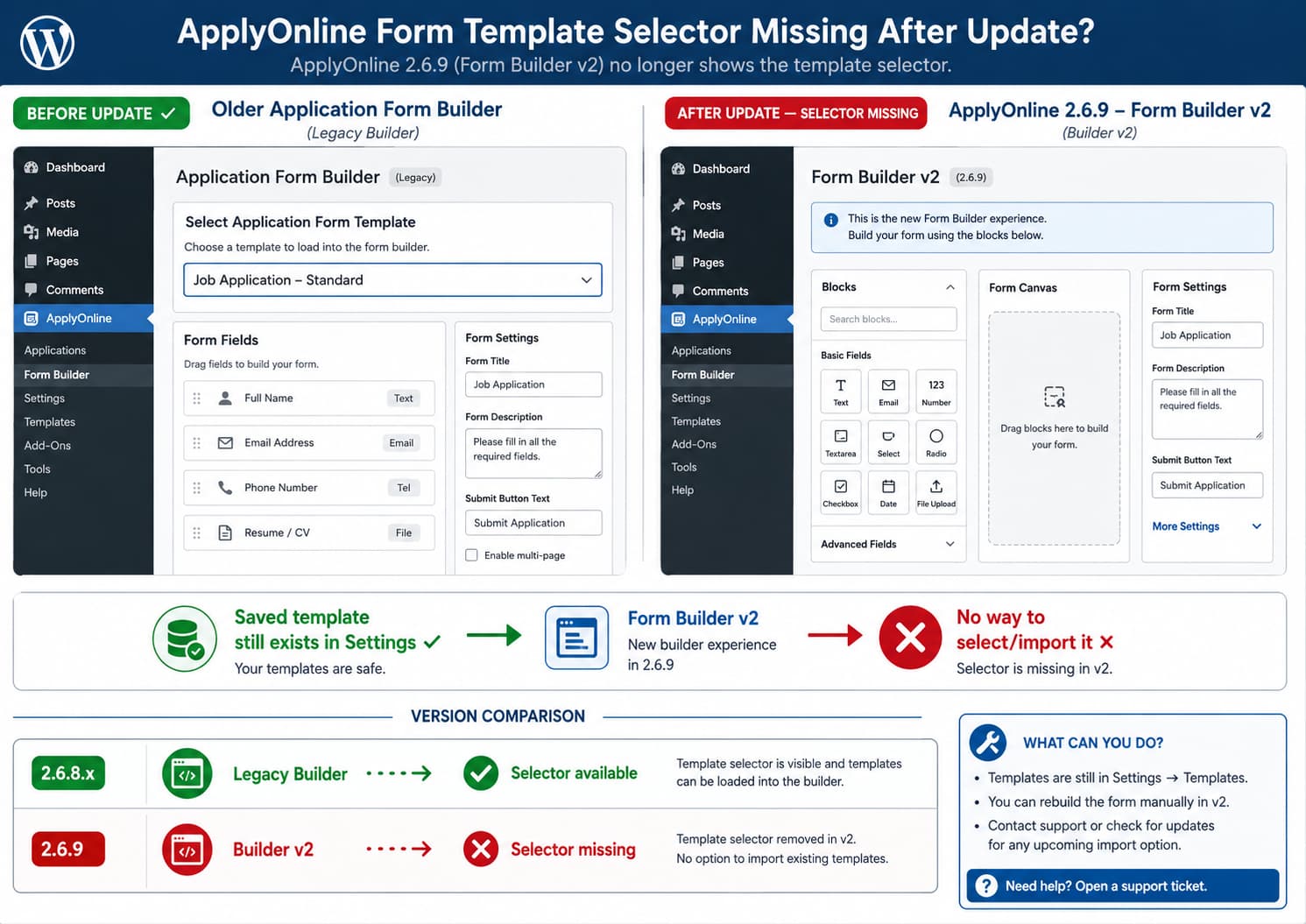
If custom application form templates still exist under ApplyOnline settings but the selector for choosing one has disappeared from the individual ad editor, the template itself is probably not the immediate problem.
ApplyOnline 2.6.9 introduced Application Form Builder v2, replacing the plugin’s legacy form builder. Earlier releases explicitly supported importing an existing form into the Application Form Builder, so losing the selector immediately after moving to the new builder points to a missing or changed workflow in Form Builder v2 rather than a deleted custom template. (wordpress.org)
At the time of writing, the public changelog does not document the selector’s removal as intentional and does not provide a release date for restoring it.
What Changed in ApplyOnline 2.6.9?
The current ApplyOnline changelog lists this as the main change in version 2.6.9:
New: Application form builder v2 replacing legacy form builder.The same release also includes several form-builder styling and field fixes. (wordpress.org)
That is particularly relevant because the older builder already had support for reusing existing forms.
ApplyOnline 2.2 previously added:
New: Import existing form in Application Form Builder.The plugin has also supported Templates/Default Fields since version 1.3. (wordpress.org)
So historically the workflow was roughly:
Create reusable form/template
        ↓
Open an ad
        ↓
Application Form Builder
        ↓
Select/import existing form
        ↓
Use template fields in that ad
If the settings page still shows the saved custom template but Form Builder v2 no longer presents an import/template selector, the saved template data has not necessarily disappeared.
The editor simply may no longer expose the control needed to apply it.
Do Not Delete and Recreate the Template
If the custom template still appears in:
ApplyOnline → Settings
do not delete it as the first troubleshooting step.
That proves at least some of the template configuration is still stored.
Deleting and rebuilding it is unlikely to restore an editor control that disappeared because of a plugin update.
Before making changes:
- Take a WordPress database backup.
- Screenshot the existing template configuration.
- Record the ApplyOnline version.
- Open an existing ad that previously used the template.
- Check whether its existing application form still works on the front end.
The key question is whether only the selector UI disappeared or whether saved template functionality itself is broken.
Check Whether Existing Ads Still Retain Their Forms
Open an ad that was created before the update.
Inspect its Application Form Builder.
Then check the public ad.
There are two important possibilities.
Existing forms still work
If ads that previously used custom templates continue displaying the correct application fields, that strongly suggests the update affected the editor workflow rather than deleting the form configuration.
In other words:
Existing saved form data: intact
Template in Settings: intact
Template selector in ad editor: missing
That is consistent with an admin-interface regression or an omitted feature in the new builder.
Existing forms are also missing or changed
This is more serious.
If existing ads have lost their form structure as well, do not save them unnecessarily.
Create a backup and report the issue with a copy of the affected site’s data if the developer requests it.
Saving an ad after its form configuration has failed to load could potentially overwrite previously stored form metadata, depending on how the plugin handles Form Builder v2.
Check That You Are Actually Running 2.6.9
Go to:
Plugins → Installed Plugins
and check ApplyOnline.
At the time of writing, WordPress.org lists ApplyOnline 2.6.9 as the current release. (wordpress.org)
This matters because 2.6.9 is the release that officially replaced the legacy form builder.
If the selector disappeared immediately after upgrading from a 2.6.8.x release to 2.6.9, record that exact version transition when reporting the problem:
Working:
ApplyOnline 2.6.8.x

Missing selector:
ApplyOnline 2.6.9
That is much more useful than simply reporting that the dropdown disappeared.
Check Whether the New Builder Has a Different Import Control
Before concluding that the feature is completely gone, inspect all Form Builder v2 controls.
Look for labels such as:
Import
Template
Load Form
Existing Form
Default Fields
Copy Form
Version 2.6.9 replaced the builder interface, so an old dropdown could theoretically have been moved or redesigned.
However, the current public plugin documentation and changelog do not document a replacement workflow for selecting a saved custom form template from an ad editor.
If no equivalent control exists, do not assume it has merely moved.
Why This Looks Like a Regression or Missing v2 Feature
Three facts are important:
1. Reusable templates already existed
ApplyOnline has supported Templates/Default Fields since version 1.3. (wordpress.org)
2. Importing an existing form was explicitly added
Version 2.2 added:
Import existing form in Application Form Builder3. Version 2.6.9 replaced the builder
Version 2.6.9 introduced:
Application form builder v2 replacing legacy form builderIf the reusable templates remain in settings but the new builder no longer exposes the import/selection control, the transition to Form Builder v2 is the strongest available lead.
That does not prove the developer unintentionally removed it. It could be an unfinished part of the new interface.
But there is currently no public changelog statement saying that reusable template selection was intentionally deprecated.
Test the Previous Version on Staging
A controlled rollback is one of the clearest ways to confirm whether the selector disappeared specifically in 2.6.9.
Do this on a staging copy or after creating a complete backup.
Test:
ApplyOnline 2.6.9
→ Open ad editor
→ Template selector missing
Then test the immediately previous working release:
ApplyOnline 2.6.8.x
→ Open same ad editor
→ Check for template selector
If the selector returns without changing the template data, that provides strong evidence that the editor change was introduced with Form Builder v2.
Do not automatically keep an outdated plugin version on a production site just to restore the selector.
Older versions can lack later bug, compatibility, or security fixes. Use rollback primarily as a diagnostic unless you have reviewed the risks and thoroughly tested the older release.
Avoid Editing the Plugin to Restore the Old Dropdown
It may be tempting to copy the template selector code from the legacy builder into 2.6.9.
That is risky.
Form Builder v2 may use different:
- field structures;
- JavaScript state;
- metadata;
- AJAX actions;
- nonces;
- save handlers.
Restoring only the visual <select> control does not guarantee that the selected template will import correctly into the new data structure.
A selector that appears but saves incorrectly could be worse than no selector at all.
Do not directly edit:
wp-content/plugins/apply-online/as a permanent solution.
Plugin updates will overwrite those changes.
Temporary Workaround: Duplicate an Existing Ad
If an existing ad already contains the desired application form, duplicating that ad may be safer than reconstructing the form manually.
The exact availability of duplication depends on the site’s installed plugins and workflow, so verify the copied ad carefully.
After duplicating:
- Change the ad title.
- Update its description and other ad-specific content.
- Inspect every application field.
- Submit a test application.
- Confirm the received application contains all expected fields.
The advantage is that the new ad may inherit the already-saved form configuration without requiring the missing template selector.
Do not assume duplication is safe without testing, particularly after a major form-builder rewrite.
Another Workaround: Rebuild the Form in the New Builder
If only a small number of ads are affected, rebuilding the fields manually in Form Builder v2 is another temporary option.
Before doing so, keep the original reusable template intact.
This avoids losing the source configuration if template importing returns in a future release.
Manually rebuilding is practical for a small form but becomes inefficient when:
- many ads use the same template;
- the form has dozens of fields;
- field order changes regularly;
- several reusable templates are maintained.
In those cases, restoring reusable template selection is much more important than a manual workaround.
There Is No Verified ETA Yet
The support question asks whether the selector will be restored and when.
The current public information does not provide a reliable answer to either question.
ApplyOnline’s current changelog contains an Upcoming section, but the listed upcoming work includes items such as:
- a fixed-height scrollbar for form fields;
- reCAPTCHA integration;
- required field marks;
- additional layout options;
- SMTP options;
- consent/terms fields.
It does not currently list restoration of the custom form template selector. (wordpress.org)
Therefore, it would be inaccurate to promise:
It will be fixed in the next release.or give a date.
Only the plugin developer can confirm whether the missing selector is:
- a bug;
- an unfinished Form Builder v2 feature;
- an intentional interface change;
- scheduled for a future release.
What to Include in a Useful Bug Report
A precise report should include:
ApplyOnline version: 2.6.9

Before update:
Custom application form template could be selected/imported
from the Application Form Builder in an ad.

After update:
Template still exists under ApplyOnline Settings,
but the ad editor no longer contains the selector/import control.

Expected:
Choose an existing saved application form/template
while editing an ad.
Also provide:
- WordPress version;
- PHP version;
- screenshot of the saved template in Settings;
- screenshot of Form Builder v2 with the missing selector;
- previous ApplyOnline version where it worked;
- whether old ads still retain their forms;
- whether manually created fields in v2 save correctly.
If a previous release restores the selector on staging, include that result.
For example:
2.6.8.x → selector present
2.6.9   → selector absent
That gives the developer a clear regression boundary.
How to Verify a Future Fix
When an update claims to restore template functionality, test the full workflow rather than only looking for the dropdown.
Create or verify the template
Go to the template/default form area and confirm your reusable template is still present.
Open a new ad
Open:
All Ads → Add New
Find the Application Form Builder.
Select/import the template
Confirm that the custom template can be selected.
Verify all fields
Check:
- field labels;
- field types;
- required settings;
- option values;
- file-upload fields;
- field order.
Save the ad
Reload the editor and make sure the imported form remains intact.
Test the front end
Submit a test application.
Verify that the received application contains the expected fields and values.
The feature is not fully restored merely because the selector reappears; the imported form also needs to save and submit correctly under Form Builder v2.
Current Status
ApplyOnline 2.6.9 replaced the legacy Application Form Builder with Form Builder v2. Earlier releases explicitly supported importing existing forms, while the current public changelog does not document the removal of that functionality or provide a replacement workflow. (wordpress.org)
If your saved custom templates remain visible in Settings but the selector disappeared from the ad editor after updating, do not delete the templates.
First verify existing ads, reproduce the version difference on staging, and report the missing Form Builder v2 selector to the developer.
There is currently no authoritative public release date for its return.
