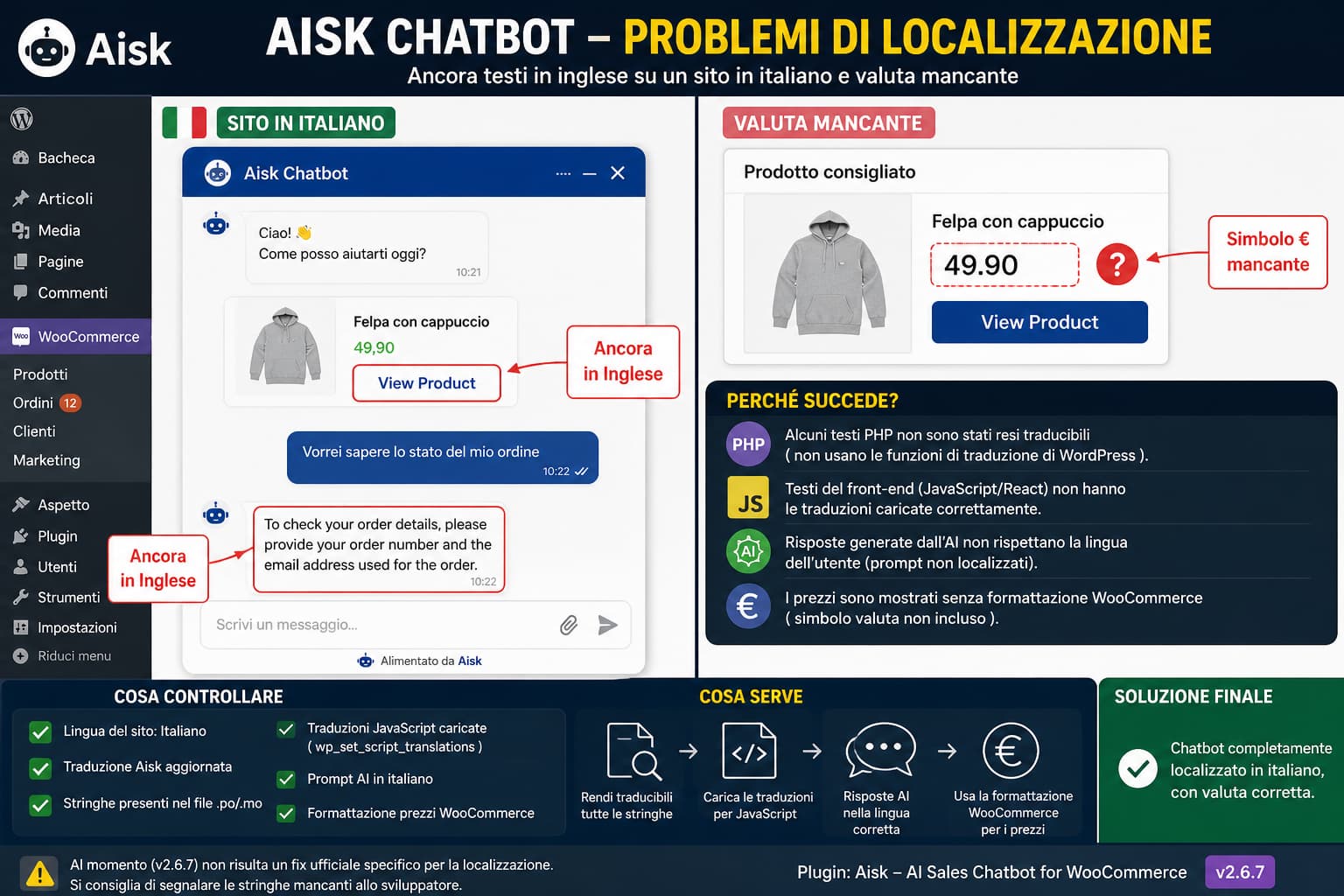
An Aisk chatbot can remain partly in English even after translating the plugin into Italian. Typical examples include the “View Product” button and fixed order-tracking responses such as:
To check your order details, please provide your order number and the email address used for the order.
This does not necessarily mean the Italian translation file is broken.
WordPress can translate only strings that the plugin exposes correctly through its internationalization system. Front-end JavaScript strings need additional translation handling, and dynamically generated AI responses are different again. A product price appearing without its currency symbol is a separate WooCommerce formatting issue and should be diagnosed independently.
Aisk 2.6.7 is currently the latest public release, and its published changelog does not list a fix specifically for incomplete localization. (wordpress.org)
Why Some Aisk Text Can Stay in English
WordPress plugin translation normally relies on gettext.
For example, a PHP string intended for translation should be written using a WordPress localization function such as:
__( 'View Product', 'aisk-ai-chat' );or:
esc_html__( 'View Product', 'aisk-ai-chat' );WordPress’s Plugin Handbook explains that strings must be wrapped in appropriate gettext functions and use the plugin’s text domain before translation tools can reliably translate them. (developer.wordpress.org)
If a plugin instead contains something equivalent to:
$label = 'View Product';that text is simply a PHP string. Creating an Italian .po or .mo file cannot translate it automatically.
The same problem can occur in JavaScript, React components, REST API responses, AJAX handlers, chatbot workflow messages, or text returned by an AI model.
That is why one part of a plugin can be translated correctly while another remains in English.
First Check Whether the Exact String Is Translatable
If you use Loco Translate or another gettext editor, do not start by repeatedly recreating the Italian translation.
Search for the exact untranslated text.
For example:
View Productand:
To check your order details, please provide your order number and the email address used for the order.A useful test is:
- Open the Aisk translation in your translation tool.
- Synchronize or rescan the plugin source.
- Search for the exact English phrase.
- Check whether it appears in the translation catalog.
There are two very different outcomes.
The string exists in the translation catalog
If the string appears, translate it into Italian and save the translation.
Then clear caches and retest the chatbot.
If it still remains English, investigate whether the correct text domain and translation file are actually being loaded.
The string does not exist
This is much more significant.
If a source scan cannot find the text as a translatable gettext string, translating the normal Aisk language catalog cannot solve that particular label.
The plugin developer would need to expose the string correctly for localization or provide another setting for overriding it.
Check the WordPress Site Language
Go to:
Settings → General → Site Language
Confirm that the site language is actually:
ItalianoWordPress selects translation files based on the current locale.
WordPress documentation also explains that plugin localization normally uses .po files for editable translations and compiled .mo files for the strings WordPress actually loads. (developer.wordpress.org)
If the WordPress installation itself is still using English, an Italian Aisk translation file may not be selected automatically.
After changing the language, visit:
Dashboard → Updates
and install any available translation updates.
Make Sure the Translation Is Stored in an Update-Safe Location
When using a translation plugin such as Loco Translate, avoid storing your only customized translation inside:
wp-content/plugins/aisk-ai-chat/A future Aisk update can replace the entire plugin directory.
Use an update-safe translation location supported by your translation tool, normally somewhere under:
wp-content/languages/Then clear:
- page cache;
- object cache;
- CDN cache;
- browser cache.
Test the chatbot again in a private browser window.
However, moving translation files will not solve strings that were never made translatable in the first place.
Front-End JavaScript Requires Its Own Translation Handling
This is particularly relevant to a chatbot.
Aisk uses a front-end chat widget, so some interface labels can be generated by JavaScript rather than PHP.
WordPress provides JavaScript internationalization support, but the plugin has to register translations correctly for its script.
For registered scripts, WordPress provides:
wp_set_script_translations()The official WordPress documentation describes this function as the mechanism for attaching translated strings to a registered script. (developer.wordpress.org)
Conceptually, a plugin might use:
wp_set_script_translations(
    'aisk-chat-widget',
    'aisk-ai-chat'
);
The actual Aisk script handle must be determined from the plugin code; do not copy that example as an Aisk-specific fix.
This distinction matters because you can have:
PHP admin strings       → translated
JavaScript widget text  → English
even with a valid Italian .mo translation.
If View Product appears only inside the JavaScript-powered chatbot, front-end script translation should be one of the first things the plugin developer checks.
Check Whether “View Product” Can Be Found in the Translation Source
The View Product label deserves a simple diagnostic.
After synchronizing the Aisk translation catalog, search for:
View ProductIf it appears
Translate it, save the translation, clear caches, and reload the widget.
If the English label remains, inspect JavaScript translation loading.
If it does not appear
The label may be:
- hardcoded in JavaScript;
- dynamically inserted by the REST response;
- generated from a template not scanned by the translation tool;
- missing the appropriate WordPress translation function.
That requires a plugin-side internationalization fix rather than another translation-file edit.
The Order-Tracking Message Is More Important
Aisk officially supports WooCommerce order management. Its plugin description says customers can check order status using their order number and email address. (wordpress.org)
The response:
To check your order details, please provide your order number and the email address used for the order.appears to be part of that workflow.
A predetermined workflow response is different from a free-form AI answer.
If it is produced directly by plugin code, it needs to be internationalized like any other user-facing string.
If it is supplied inside an AI system prompt or generated dynamically by the model, gettext translation alone may not control it.
This leads to an important troubleshooting distinction.
Static Plugin Text vs. AI-Generated Text
A multilingual chatbot contains at least two potential language layers.
Static interface and workflow text
Examples include:
View Product
Send
Close
Order number
Email address
These should normally be exposed as translatable plugin strings.
AI-generated responses
A response created by OpenAI is not a normal gettext string.
A .po file cannot translate arbitrary text generated after the page loads.
For AI responses, the chatbot needs language-aware prompt logic, such as instructing the model to respond in the visitor’s language.
Aisk’s public documentation confirms that OpenAI is used to generate chatbot responses and that user messages are sent to the service for processing. (wordpress.org)
Therefore, when an English sentence appears, determine first whether it is:
Plugin-defined messageor:
AI-generated responseThe solution is different.
How to Test Which Type of Message It Is
Ask for order status several times using slightly different Italian questions.
For example:
Dov'è il mio ordine?and:
Vorrei controllare lo stato del mio ordine.If the chatbot returns the exact same English sentence every time, that strongly suggests a predefined workflow message rather than free-form AI translation.
That does not prove where the text is stored, but it gives the developer a much better place to investigate.
Next, search the plugin translation catalog for the exact sentence.
If it is missing there as well, the issue is likely outside the normal gettext translation path.
The Missing Currency Symbol Is a Separate Problem
If Aisk recommends a WooCommerce product and displays something like:
49.90
View Product
instead of:
€49,90
View Product
do not treat that as an Italian translation problem.
The currency symbol is WooCommerce formatting.
First check:
WooCommerce → Settings → General → Currency options
Confirm that the correct currency is configured.
Then visit the actual WooCommerce product page.
Product page also lacks the currency
Investigate the WooCommerce currency configuration or theme formatting.
Product page correctly shows € but Aisk does not
The problem is much more likely to be in how the chatbot builds its product recommendation data.
WooCommerce provides formatted product price output through:
$product->get_price_html()WooCommerce’s own templates use get_price_html() when displaying product prices, allowing WooCommerce to include the configured currency symbol and appropriate price markup. (woocommerce.github.io)
By contrast:
$product->get_price()returns the product’s active price value.
If a custom integration outputs only that raw value, it can lose the formatting users expect from WooCommerce.
For example, plugin developers generally should not manually build a displayed price like this:
echo $product->get_price();when WooCommerce-formatted output is required.
Depending on the integration, an appropriate WooCommerce formatter such as:
echo wp_kses_post( $product->get_price_html() );or:
echo wp_kses_post( wc_price( $price ) );can preserve the store’s currency formatting.
This is a developer-side implementation detail rather than something an Italian .po translation should fix.
Compare the Product Page and Chatbot Output
A simple test can isolate the currency problem.
Suppose the WooCommerce product page displays:
€39,00but Aisk displays:
39.00That establishes that WooCommerce knows the correct currency.
The chatbot is losing it somewhere between:
WooCommerce product
        ↓
Aisk product data
        ↓
Chatbot recommendation
At that point, changing WooCommerce’s currency configuration is unlikely to be the correct solution.
The plugin developer should inspect how the recommendation payload formats price values.
Do Not Edit Aisk Plugin Files as the Permanent Fix
You may be able to find the English phrases directly inside:
wp-content/plugins/aisk-ai-chat/and replace them manually with Italian text.
That can be useful as a diagnostic.
For example, if changing one hardcoded label immediately makes the widget display Italian, you have identified the source of the problem.
But direct plugin-file editing is not a maintainable fix.
The next update can overwrite it.
It also does not solve localization for:
- other languages;
- JavaScript translation files;
- chatbot API responses;
- WhatsApp;
- Telegram;
- future strings.
The permanent fix should be implemented inside the plugin’s internationalization layer.
What the Plugin Developer Should Check
For incomplete Italian localization, the developer should audit every user-facing string across:
PHP
JavaScript / React
REST API responses
AJAX responses
Order-tracking workflow
Product recommendation cards
WhatsApp messages
Telegram messages
AI prompts and fallback responses
For PHP strings, WordPress gettext functions should be used consistently with the correct text domain.
For JavaScript strings, WordPress’s JavaScript internationalization APIs and script translations should be loaded properly. (developer.wordpress.org)
The translation template should then be regenerated so tools such as WordPress.org translations, Poedit, and Loco Translate can discover all user-facing strings.
For chatbot-generated responses, the selected locale or visitor language needs to be included in the AI prompting logic rather than relying on gettext.
For product recommendations, prices should use WooCommerce-aware formatting rather than raw numeric values.
How to Verify a Future Aisk Fix
After installing a future release that claims to improve localization, test more than the WordPress admin interface.
Set WordPress to Italian and check:
- The chatbot welcome message.
- Chat controls and buttons.
- View Product.
- Product price and € symbol.
- Product recommendation cards.
- Order-status request.
- Order number prompt.
- Email-address prompt.
- Successful order-status response.
- Error and validation messages.
- Contact/support responses.
- WhatsApp responses, if enabled.
- Telegram responses, if enabled.
Also test both logged-in and guest visitors.
Clear all caches before testing so an old JavaScript bundle or translated catalog is not mistaken for the current release.
Is There Already a Fix?
At the time of writing, the current WordPress.org release is Aisk 2.6.7.
Its public changelog lists fixes for WordPress 7.0 compatibility, WhatsApp URL validation, the chat handler, contact-form behavior, Telegram/WhatsApp functionality, and other areas, but it does not list a release specifically fixing incomplete Italian localization. (wordpress.org)
The localization report on the official support forum is also currently unresolved.
That means there is no verified current release that can be recommended specifically as the localization fix.
The practical approach for now is:
- Confirm WordPress is actually using Italian.
- Synchronize the Aisk translation catalog.
- Search for each untranslated phrase.
- Translate strings that are available.
- Identify strings missing from the translation catalog.
- Separate AI-generated responses from predefined plugin messages.
- Diagnose the missing currency separately.
- Report the exact untranslated strings to the developer.
If the phrases cannot be found by a translation scan, repeated edits to the Italian .po file will not solve them. Those strings first need to be internationalized correctly by the plugin.
