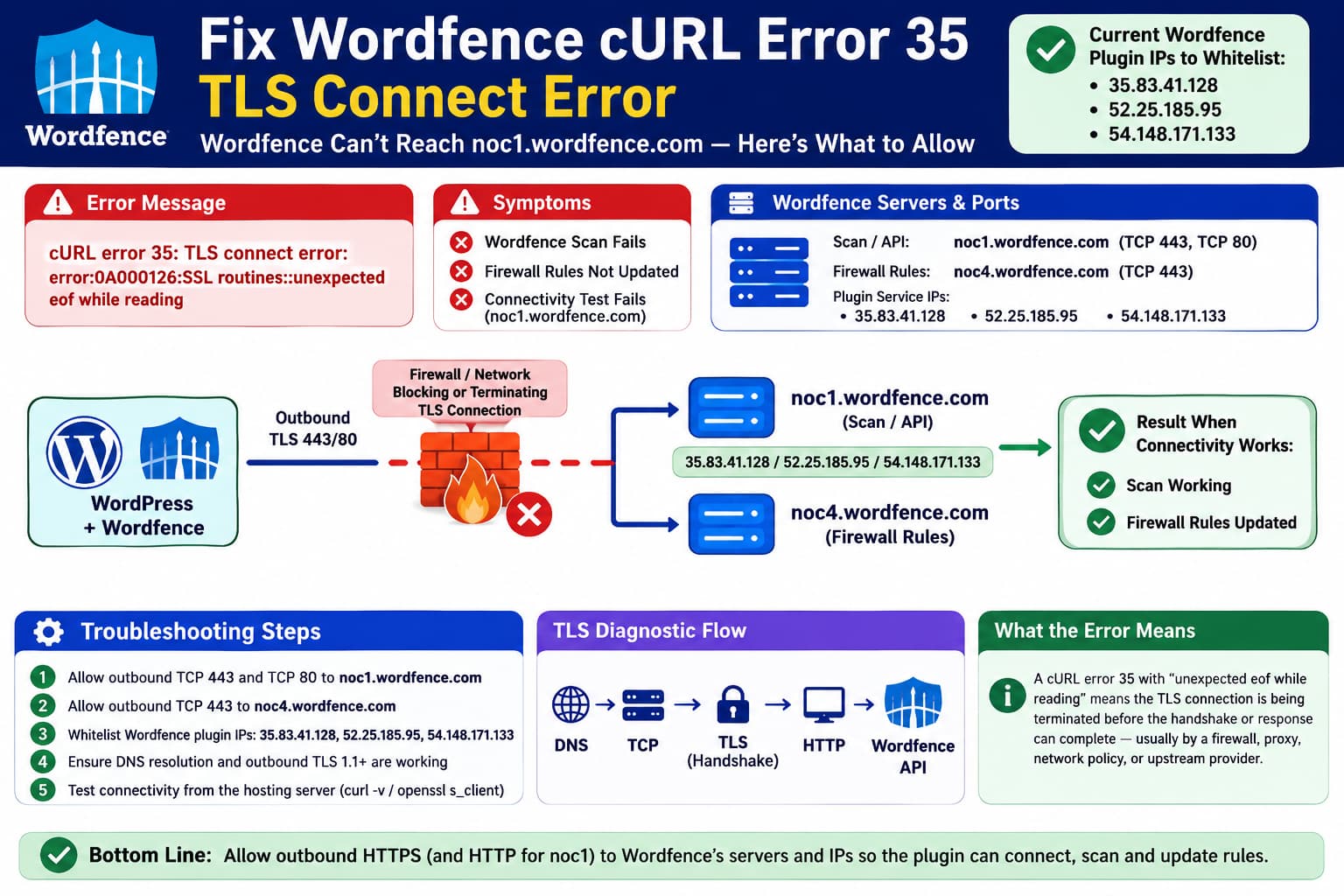
A Wordfence scan may fail with:
cURL error 35: TLS connect error:
error:0A000126:SSL routines::unexpected eof while reading
and the same error can appear under:
Wordfence
→ Tools
→ Diagnostics
→ Connectivity
when WordPress tries to connect to:
noc1.wordfence.comIf firewall rules also stop updating, this becomes more than a scanner issue.
The combination:
Wordfence scan
✗

noc1.wordfence.com connectivity
✗

Firewall rules update
✗
strongly points to an outbound network/TLS problem between the web server and Wordfence’s infrastructure.
Wordfence’s documentation confirms that scans require the web server itself to connect to noc1.wordfence.com. Firewall rule updates use Wordfence’s rule-update infrastructure, and current Wordfence support specifically identifies noc4.wordfence.com as the destination used for rule updates.
What cURL Error 35 Actually Means
libcurl defines error 35, CURLE_SSL_CONNECT_ERROR, as a failure somewhere during the SSL/TLS handshake. It is not an HTTP 403 or 500 response: the secure connection is failing before a normal application-level response can be exchanged.
The additional OpenSSL message:
unexpected eof while readingmeans the TLS connection ended unexpectedly while OpenSSL was still expecting handshake or encrypted data.
That can happen when something in the network path closes or resets the connection, including a hosting firewall, outbound security policy, proxy, TLS-inspection appliance, upstream provider, or another network middlebox.
It can also occur with client-side TLS/library incompatibilities, but upgrading PHP alone does not necessarily change the cURL/OpenSSL stack used by the server.
Upgrading PHP 8.1 to 8.3 Does Not Rule Out a Server TLS Problem
PHP, libcurl and OpenSSL are separate components.
You can have:
PHP 8.3while PHP still links to a particular system version of:
libcurl
OpenSSL
CA certificate bundle
The command-line curl binary can even use a different library stack from PHP.
Wordfence currently recommends modern PHP and TLS and states that its cloud servers require TLS 1.1 or later. Its Diagnostics page can be used to inspect the SSL and cURL environment WordPress is actually using.
So this result:
PHP 8.1
→ error

PHP 8.3
→ same error
makes a PHP-version bug less likely, but does not eliminate:
server firewall
network routing
TLS interception
OpenSSL configuration
cURL configuration
CA configuration
as possible causes.
Current Wordfence Servers to Allow
Wordfence’s current Advanced Information and Configuration documentation publishes three IP addresses for its plugin services:
| Purpose | Current addresses |
|---|---|
| Wordfence plugin services | 35.83.41.128 |
52.25.185.95 | |
54.148.171.133 |
Wordfence says these are the IP addresses to allow when a hosting environment restricts outbound connections from WordPress to the internet.
A very recent Wordfence support report also showed noc1.wordfence.com resolving to all three addresses:
52.25.185.95
54.148.171.133
35.83.41.128
which matches Wordfence’s current published infrastructure list.
For this problem, I would therefore give the hosting provider all three current plugin-service IPs, rather than allowlisting only whichever IP DNS happens to return during one test.
Scan Server: noc1.wordfence.com
Wordfence documents the scanner endpoint as:
noc1.wordfence.comThe server running WordPress must be able to establish outbound connections to it.
Wordfence’s scan documentation currently states that both:
TCP 443
TCP 80
must be reachable for noc1.wordfence.com.
The important traffic direction is:
Your WordPress server
        ↓
OUTBOUND TCP
        ↓
noc1.wordfence.com
This is unrelated to whether a browser can open the WordPress website successfully.
Firewall Rule Server: noc4.wordfence.com
For firewall definitions, Wordfence support currently identifies:
noc4.wordfence.comas its firewall rule update server.
In an April 2026 support case where rule updates stopped working, Wordfence specifically instructed the host to test:
curl -v https://noc4.wordfence.combecause the firewall rules require connectivity to noc4.
So for this exact combination of problems, the minimum important FQDNs are:
| Function | Hostname | Main port |
|---|---|---|
| Scanning / Wordfence API | noc1.wordfence.com | TCP 443, also TCP 80 per Wordfence |
| WAF rule/signature updates | noc4.wordfence.com | TCP 443 |
If the host can whitelist by hostname, allowing the FQDNs is preferable because cloud addresses can change.
If the host only supports destination-IP rules, use Wordfence’s current three plugin-service IPs and periodically verify them against Wordfence’s Advanced documentation.
Be Careful With an Old Wordfence IP Address
There is currently a documentation inconsistency worth knowing about.
The older scanner documentation still says noc1.wordfence.com should resolve to:
44.239.130.172However, Wordfence’s newer Advanced documentation explicitly lists that address under:
Wordfence servers previously used these addresses, which can be removed if you had allowlisted them in the past.
The retired addresses listed there include:
44.239.130.172
44.238.191.15
35.155.126.231
The current plugin-service addresses are instead:
35.83.41.128
52.25.185.95
54.148.171.133
So I would not tell a hosting provider to whitelist only 44.239.130.172, despite finding that value in older Wordfence scan documentation.
Use the current Advanced infrastructure list.
What About Wordfence Central and Incoming Connections?
Wordfence publishes a different set of addresses used by Wordfence Central and other services when Wordfence needs to connect back to your website:
44.235.211.232
54.68.32.247
54.71.203.174
They are represented by:
outbound.wordfence.comThese addresses are relevant when:
Wordfence Central
        ↓
connects INTO your website
or when using functionality where Wordfence initiates a remote scan-start callback.
They are different from the outbound server-to-Wordfence problem described by cURL error 35.
If you are not using Wordfence Central or remote scan starting, I would not confuse the hosting provider by presenting those addresses as the primary fix.
But if inbound filtering is extremely restrictive, they are worth allowlisting too.
What to Give the Hosting Provider
For this particular failure, this is the concise technical information I would send:
Please verify unrestricted outbound connectivity from the web/PHP server to:

Hostnames:
noc1.wordfence.com
noc4.wordfence.com

Current Wordfence plugin-service destination IPs:
35.83.41.128
52.25.185.95
54.148.171.133

Protocols/ports:
Outbound TCP 443
Outbound TCP 80 to noc1.wordfence.com as documented by Wordfence
DNS resolution must also function normally.

Please ensure there is no:
- outbound firewall block
- TLS inspection/proxy interference
- destination/IP reputation block
- country/geolocation rule
- SNI filtering
- upstream provider ACL
- connection reset affecting these destinations

Current error from PHP/WordPress:
cURL error 35: TLS connect error:
error:0A000126:SSL routines::unexpected eof while reading

The TLS connection is being terminated before WordPress receives a normal HTTPS response.
That gives the provider enough information to inspect the connection at the firewall/network layer.
Run These Tests From the Actual Hosting Server
A browser test from your laptop is not useful because Wordfence is making the connection from the hosting server.
If SSH is available, run:
dig +short noc1.wordfence.com
dig +short noc4.wordfence.com

curl -4 -v --connect-timeout 15 https://noc1.wordfence.com/

curl -4 -v --connect-timeout 15 \
'https://noc4.wordfence.com/?ticket=wordfence-connectivity-test'

openssl s_client \
-connect noc1.wordfence.com:443 \
-servername noc1.wordfence.com \
-tls1_2 </dev/null

openssl s_client \
-connect noc4.wordfence.com:443 \
-servername noc4.wordfence.com \
-tls1_2 </dev/null
Wordfence itself regularly asks users with cURL error 35 to run a verbose curl request from the affected server.
A successful test does not necessarily need to display a normal webpage.
For example, noc1 can return an API message saying no Wordfence API key was supplied. That still proves:
DNS
✓

TCP connection
✓

TLS handshake
✓

HTTP request/response
✓
In an earlier Wordfence support test, noc1 returned a JSON API-key error after a completely successful TLS handshake, which was considered useful connectivity evidence.
Test Each Current Wordfence IP Separately
Because noc1.wordfence.com can resolve to multiple backend IPs, a host could theoretically reach one but not another.
The best test preserves the hostname and TLS SNI while forcing each destination IP:
for ip in 35.83.41.128 52.25.185.95 54.148.171.133
do
    echo "Testing $ip"

    curl -4 -v \
      --connect-timeout 15 \
      --resolve noc1.wordfence.com:443:$ip \
      https://noc1.wordfence.com/
done
Then repeat for noc4:
for ip in 35.83.41.128 52.25.185.95 54.148.171.133
do
    echo "Testing $ip"

    curl -4 -v \
      --connect-timeout 15 \
      --resolve noc4.wordfence.com:443:$ip \
      'https://noc4.wordfence.com/?ticket=wordfence-test'
done
This is more useful than simply pinging the server.
Ping/ICMP can be intentionally disabled while HTTPS works perfectly.
What matters to Wordfence is TCP/TLS.
Also Test Through WordPress/PHP
CLI cURL succeeding does not prove PHP’s HTTP stack succeeds.
A closer WordPress-level test is:
wp eval '
$r = wp_remote_get(
    "https://noc1.wordfence.com/",
    array( "timeout" => 15 )
);

if ( is_wp_error( $r ) ) {
    echo $r->get_error_message() . PHP_EOL;
} else {
    echo wp_remote_retrieve_response_code( $r ) . PHP_EOL;
}
'
Then repeat with:
https://noc4.wordfence.com/If:
command-line curl
✓ works
but:
wp_remote_get()
✗ cURL error 35
the host should compare:
CLI curl/OpenSSL
versus
PHP cURL/OpenSSL
configurations.
If both fail with the same unexpected EOF, a network-path problem becomes much more likely.
admin-ajax.php Returning 0 Does Not Test This Problem
Opening:
/wp-admin/admin-ajax.phpand receiving:
0is normal WordPress behavior.
It proves that the site’s own AJAX endpoint is reachable.
It does not prove:
your server
→ noc1.wordfence.com
works.
Those are two completely different network paths.
So this test:
admin-ajax.php = 0is good, but it does not clear the hosting firewall, cURL or TLS layer.
The Current Wordfence Service Is Not Reporting an Outage
At the time of verification, Wordfence’s status page reports:
Wordfence Plugin
Operational

Wordfence Plugin Servers
Operational

Wordfence Central
Operational
and its incident archive reports no August 2026 incidents.
There was a noc1.wordfence.com infrastructure outage on June 9, 2026, but Wordfence marked it resolved the same day.
That makes a current global Wordfence outage a weaker explanation for a server that consistently fails while another website can still connect normally.
The evidence points more strongly to:
affected hosting server
or
affected network route
than to Wordfence being globally offline.
Wordfence 9.0.0 Is Current
WordPress.org currently lists Wordfence 9.0.0, released August 10, 2026.
The reported last successful firewall update was August 8, 2026.
That date is interesting because it predates the Wordfence 9.0.0 release on August 10.
So if connectivity genuinely stopped around August 8, Wordfence 9.0.0 itself cannot be the event that initially caused the failure.
The current error is also occurring during the TLS handshake, below most plugin-level application logic.
Could a Firewall Cause “Unexpected EOF While Reading”?
Yes.
It is technically possible.
cURL error 35 tells us that the SSL/TLS handshake failed. An unexpected EOF indicates the encrypted connection ended prematurely.
A firewall or other middlebox can cause exactly this class of symptom if it:
accepts TCP connection
↓
examines TLS ClientHello/SNI
↓
terminates connection
↓
client receives unexpected EOF
There are public WordPress examples where disabling ModSecurity eliminated the same OpenSSL unexpected eof while reading class of errors on server-side HTTP requests, demonstrating that security middleware can be responsible.
That does not prove this particular host is blocking Wordfence.
It means the error is compatible with that explanation and is appropriate for the hosting provider to investigate.
Is Wordfence Blocking Iranian Servers?
This needs a careful answer.
I could not find a current public Wordfence document stating that:
Wordfence plugin servers categorically block websites hosted in Iran or all Iranian IP addresses.
Wordfence’s published license terms do state that the company and its customers are subject to applicable trade-control laws, and Defiant is a U.S. company.
But that is not evidence of an Iran-wide technical IP block.
Therefore I would not state:
Wordfence blocks Iranwithout confirmation from Wordfence.
Nor would I state:
Wordfence definitely does not block Iranbecause a provider-level or compliance-related policy could change and may not be fully documented publicly.
The accurate conclusion is:
There is no Iran-specific blanket Wordfence plugin-service restriction that I could verify in the current public Wordfence documentation. Wordfence is subject to U.S. trade-control requirements, so Wordfence Support should explicitly confirm whether the affected Iranian server IP is subject to any backend or provider-level restriction.
This distinction matters.
Iran Can Introduce Another Network Layer
If the hosting server itself is physically located in Iran or exits through an Iranian network, the route can also be affected by:
hosting-provider filtering
upstream transit filtering
national network policy
TLS/SNI filtering
destination-specific blocks
That can look almost identical to a destination-side block from the application’s perspective.
The clean way to identify which side is responsible is packet-level/network testing.
For example:
Iran-hosted server
→ noc1 fails

different network
→ same noc1 IP works
strongly suggests a path-specific policy or routing issue.
But it still does not tell you whether the connection was terminated by:
local host
Iranian network/upstream
transit provider
Wordfence hosting provider
Wordfence infrastructure
without logs from the respective providers.
Ask the Hosting Provider to Capture the Failure
Because the host specifically requested technical information, the most useful next step is not another WordPress reinstall.
Ask them to inspect:
TCP handshake
TLS ClientHello
SNI: noc1.wordfence.com
connection reset / FIN source
egress firewall logs
proxy logs
DPI/security logs
routing
If they can run tcpdump, the critical question is:
Which side sends the FIN/RST when the TLS connection dies?
That can immediately distinguish a local-server/firewall termination from a remote/upstream termination.
Do Not Disable SSL Verification as the Permanent Fix
Wordfence does expose:
Wordfence
→ Tools
→ Diagnostics
→ Debugging Options
→ Enable SSL Verification
and its documentation says SSL verification can be disabled as a troubleshooting measure when connectivity cannot otherwise be established.
I would not leave it disabled.
Also, with:
TLS connect error
unexpected eof
the connection may be dying before certificate verification becomes the decisive step.
Turning verification off does not repair a firewall that is terminating TLS.
Recommended Troubleshooting Order
- Update Wordfence to the current release, but note that the reported failure apparently started before 9.0.0 was released.
- In Wordfence Diagnostics, record PHP, cURL, OpenSSL and CA bundle information.
- Have the host allow outbound TCP 443 to
noc1.wordfence.comandnoc4.wordfence.com, plus TCP 80 tonoc1as Wordfence documents. - Allow Wordfence’s current plugin-service IPs:
35.83.41.128,52.25.185.95, and54.148.171.133. - Run
dig,curl -v, andopenssl s_clientfrom the actual hosting server. - Test each of the three Wordfence IPs individually using
curl --resolve. - Repeat the connectivity test through WordPress/PHP using
wp_remote_get(). - Ask the host to inspect outbound firewall, proxy, TLS inspection and connection-reset logs.
- If the server is in Iran, ask both the host and Wordfence whether the server’s public IP is affected by a geographic, compliance, provider or network-level restriction.
- Send the resulting diagnostics to Wordfence support rather than reinstalling the plugin repeatedly.
For free Wordfence users, Wordfence’s official support channel is its WordPress.org support forum. Wordfence support commonly asks affected users to send a Diagnostics report and verbose cURL output when this class of connection error occurs.
Most Likely Cause in This Case
The strongest clues are:
Scan fails
+
noc1 diagnostics fails
+
firewall rules fail
+
PHP upgrade does not help
+
another website reaches Wordfence normally
+
Wordfence status is operational
That makes an affected-server outbound connectivity/TLS path problem the leading explanation.
The best evidence to obtain now is:
curl -v noc1
curl -v noc4
per-IP --resolve tests
WordPress wp_remote_get test
host firewall/TLS logs
rather than more WordPress-side cache or plugin troubleshooting.
Current Wordfence Connectivity Reference
| Requirement | Current value |
|---|---|
| Scan/API hostname | noc1.wordfence.com |
| WAF rule update hostname | noc4.wordfence.com |
| Current plugin-service IP 1 | 35.83.41.128 |
| Current plugin-service IP 2 | 52.25.185.95 |
| Current plugin-service IP 3 | 54.148.171.133 |
| Scan outbound port | TCP 443 |
| Additional scan port documented by Wordfence | TCP 80 |
| Rule updates | HTTPS / TCP 443 |
| Minimum documented TLS capability | TLS 1.1+ |
| Central/inbound service IPs | 44.235.211.232, 54.68.32.247, 54.71.203.174 |
| Wordfence status at verification | Operational |
