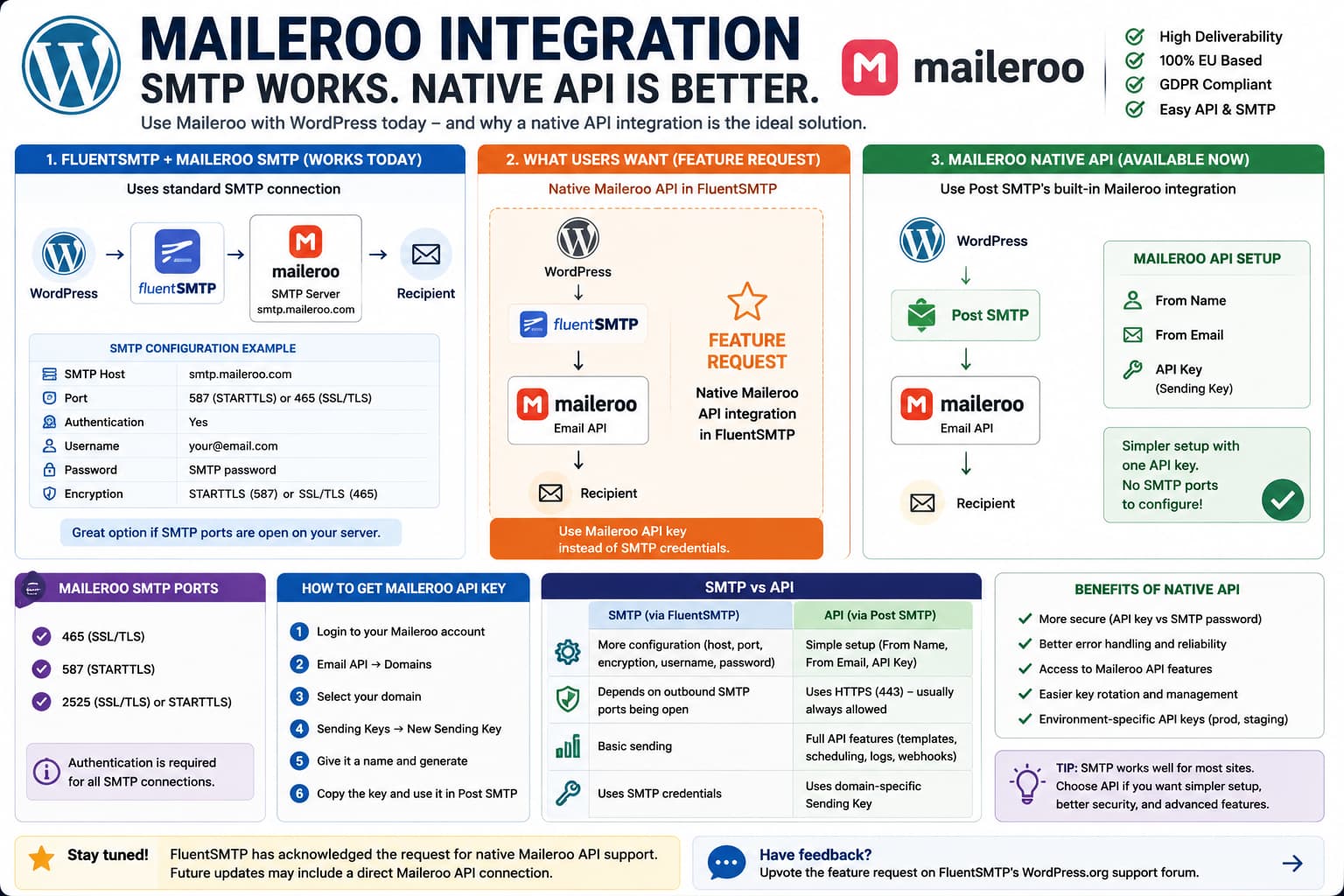
Maileroo works with WordPress through standard SMTP, but if your mail plugin supports provider-specific API connections for services such as Amazon SES, SendGrid, Mailgun, or Postmark, it is reasonable to expect a native Maileroo API option as well.
For FluentSMTP users, this distinction currently matters.
FluentSMTP can send through Maileroo using its generic Other SMTP connection, but Maileroo is not currently listed among FluentSMTP’s native API providers. FluentSMTP’s current provider list includes services such as Amazon SES, Mailgun, SendGrid, Brevo, Postmark, SparkPost, SMTP2GO, and others, with generic SMTP available for providers that do not have dedicated integrations.
There has already been an official FluentSMTP support request asking specifically for Maileroo API support. FluentSMTP support confirmed that Maileroo’s API was not natively supported at the time and logged the request as a feature suggestion.
The good news is that you do not have to stop using Maileroo. There are now two practical choices:
Stay with FluentSMTP→ Use Maileroo through Other SMTPNeed Maileroo's native Email API now→ Use Post SMTP's dedicated Maileroo API connection
Maileroo currently documents a direct Email API integration with Post SMTP, in addition to ordinary SMTP delivery.
SMTP and Native API Are Not the Same Connection
With a normal Maileroo SMTP configuration, WordPress connects to:
smtp.maileroo.com
using an SMTP username, password, port, and encryption method.
Maileroo currently documents these SMTP ports:
4655872525
with authentication required and support for SSL/TLS or STARTTLS.
A native Email API integration works differently.
Instead of opening an SMTP session, the WordPress mail plugin sends the message to Maileroo’s HTTP API using a Sending Key/API key associated with the verified sending domain. Maileroo’s Email API supports transactional sending and additional API functionality such as templates, scheduling, bulk delivery, logs, analytics, and webhooks.
For ordinary WordPress transactional email, both approaches ultimately accomplish the same core job:
wp_mail()↓Mail plugin↓Maileroo↓Recipient
The difference is the transport between the WordPress plugin and Maileroo.
Why a Native Maileroo API Connection Is Useful
The biggest immediate advantage is simpler configuration.
A generic SMTP setup requires fields such as:
SMTP hostnameSMTP portEncryptionAuthenticationSMTP usernameSMTP password
A dedicated Maileroo API integration can instead ask primarily for:
From NameFrom EmailMaileroo API Key
Maileroo’s documented Post SMTP integration currently follows exactly that model.
Maileroo also lets you create separate Sending Keys for different environments, such as production and staging, and revoke or regenerate a key if it is compromised.
This makes a native connection attractive for administrators who prefer provider-specific API credentials over generic SMTP authentication.
Does FluentSMTP Currently Support Maileroo’s API?
As of this article’s verification, Maileroo is still not listed as a native FluentSMTP provider.
FluentSMTP’s current public provider list includes:
- Amazon SES
- Gmail / Google Workspace
- Outlook / Office 365
- SendGrid
- Mailgun
- Cloudflare Email
- toSend
- Brevo
- Netcore
- Postmark
- SparkPost
- SMTP2GO
- Elastic Email
- generic SMTP
but not Maileroo.
A search of FluentSMTP’s current public source repository also does not expose a Maileroo provider implementation.
So if your FluentSMTP connection screen does not show Maileroo as a provider, you have not overlooked a hidden setting.
Option 1: Use Maileroo With FluentSMTP Through Other SMTP
If you already use FluentSMTP and it is reliable, there is no requirement to change plugins.
Create an SMTP account in Maileroo for the sending domain.
Maileroo documents the following configuration:
SMTP Host:smtp.maileroo.comPort:587Encryption:STARTTLSAuthentication:YesUsername:Your Maileroo SMTP account/emailPassword:The generated SMTP password
Port 465 with SSL/TLS is another supported option.
Then open FluentSMTP and choose:
Settings→ FluentSMTP→ Add Connection→ Other SMTP
Enter the Maileroo credentials and send a test email.
For most sites, I would prefer:
Port 587 + STARTTLS
or:
Port 465 + SSL/TLS
rather than an unencrypted SMTP connection.
Verify the Sending Domain First
Do not troubleshoot WordPress indefinitely if the Maileroo sending domain itself is not ready.
Maileroo’s WordPress API documentation requires a verified sending domain before the API connection is configured.
Check the domain in the Maileroo dashboard and make sure its required DNS authentication records are valid.
Your From address should also belong to the domain that you configured for sending.
For example:
Verified domain:example.comRecommended From address:notifications@example.com
rather than an unrelated domain.
Send a FluentSMTP Test Email
After configuring Other SMTP:
FluentSMTP→ Email Test
send a message to an address you can inspect.
Then verify:
Message receivedCorrect From addressCorrect From nameNo authentication errorNo connection timeoutMaileroo log shows the message
If the test works, Maileroo itself does not require a native FluentSMTP integration for basic WordPress mail delivery.
The native API request is primarily about providing a better provider-specific connection method.
If SMTP Times Out
A connection failure such as:
Connection timed outCould not connect to SMTP host
is different from an incorrect SMTP password.
Some hosting environments restrict outbound SMTP connections. FluentSMTP’s own support guidance distinguishes generic SMTP connections, which require access to the appropriate outgoing SMTP port, from HTTP API-based integrations.
That is another situation where an API integration can be useful.
Before changing plugins, ask the host whether outbound connections to:
smtp.maileroo.com:587
or:
smtp.maileroo.com:465
are allowed.
Option 2: Use Maileroo’s Native Email API Through Post SMTP
If the requirement is specifically:
I want Maileroo through an API key instead of SMTP.
there is now a direct WordPress solution.
Maileroo officially documents Post SMTP as supporting its Email API.
The setup is:
WordPress↓Post SMTP↓Maileroo Email API↓Recipient
rather than:
WordPress↓SMTP client↓smtp.maileroo.com↓Recipient
Create a Maileroo Sending Key
In Maileroo:
Email API→ Domains→ Select domain→ Sending Keys→ New Sending Key
Give the key a recognizable name, for example:
WordPress Production
Maileroo allows separate keys to be created for different environments and lets a compromised key be deleted and replaced.
Copy the generated key securely.
Do not paste it into support forums, screenshots, Git repositories, or public code.
Configure Post SMTP
Install and activate Post SMTP.
Open its setup wizard and select:
Maileroo
as the provider.
Maileroo’s current documentation says the integration asks for:
From NameFrom EmailAPI Key
rather than SMTP host and password settings.
Enter the Sending Key you created.
Then run the built-in email test.
Verify the API Connection
Do not stop at a green “test succeeded” notice.
Check both WordPress and Maileroo.
Confirm:
Test email reached the recipientCorrect sender is shownMaileroo logged the deliveryNo bounce is recordedAPI connection remains active
Maileroo specifically recommends checking both the received test message and its dashboard delivery information after configuring Post SMTP.
You Do Not Need to Install Maileroo’s Own SMTP Plugin for API Sending
Maileroo also provides Simple SMTP by Maileroo.
That plugin is a lightweight WordPress SMTP solution and Maileroo documents it as working through SMTP accounts.
This makes it useful if your goal is simply:
WordPress + straightforward Maileroo SMTP
But if your requirement is specifically:
Maileroo Email API
Maileroo’s current documentation points to the Post SMTP integration instead.
Should You Replace FluentSMTP Just for Maileroo API Support?
Not necessarily.
If your current configuration is:
FluentSMTP+ Maileroo SMTP+ reliable delivery
there is nothing inherently broken about it.
FluentSMTP also provides useful features such as logging, multiple connections, fallback connections, routing, and resending.
Switch only if direct Maileroo API transport is important enough to justify changing the site’s mail layer.
For example, switching becomes more reasonable if:
SMTP ports are restricted by the hostyou strongly prefer API-key authenticationyou manage many WordPress sitesyou specifically want Maileroo's documented API integration
If SMTP is already stable and the site sends only modest transactional mail, staying on FluentSMTP is also a valid choice.
Do Not Run Two Mail Transport Plugins Together
Avoid leaving:
FluentSMTP
and:
Post SMTP
both actively controlling WordPress email delivery.
SMTP plugins generally intercept WordPress’s mail process so they can replace the default transport.
Having multiple mail transport plugins active can make troubleshooting unpredictable.
If testing Post SMTP:
- use staging if possible,
- record the current FluentSMTP configuration,
- deactivate FluentSMTP,
- configure Post SMTP,
- send test messages,
- keep only the transport plugin you decide to use.
Do Not Custom-Code a Maileroo API Integration Unless You Need To
Maileroo exposes a RESTful Email API, so technically a WordPress developer could build a custom wp_mail() replacement around it. Maileroo documents API-based transactional email as a supported service.
However, a production mail integration needs more than one wp_remote_post() call.
It needs to correctly handle:
HTML and plain-text contentToCCBCCReply-ToAttachmentsHeadersmultiple recipientsAPI errorstimeoutsloggingretriesfailed sendsWordPress filters
Since a maintained WordPress integration already exists, a custom transport normally adds unnecessary maintenance.
What a Native FluentSMTP Maileroo Provider Would Need
If FluentSMTP adds Maileroo in the future, a good integration should behave similarly to its existing API providers.
At minimum it should support:
Maileroo Sending KeyVerified From EmailFrom NameTo / CC / BCCReply-ToHTML and text mailAttachmentsError response parsingTest emailFluentSMTP email loggingResend supportFallback connection support
Ideally it should also validate credentials when the connection is saved rather than waiting until the first production email fails.
Maileroo already provides the API and domain-specific Sending Keys needed for this type of integration.
There Is Already Demand for the Integration
This is not the first request for Maileroo API support in FluentSMTP.
An earlier FluentSMTP WordPress.org request asked to add Maileroo so that an API key could be used instead of SMTP. FluentSMTP support acknowledged the request and said it had been logged for evaluation.
A separate request for another WordPress mail plugin also specifically mentioned adding Maileroo API support alongside SMTP2GO, which shows that users are looking for Maileroo as a first-class provider rather than only as an “Other SMTP” service.
That does not guarantee FluentSMTP will add it, but it confirms the use case is legitimate.
How to Check Whether FluentSMTP Adds Maileroo Later
After a future FluentSMTP update, check:
FluentSMTP→ Settings→ Add Connection
If Maileroo appears as its own provider and asks for:
Maileroo API Key
rather than SMTP host credentials, it has received a native integration.
Also check the FluentSMTP changelog.
Do not assume generic Other SMTP has become an API integration just because Maileroo works through it.
The distinction is:
Other SMTP→ SMTP protocolDedicated Maileroo provider→ Maileroo API
Recommended Setup Today
For someone specifically requesting native Maileroo API delivery, the clearest current setup is:
Maileroo verified domain ↓Maileroo Sending Key ↓Post SMTP ↓Maileroo Email API ↓WordPress transactional emails
Maileroo officially documents this configuration today.
If staying with FluentSMTP is more important than using the API, use:
FluentSMTP→ Other SMTP→ smtp.maileroo.com→ Port 587 / STARTTLS
Both are valid.
What FluentSMTP currently lacks is the middle ground the feature request is asking for:
FluentSMTP→ Maileroo→ API Key
