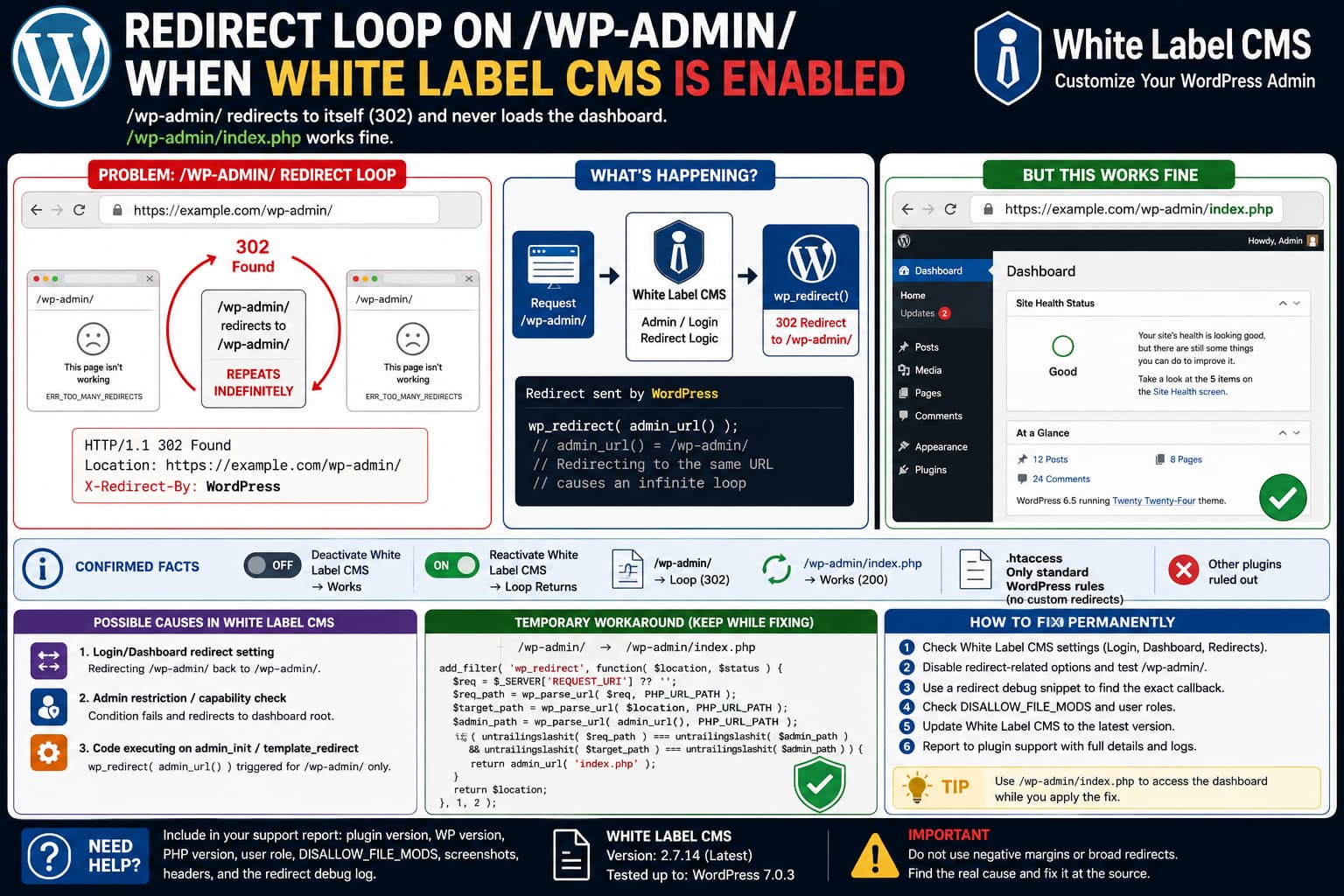
If activating White Label CMS causes:
/wp-admin/to redirect repeatedly back to:
/wp-admin/while this URL still works:
/wp-admin/index.phpyou already have two unusually useful diagnostic clues.
The first is the response header:
X-Redirect-By: WordPressWordPress’s wp_redirect() function uses WordPress as the default value for the X-Redirect-By response header. That means a redirect containing this header is being generated through WordPress’s PHP redirect system rather than by a normal .htaccess Redirect directive.
The second clue is that the explicit dashboard file works:
/wp-admin/index.phpbut the directory URL does not:
/wp-admin/That strongly suggests a redirect callback that treats the two request paths differently.
If disabling White Label CMS immediately stops the loop and reactivating it immediately restores the loop, focus on the plugin’s admin/login redirect logic before changing permalinks, DNS, SSL, or your WordPress Address.
What the Redirect Loop Looks Like
The failing sequence is effectively:
GET /wp-admin/
        ↓
302 Found
Location: /wp-admin/
X-Redirect-By: WordPress
        ↓
GET /wp-admin/
        ↓
302 Found
Location: /wp-admin/
        ↓
repeat
The browser eventually stops following the redirects and reports:
ERR_TOO_MANY_REDIRECTSBut requesting:
/wp-admin/index.phploads the WordPress dashboard normally.
That difference is important.
If the entire WordPress admin session, authentication cookie, or HTTPS configuration were broken, you would normally expect /wp-admin/index.php to fail as well.
White Label CMS Does Perform WordPress-Level Admin Redirects
White Label CMS is specifically designed to customize the WordPress administration experience, including the login screen, dashboard, menus, and client-facing admin environment. The current public release is 2.7.14, with more than 200,000 active installations, and WordPress.org lists it as tested through WordPress 7.0.3.
There is also historical evidence of White Label CMS redirecting particular admin requests back to:
/wp-admin/A previous WordPress.org support report documented the plugin redirecting its own settings URL:
/wp-admin/options-general.php?page=wlcms-plugin.phpback to:
/wp-admin/The reporter reproduced that behavior without other plugins active.
Another report identified a capability-related condition involving DISALLOW_FILE_MODS that could also result in White Label CMS redirecting its settings page to the dashboard.
Those reports do not prove that the exact /wp-admin/ self-loop has the same cause.
They do establish something useful, however: White Label CMS contains admin-routing logic capable of issuing WordPress-level redirects to /wp-admin/.
Why /wp-admin/index.php Can Work While /wp-admin/ Loops
WordPress treats both URLs as ways of reaching the dashboard:
/wp-admin/
/wp-admin/index.php
But PHP code can still inspect the literal incoming request.
For example:
$_SERVER['REQUEST_URI']may contain:
/wp-admin/for one request and:
/wp-admin/index.phpfor the other.
A redirect condition based on the current URI could therefore trigger only on the directory form.
Conceptually, problematic logic can look like:
if ( some_white_label_condition() ) {
	wp_redirect( admin_url() );
	exit;
}
admin_url() normally points to the admin directory.
So if that callback is already executing during:
/wp-admin/the result becomes:
/wp-admin/
→ /wp-admin/
→ /wp-admin/
A redirect does not need to send the browser somewhere different. Redirecting a URL to itself is enough to create an infinite loop.
First Workaround: Use /wp-admin/index.php
If you need access immediately and this URL works:
https://example.com/wp-admin/index.phpuse it temporarily.
You do not need to disable White Label CMS just to continue working in wp-admin.
This is a workaround rather than a permanent fix, but it gives you access to:
Settings → White Label CMSso you can inspect the plugin configuration while keeping its dashboard customizations active.
Check White Label CMS Redirect-Related Settings
White Label CMS has historically included administration/login-related customization in addition to visual branding. Earlier documentation of the plugin specifically describes an admin setting for login URL redirection.
Using the working URL:
/wp-admin/index.phpopen:
Settings
→ White Label CMSReview the plugin’s:
Login
Settings
Dashboard
Menus
sections.
Pay particular attention to anything related to:
login redirect
dashboard redirect
welcome dashboard
admin restrictions
client administrator
custom dashboard
Temporarily disable only redirect-related options and save.
Then test:
/wp-admin/again.
You do not need to remove your logo, custom dashboard widgets, menu branding, or admin CSS just to perform this test.
The goal is to isolate routing behavior from appearance customizations.
Confirm the Redirect With curl
Browser DevTools can show the redirect, but curl makes the sequence easier to inspect.
Run:
curl -I https://example.com/wp-admin/A problematic response may look like:
HTTP/2 302
location: https://example.com/wp-admin/
x-redirect-by: WordPress
Now compare:
curl -I https://example.com/wp-admin/index.phpIf that produces:
HTTP/2 200or otherwise successfully loads the authenticated dashboard while /wp-admin/ redirects to itself, you have confirmed the path-specific behavior.
Be aware that command-line requests do not automatically contain your browser’s WordPress login cookies. For authenticated testing, browser DevTools is often easier unless you deliberately supply a valid session cookie.
Why .htaccess Is Unlikely to Be the Cause
If .htaccess contains only the normal WordPress rewrite block and the redirect response says:
X-Redirect-By: WordPressthen repeatedly modifying rewrite rules is unlikely to solve this particular problem.
WordPress’s documented wp_redirect() implementation sets:
X-Redirect-By: WordPressby default.
By contrast, an Apache-level rule would usually happen before the WordPress PHP application generates its response.
This is why checking the redirect headers is much more useful than repeatedly resaving permalinks.
Capture the Exact PHP Callback Causing the Redirect
If the settings do not reveal the cause, you can identify the PHP code issuing the redirect.
Create:
/wp-content/mu-plugins/if it does not already exist.
Then create:
/wp-content/mu-plugins/wp-admin-redirect-debug.phpwith:
<?php
/**
 * Plugin Name: WP Admin Redirect Debug
 * Description: Logs WordPress redirects originating while /wp-admin/ is requested.
 */

defined( 'ABSPATH' ) || exit;

add_filter(
	'wp_redirect',
	function ( $location, $status ) {

		$request_uri = isset( $_SERVER['REQUEST_URI'] )
			? wp_unslash( $_SERVER['REQUEST_URI'] )
			: '';

		$request_path = wp_parse_url( $request_uri, PHP_URL_PATH );
		$admin_path   = wp_parse_url( admin_url(), PHP_URL_PATH );

		if (
			$request_path &&
			$admin_path &&
			untrailingslashit( $request_path ) === untrailingslashit( $admin_path )
		) {
			error_log(
				sprintf(
					'[WP Admin Redirect] Request: %s | Status: %d | Location: %s | Trace: %s',
					$request_uri,
					(int) $status,
					$location,
					wp_debug_backtrace_summary()
				)
			);
		}

		return $location;
	},
	999,
	2
);
WordPress provides wp_debug_backtrace_summary() specifically to return a compact summary of the functions that led to the current point in execution.
Enable logging in wp-config.php if necessary:
define( 'WP_DEBUG', true );
define( 'WP_DEBUG_LOG', true );
define( 'WP_DEBUG_DISPLAY', false );
Then request:
/wp-admin/once and inspect:
/wp-content/debug.logYou should see something similar to:
[WP Admin Redirect]
Request: /wp-admin/
Status: 302
Location: https://example.com/wp-admin/
Trace: ...
The trace is the important part.
If it contains a White Label CMS class or function, you now have direct evidence of the callback creating the redirect.
Remove the debugging mu-plugin when testing is complete.
An Even Faster Redirect Debugging Method
If you already have SSH or WP-CLI access, you can temporarily log all WordPress redirects through a small mu-plugin:
<?php

add_filter(
	'wp_redirect',
	function ( $location, $status ) {
		error_log(
			sprintf(
				'[Redirect] %s => %s [%d] | %s',
				$_SERVER['REQUEST_URI'] ?? '',
				$location,
				$status,
				wp_debug_backtrace_summary()
			)
		);

		return $location;
	},
	999,
	2
);
Then reproduce the loop only once.
Do not leave this enabled permanently because wp-admin legitimately performs many redirects during normal operation.
Check White Label CMS Options With WP-CLI
You can inspect the plugin’s stored options without manually searching the database.
Run:
wp option list --search="wlcms*" --fields=option_name,option_valueWP-CLI officially supports wildcard searches with * and ? when listing WordPress options.
Depending on your installed White Label CMS version, this can reveal option names associated with:
redirect
login
dashboard
admin
Do not immediately delete every matching option.
First export them:
wp option list --search="wlcms*" --format=json > wlcms-options-backup.jsonThen inspect their values.
This is considerably safer than running SQL DELETE queries against every option beginning with the plugin prefix.
Check DISALLOW_FILE_MODS
If your wp-config.php contains:
define( 'DISALLOW_FILE_MODS', true );note that White Label CMS has had a previous support report where this configuration affected access to its settings and resulted in a redirect to /wp-admin/.
You can check the constant with WP-CLI:
wp config list DISALLOW_FILE_MODSDo not permanently enable plugin installation just to fix an admin redirect.
Instead, treat this as a compatibility test.
If temporarily changing the constant on staging makes the redirect disappear, report that exact result to the White Label CMS developer.
Check the User Role
White Label CMS includes controls intended to simplify or restrict the admin interface for client users. WordPress.org specifically describes its ability to control which menus appear and to provide a restricted client-facing admin experience.
Therefore test the behavior using a full Administrator account.
Then compare another account if relevant.
If:
Administrator → /wp-admin/ works
Client/editor role → loop
the problem is likely tied to role/capability logic.
If:
Administrator → loop
Editor → loop
the problem is probably more general.
This distinction is valuable when reporting the bug.
Temporary Fix While Keeping White Label CMS Active
If you have confirmed that the problematic redirect is exactly:
/wp-admin/
→ /wp-admin/
and:
/wp-admin/index.phpworks correctly, you can temporarily rewrite only that self-redirect.
Create:
/wp-content/mu-plugins/wlcms-admin-loop-workaround.phpwith:
<?php
/**
 * Plugin Name: White Label CMS Admin Loop Workaround
 * Description: Prevents an exact /wp-admin/ self-redirect by sending it to index.php.
 */

defined( 'ABSPATH' ) || exit;

add_filter(
	'wp_redirect',
	function ( $location, $status ) {

		if ( ! is_user_logged_in() ) {
			return $location;
		}

		$request_uri = isset( $_SERVER['REQUEST_URI'] )
			? wp_unslash( $_SERVER['REQUEST_URI'] )
			: '';

		$request_path = wp_parse_url( $request_uri, PHP_URL_PATH );
		$target_path  = wp_parse_url( $location, PHP_URL_PATH );
		$admin_path   = wp_parse_url( admin_url(), PHP_URL_PATH );

		if (
			$request_path &&
			$target_path &&
			$admin_path &&
			untrailingslashit( $request_path ) === untrailingslashit( $admin_path ) &&
			untrailingslashit( $target_path ) === untrailingslashit( $admin_path )
		) {
			return admin_url( 'index.php' );
		}

		return $location;
	},
	1,
	2
);
This does not disable White Label CMS.
It changes only the exact self-redirect case:
/wp-admin/
→ /wp-admin/
into:
/wp-admin/
→ /wp-admin/index.php
Because the explicit index.php URL is already known to work, this can keep the dashboard accessible while you wait for or investigate a permanent fix.
Treat this as a temporary compatibility workaround.
Remove it after the underlying redirect has been corrected.
Why This Workaround Is Better Than Redirecting All Admin Traffic
Do not use a broad rule such as:
add_filter( 'wp_redirect', function () {
	return admin_url( 'index.php' );
} );
That would destroy legitimate WordPress admin redirects.
WordPress uses redirects for many normal operations, including:
saving settings
updating posts
plugin activation
authentication
nonce failures
admin actions
The workaround above checks both:
current request = wp-admin rootand:
redirect destination = wp-admin rootbefore changing anything.
Do Not Redirect /wp-admin/index.php Back to /wp-admin/
Another tempting workaround is to add a “clean URL” rule:
/wp-admin/index.php
→ /wp-admin/
Do not do that while this bug exists.
You would create:
/wp-admin/
→ /wp-admin/index.php
→ /wp-admin/
→ ...
and end up with another loop.
Until the root cause is resolved, treat:
/wp-admin/index.phpas the known-good endpoint.
Do Not Change WordPress Address or Site Address First
Do not start by changing:
WordPress Address (URL)
Site Address (URL)
when:
- the frontend works,
- login works,
/wp-admin/index.phpworks,- the redirect appears only while White Label CMS is enabled,
- and disabling White Label CMS immediately removes the loop.
Those observations point much more strongly toward plugin-level admin routing than a site-wide URL mismatch.
Changing the WordPress URLs unnecessarily can create an entirely separate redirect or login problem.
Check the Exact Location Header
Do not rely only on the browser’s address bar.
Open:
DevTools
→ Network
→ wp-admin/
→ Headers
Check:
Status Code
Location
X-Redirect-By
A true self-loop will show something equivalent to:
Status: 302
Location: https://example.com/wp-admin/
X-Redirect-By: WordPress
Also compare:
http vs https
www vs non-www
trailing slash
subdirectory path
For example:
https://example.com/wp-admin/redirecting to exactly itself is different from:
https://example.com/wp-admin/
→ https://www.example.com/wp-admin/
The latter could involve domain canonicalization instead.
The Current White Label CMS Version Does Not Document This Fix
At the time of verification, WordPress.org lists White Label CMS 2.7.14 as the current public release. Its published changelog describes 2.7.14 as a security patch and does not mention a /wp-admin/ self-redirect or redirect-loop correction.
Therefore:
Update White Label CMSis still sensible if you are running an older version, but it should not be presented as a confirmed fix for this exact problem.
Test the behavior after updating.
What to Send White Label CMS Support
A strong bug report should include:
White Label CMS version
WordPress version
PHP version
single site or multisite
user role
DISALLOW_FILE_MODS value
and the exact request:
GET /wp-admin/with response:
302
Location: /wp-admin/
X-Redirect-By: WordPress
Also mention:
/wp-admin/index.php worksand:
deactivating White Label CMS immediately stops the loopIf you used the redirect-debugging snippet, include the relevant function names from:
wp_debug_backtrace_summary()but remove sensitive file-system details before posting publicly.
The White Label CMS WordPress.org page links directly to its support forum.
How to Verify the Permanent Fix
Once White Label CMS has been updated or its problematic setting has been corrected:
- Remove the temporary redirect workaround.
- Clear page/server cache if applicable.
- Log in normally.
- Open:
/wp-admin/- Confirm that it returns the dashboard instead of another 302.
- Open:
/wp-admin/index.php- Confirm that it also works.
- Test White Label CMS settings.
- Log out and back in.
- Test with the affected user role again.
The final behavior should be:
/wp-admin/
→ Dashboard
not:
/wp-admin/
→ 302 /wp-admin/
The Key Diagnostic Lesson
The most useful part of this problem is not simply that White Label CMS causes a redirect.
It is the combination of these facts:
White Label CMS disabled
→ /wp-admin/ works

White Label CMS enabled
→ /wp-admin/ loops

/wp-admin/index.php
→ works in both cases

302 header
→ X-Redirect-By: WordPress
Together, those clues narrow the problem to a WordPress-level redirect triggered specifically by the /wp-admin/ request path.
That is much more actionable than treating it as a generic WordPress “too many redirects” error.
