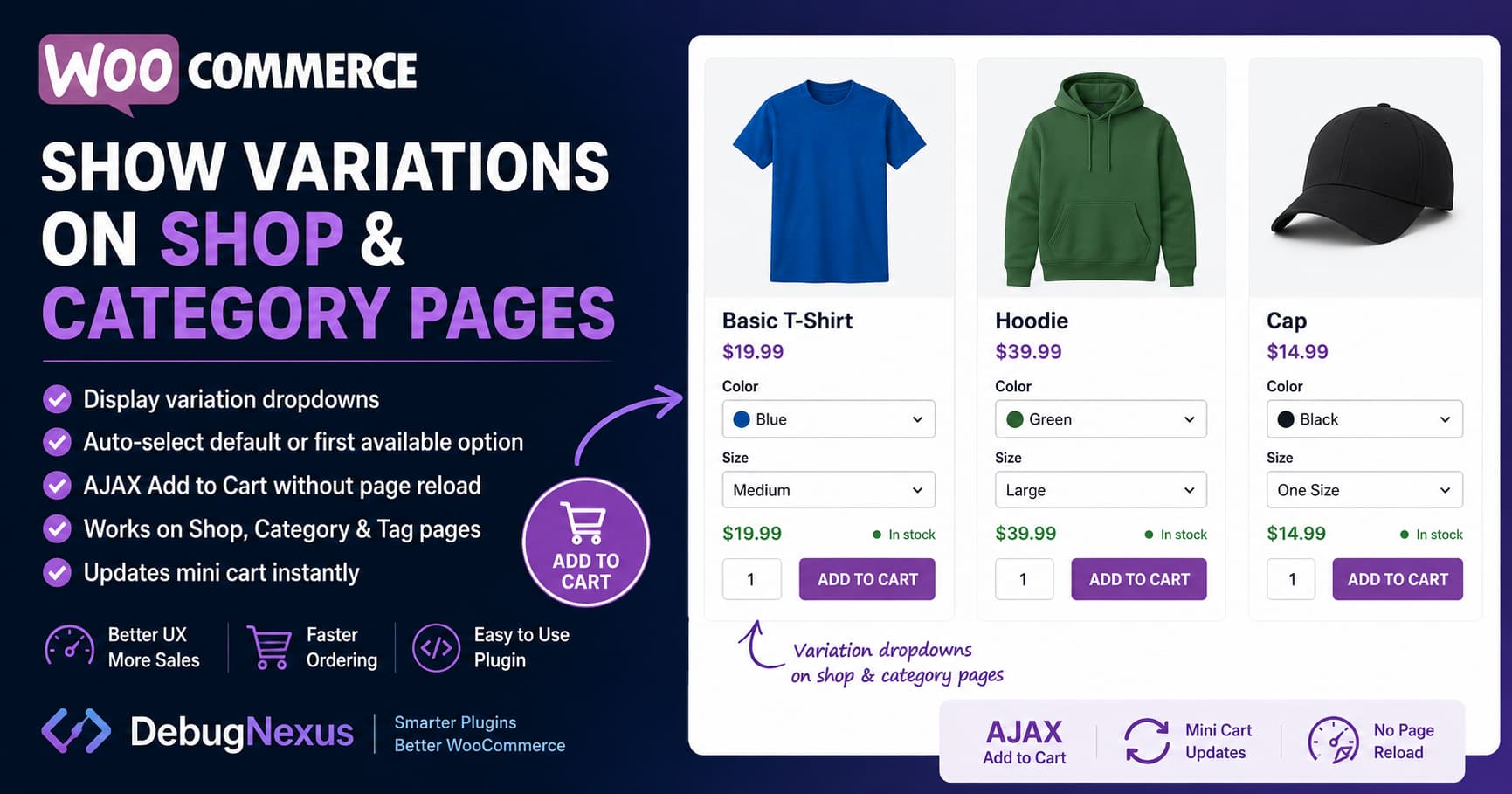
Variable products in WooCommerce normally display a Select options or View product button on shop and category pages.
Customers must open the individual product page, choose attributes such as size or color, and then click Add to cart.
For stores with many variable products, this creates unnecessary steps in the purchasing process.
A more convenient solution is to:
- Display variation dropdowns directly on shop and category pages.
- Automatically select the configured default variation.
- Optionally select the first available variation when no default exists.
- Change the button to Add to cart after a valid variation is selected.
- Add the selected variation to the cart using AJAX.
- Update the mini cart without reloading the page.
This guide provides a complete WooCommerce solution for classic shop, product category, and product tag archive templates.
Why WooCommerce Shows “Select Options”
WooCommerce does not add variable products directly to the cart because the parent product itself cannot normally be purchased.
A specific variation must be identified first.
For example, a variable T-shirt might contain:
- Small, blue
- Medium, blue
- Large, blue
- Small, red
- Medium, red
- Large, red
WooCommerce needs the selected variation ID and its attributes before it can validate pricing, availability, stock, and purchasing restrictions.
This is why WooCommerce displays Select options on product archive pages instead of a normal Add to cart button. Customers are expected to select all required attributes before the variation can be purchased.
Simply changing the button text from “Select options” to “Add to cart” is therefore not a complete solution. It may still open the product page, fail validation, or attempt to add the parent variable product without a valid variation.
What the Following Solution Does
The code below replaces the normal archive button for variable products with WooCommerce’s native variation form.
It supports:
- Main WooCommerce shop page
- Product category pages
- Product tag pages
- Variation dropdowns
- Default product attributes
- Variation price updates
- Stock availability
- Quantity selection
- AJAX add to cart
- Mini-cart fragment updates
- Products loaded through many AJAX filter systems
- Fallback to normal WooCommerce form submission
It leaves simple, grouped, external, and other product types unchanged.
The solution uses WooCommerce’s existing variation form rather than manually recreating its variation-matching logic. WooCommerce already exposes the loop add-to-cart HTML through the woocommerce_loop_add_to_cart_link filter, making it possible to replace the archive button without directly modifying a WooCommerce template file.
Complete WooCommerce Category Variation Plugin
The safest implementation is to install this as a small custom plugin.
Do not add the entire solution directly to the parent theme’s functions.php file because it could be lost during a theme update.
Create the following folder:
/wp-content/plugins/debugnexus-archive-variations/Inside that folder, create this file:
debugnexus-archive-variations.phpPaste the following code into the file:
<?php
/**
 * Plugin Name: DebugNexus Archive Variations
 * Description: Shows variable-product options on classic WooCommerce shop, category, and tag archives with AJAX add to cart.
 * Version: 1.0.0
 * Author: DebugNexus
 */

defined( 'ABSPATH' ) || exit;

/**
 * Limit the feature to classic WooCommerce product archives.
 */
function dn_archive_variations_is_supported_page() {
	return function_exists( 'is_shop' ) && (
		is_shop() ||
		is_product_category() ||
		is_product_tag()
	);
}

/**
 * Load WooCommerce's variation script plus the archive helper.
 */
add_action( 'wp_enqueue_scripts', 'dn_archive_variations_enqueue_assets', 20 );

function dn_archive_variations_enqueue_assets() {
	if ( ! dn_archive_variations_is_supported_page() ) {
		return;
	}

	wp_enqueue_script( 'wc-add-to-cart-variation' );
	wp_enqueue_script( 'wc-add-to-cart' );

	wp_localize_script(
		'wc-add-to-cart-variation',
		'dnArchiveVariations',
		array(
			'ajaxUrl'         => class_exists( 'WC_AJAX' )
				? WC_AJAX::get_endpoint( 'add_to_cart' )
				: '',
			'autoSelectFirst' => apply_filters(
				'dn_archive_variations_auto_select_first',
				true
			) ? 'yes' : 'no',
			'addedText'       => __( 'Added to cart.', 'woocommerce' ),
		)
	);

	$script = <<<'JS'
(function ($) {
	'use strict';

	var formSelector =
		'.dn-archive-variable-product form.variations_form';

	/**
	 * Select the first purchasable and in-stock variation when:
	 *
	 * 1. The product does not already have default attributes selected.
	 * 2. WooCommerce included the variation data in the page.
	 * 3. The variation does not use an "Any attribute" value.
	 */
	function selectFirstAvailableVariation($form) {
		if (
			typeof dnArchiveVariations === 'undefined' ||
			dnArchiveVariations.autoSelectFirst !== 'yes'
		) {
			return;
		}

		var hasSelectedValue = false;

		$form.find('.variations select').each(function () {
			if ($(this).val()) {
				hasSelectedValue = true;
				return false;
			}
		});

		// Respect default values configured in the product editor.
		if (hasSelectedValue) {
			return;
		}

		var variations = $form.data('product_variations');

		/*
		 * WooCommerce may fetch variations through AJAX when the
		 * product contains more variations than its normal threshold.
		 */
		if (!$.isArray(variations) || !variations.length) {
			return;
		}

		var chosenVariation = null;

		$.each(variations, function (index, variation) {
			if (
				variation &&
				variation.variation_is_active !== false &&
				variation.variation_is_visible !== false &&
				variation.is_purchasable &&
				variation.is_in_stock
			) {
				chosenVariation = variation;
				return false;
			}
		});

		if (!chosenVariation || !chosenVariation.attributes) {
			return;
		}

		var selections = [];
		var isComplete = true;

		$.each(
			chosenVariation.attributes,
			function (attributeName, attributeValue) {
				var $select = $form.find(
					'select[name="' + attributeName + '"]'
				);

				var optionExists = false;

				/*
				 * An empty value represents "Any attribute."
				 * Do not guess which option the customer wants.
				 */
				if (!attributeValue || !$select.length) {
					isComplete = false;
					return false;
				}

				$select.find('option').each(function () {
					if ($(this).val() === attributeValue) {
						optionExists = true;
						return false;
					}
				});

				if (!optionExists) {
					isComplete = false;
					return false;
				}

				selections.push([$select, attributeValue]);
			}
		);

		if (!isComplete) {
			return;
		}

		$.each(selections, function (index, selection) {
			selection[0].val(selection[1]);
		});

		$form.find('.variations select').trigger('change');
	}

	/**
	 * Prepare forms inserted during initial page load or by an
	 * AJAX filtering or infinite-scroll plugin.
	 */
	function prepareForms(context, initializeNewForms) {
		var $forms = $(context).find(formSelector);

		$forms.each(function () {
			var $form = $(this);

			if (!$form.data('dnArchiveReady')) {
				/*
				 * WooCommerce automatically initializes forms present
				 * during page load. Only manually initialize forms
				 * inserted later.
				 */
				if (
					initializeNewForms &&
					typeof $form.wc_variation_form === 'function'
				) {
					$form.wc_variation_form();
				}

				$form.data('dnArchiveReady', true);
			}

			selectFirstAvailableVariation($form);
		});
	}

	$(function () {
		prepareForms(document, false);
	});

	$(document.body).on(
		'updated_wc_div dn_archive_variations_refresh',
		function (event, context) {
			prepareForms(context || document, true);
		}
	);

	/**
	 * AJAX add to cart for the selected variation.
	 */
	$(document).on(
		'submit.dnArchiveVariations',
		formSelector,
		function (event) {
			if (
				typeof dnArchiveVariations === 'undefined' ||
				!dnArchiveVariations.ajaxUrl
			) {
				// Allow WooCommerce's normal form submission.
				return;
			}

			var form = this;
			var $form = $(form);
			var $button = $form.find(
				'.single_add_to_cart_button'
			);

			var $status = $form
				.closest('.dn-archive-variable-product')
				.find('.dn-archive-variation-status');

			var variationId = parseInt(
				$form.find('input.variation_id').val(),
				10
			);

			event.preventDefault();

			if (!variationId) {
				var $missingSelect = $form
					.find('.variations select')
					.filter(function () {
						return !$(this).val();
					})
					.first();

				if ($missingSelect.length) {
					$missingSelect.trigger('focus');
				}

				$form.trigger('check_variations');
				return;
			}

			var data = {};

			$.each($form.serializeArray(), function () {
				data[this.name] = this.value;
			});

			/*
			 * WooCommerce's AJAX handler accepts the variation
			 * product ID and derives its parent and attributes.
			 */
			data.product_id = variationId;
			data.quantity = data.quantity || 1;

			$button
				.addClass('loading')
				.prop('disabled', true);

			$status.text('');

			$(document.body).trigger(
				'adding_to_cart',
				[$button, data]
			);

			$.ajax({
				type: 'POST',
				url: dnArchiveVariations.ajaxUrl,
				data: data,
				dataType: 'json'
			})
			.done(function (response) {
				if (
					response &&
					response.error &&
					response.product_url
				) {
					window.location.href =
						response.product_url;

					return;
				}

				if (response && response.fragments) {
					$(document.body).trigger(
						'added_to_cart',
						[
							response.fragments,
							response.cart_hash,
							$button
						]
					);

					$status.text(
						dnArchiveVariations.addedText
					);

					return;
				}

				/*
				 * Use the normal WooCommerce form handler if an
				 * extension returns an unexpected response.
				 */
				HTMLFormElement.prototype.submit.call(form);
			})
			.fail(function () {
				/*
				 * Fall back to normal form submission when an
				 * AJAX request or extension causes an error.
				 */
				HTMLFormElement.prototype.submit.call(form);
			})
			.always(function () {
				$button
					.removeClass('loading')
					.prop('disabled', false);

				$form.trigger('check_variations');
			});
		}
	);
})(jQuery);
JS;

	wp_add_inline_script(
		'wc-add-to-cart-variation',
		$script,
		'after'
	);

	wp_register_style(
		'dn-archive-variations',
		false,
		array(),
		'1.0.0'
	);

	wp_enqueue_style( 'dn-archive-variations' );

	$css = <<<'CSS'
.woocommerce ul.products li.product
.dn-archive-variable-product {
	margin-top: 0.75rem;
}

.woocommerce ul.products li.product
.dn-archive-variable-product form.cart,
.woocommerce ul.products li.product
.dn-archive-variable-product table.variations {
	margin: 0;
	width: 100%;
}

.woocommerce ul.products li.product
.dn-archive-variable-product table.variations tr,
.woocommerce ul.products li.product
.dn-archive-variable-product table.variations th,
.woocommerce ul.products li.product
.dn-archive-variable-product table.variations td {
	display: block;
	width: 100%;
}

.woocommerce ul.products li.product
.dn-archive-variable-product table.variations th {
	padding: 0.35rem 0 0.2rem;
	text-align: left;
}

.woocommerce ul.products li.product
.dn-archive-variable-product table.variations td {
	padding: 0 0 0.35rem;
}

.woocommerce ul.products li.product
.dn-archive-variable-product select {
	max-width: 100%;
	width: 100%;
}

.woocommerce ul.products li.product
.dn-archive-variable-product .reset_variations {
	display: inline-block;
	font-size: 0.85em;
	margin-top: 0.25rem;
}

.woocommerce ul.products li.product
.dn-archive-variable-product
.woocommerce-variation-description {
	display: none;
}

.woocommerce ul.products li.product
.dn-archive-variable-product .quantity {
	margin: 0 0.4rem 0.4rem 0;
}

.woocommerce ul.products li.product
.dn-archive-variable-product
.single_add_to_cart_button {
	margin-top: 0.4rem;
}

.woocommerce ul.products li.product
.dn-archive-variation-status {
	font-size: 0.9em;
	margin-top: 0.35rem;
	min-height: 1.3em;
}
CSS;

	wp_add_inline_style(
		'dn-archive-variations',
		$css
	);
}

/**
 * Replace the variable-product archive button with
 * WooCommerce's native variation form.
 */
add_filter(
	'woocommerce_loop_add_to_cart_link',
	'dn_archive_variations_replace_loop_button',
	20,
	3
);

function dn_archive_variations_replace_loop_button(
	$html,
	$product,
	$args
) {
	if (
		! dn_archive_variations_is_supported_page() ||
		! $product instanceof WC_Product ||
		! $product->is_type( 'variable' ) ||
		! $product->is_purchasable() ||
		! $product->is_in_stock() ||
		empty( $product->get_children() )
	) {
		return $html;
	}

	$previous_product = isset( $GLOBALS['product'] )
		? $GLOBALS['product']
		: null;

	$GLOBALS['product'] = $product;

	ob_start();
	?>
	<div class="dn-archive-variable-product">
		<?php woocommerce_variable_add_to_cart(); ?>

		<div
			class="dn-archive-variation-status"
			role="status"
			aria-live="polite"
		></div>
	</div>
	<?php
	$output = ob_get_clean();

	if ( null !== $previous_product ) {
		$GLOBALS['product'] = $previous_product;
	} else {
		unset( $GLOBALS['product'] );
	}

	return $output ? $output : $html;
}
Activate the Plugin
After creating the file:
- Open WordPress Dashboard → Plugins.
- Find DebugNexus Archive Variations.
- Click Activate.
- Clear your page cache, object cache, and CDN cache.
- Open the WooCommerce shop page in a private browser window.
- Test at least one variable product.
- Test a product category page.
- Confirm that the selected variation, price, stock, and quantity are correct in the cart.
Always test this type of customization on a staging website before activating it on a live store.
Configure a Default Variation
The safest method is to configure a deliberate default variation for each product.
Open:
Products → Edit Product → Product Data → Variations
Set the required values under Default form values.
For example:
Color: Black
Size: Medium
WooCommerce uses these default values to preselect the variation. When all required default attributes are configured, customers can immediately add the product without manually selecting every option.
A carefully selected product default is preferable to blindly selecting the first variation, especially for products where size, quantity, material, or another option can significantly affect the customer’s purchase.
Disable Automatic First-Variation Selection
The plugin respects product defaults first.
When a product does not have defaults, it attempts to select the first complete, purchasable, and in-stock variation.
To disable that fallback and require either a configured default or a manual customer selection, add this small snippet through a child theme or a code-snippet plugin:
add_filter(
	'dn_archive_variations_auto_select_first',
	'__return_false'
);
Configured WooCommerce default attributes will continue to work.
How the AJAX Request Works
The JavaScript submits the selected variation ID to WooCommerce’s native AJAX add-to-cart endpoint.
WooCommerce detects that the supplied product ID belongs to a variation, obtains its parent product, reads the variation attributes, validates the product, and adds it to the cart. It then returns updated cart fragments for elements such as the mini cart and cart counter.
The form also includes the selected attributes and quantity. This can improve compatibility with extensions that inspect submitted product fields during cart validation.
If the AJAX request fails or an extension returns an unexpected response, the code falls back to WooCommerce’s normal form submission process.
Why the Native Variation Form Is Important
A custom dropdown containing only variation names might look simpler, but it can easily bypass important WooCommerce functionality.
Using the native form preserves:
- Variation matching
- Product default attributes
- Variation-specific prices
- Sale prices
- Stock status
- Backorder rules
- Quantity restrictions
- Purchasability checks
- Variation validation
- Availability messages
- WooCommerce extension hooks
WooCommerce’s variation template also supports products whose variations are fetched dynamically rather than embedded in the page.
Products With More Than 30 Variations
WooCommerce normally embeds variation data into the page for smaller variable products.
For products with more than its variation threshold, WooCommerce may request the matching variation through AJAX after the customer selects the attributes. This behavior exists to reduce the amount of variation data and processing added to the page.
For those larger products:
- Configured default values can still be displayed.
- Customers can still select attributes.
- WooCommerce can fetch matching variation information.
- The automatic “first available variation” fallback will not run when the complete variation dataset is not embedded.
Forcing every variation into every product card can significantly increase category-page size and processing time, particularly when a page contains many variable products.
Performance Considerations
Displaying variation forms on archive pages requires more work than displaying a normal product button.
Each product card may contain:
- Multiple dropdowns
- Variation data
- Price HTML
- Availability information
- JavaScript event handlers
- AJAX variation requests
Use sensible WooCommerce pagination instead of loading an entire large catalog on one page.
For example, displaying 12 or 16 products per page will normally be safer than displaying 50 complex variable products at once.
Also test:
- Mobile page speed
- Product filters
- Infinite scrolling
- Variation swatches
- Quick-view plugins
- Mini-cart updates
- Full-page caching
- CDN script optimization
Avoid delaying or combining WooCommerce variation scripts unless you have confirmed that the optimization system preserves their execution order.
Variation Swatch Plugin Compatibility
Many variation swatch plugins replace WooCommerce dropdowns with visual buttons, colors, labels, or images.
Compatibility depends on whether the swatch plugin supports variation forms outside the single-product page.
Possible outcomes include:
- The dropdowns are converted into swatches correctly.
- Normal dropdowns appear instead of swatches.
- Both dropdowns and swatches appear.
- The swatch script does not initialize on category pages.
- The swatch plugin already includes its own archive variation feature.
Before using the custom solution, check whether your existing swatch plugin has a setting such as:
Enable swatches on shop/archive pagesDo not enable two different archive variation systems simultaneously.
Classic Templates Versus WooCommerce Blocks
This solution targets classic WooCommerce archive templates that use the standard product loop and the woocommerce_loop_add_to_cart_link filter.
It may not automatically modify:
- Product Collection blocks
- Custom block-based product grids
- Elementor product widgets that replace the WooCommerce loop
- Theme-specific AJAX product components
- Headless WooCommerce storefronts
WooCommerce also has newer Add to Cart with Options and variation selector blocks, but support depends on the block and template being used.
For block-based archives, the solution should be implemented through the relevant WooCommerce block or Store API rather than relying only on classic PHP loop hooks.
Troubleshooting
Dropdowns appear, but the button remains disabled
Check that:
- Every variation has a regular price.
- The variation is enabled.
- The variation is in stock.
- All required attributes are selected.
- The variation combination actually exists.
wc-add-to-cart-variationis loaded on the page.- A JavaScript optimization plugin is not delaying the variation script.
Variations without prices are not displayed as purchasable store options.
Clicking Add to Cart opens the product page
This normally means the AJAX request failed or WooCommerce returned a validation error.
Check the browser console and WooCommerce logs for:
- JavaScript errors
- Invalid variation IDs
- Missing attributes
- Add-on validation errors
- Security plugin blocks
- Server errors
- Cache-generated outdated product forms
The fallback redirect is intentional because it lets WooCommerce display the full validation message on the product page.
The wrong variation is selected automatically
Set explicit default form values in the product editor.
If no default is configured, the script chooses the first complete, purchasable, and in-stock variation returned by WooCommerce.
Variation order can be changed under:
Products → Edit Product → Variations
You can also disable automatic fallback selection with the filter shown earlier.
Automatic selection does not work with “Any” attributes
The code deliberately avoids guessing when a variation contains an Any color, Any size, or similar wildcard attribute.
Wildcard variations can match multiple customer choices, so automatically selecting an arbitrary value could create a confusing or incorrect purchase.
WooCommerce recommends fully defining variation attributes whenever possible because wildcard and duplicate variation combinations can introduce confusing price, stock, and matching behavior.
The category layout looks too crowded
Adjust the supplied CSS or hide elements you do not need.
For example, hide the quantity field and always add one item:
.woocommerce ul.products li.product
.dn-archive-variable-product .quantity {
	display: none;
}
The hidden quantity field will still submit its default value of one.
To hide the selected variation price:
.woocommerce ul.products li.product
.dn-archive-variable-product
.woocommerce-variation-price {
	display: none;
}
Do this only when the normal product-card price already communicates the variation pricing clearly.
Should Every Store Add Variations to Category Pages?
Not necessarily.
This functionality works especially well for products with:
- One simple attribute
- A small number of variations
- Clear default choices
- Frequently reordered products
- Wholesale ordering workflows
- Products where customers already understand the options
It may be less suitable when:
- Products have many attributes.
- Customers need detailed descriptions before selecting.
- Variation images are essential.
- Prices change dramatically between variations.
- The correct size requires a measurement guide.
- Product add-ons require additional configuration.
- Each category page contains a large number of products.
The goal should be to simplify purchasing without causing customers to accidentally order an unsuitable variation.
Frequently Asked Questions
Can variable products be added from a WooCommerce category page?
Yes. A valid variation ID and the required attributes must be submitted. The solution in this guide displays the native WooCommerce variation form and adds the selected variation through AJAX.
Why does WooCommerce show “Select options” instead of “Add to cart”?
A variable product can contain multiple purchasable variations. WooCommerce needs to know which variation the customer selected before it can validate and add the item.
Can WooCommerce automatically select a variation?
Yes. Configure default form values in the product’s variation settings. The supplied code can also select the first available complete variation when no defaults have been configured.
Does changing the button text solve the problem?
No. Renaming “Select options” to “Add to cart” does not provide WooCommerce with a variation ID or selected attributes.
Does the solution update the mini cart?
Yes. A successful AJAX response triggers WooCommerce’s standard added_to_cart event and supplies the refreshed cart fragments.
Does it work with variation swatches?
It may, but the swatch plugin must support archive variation forms. Test for duplicated controls and JavaScript initialization problems.
Does it work with Elementor product grids?
It depends on whether the widget uses the standard WooCommerce loop and filters. Custom Elementor loops may require a widget-specific implementation.
Final Thoughts
Supporting variation selection on WooCommerce shop and category pages can remove unnecessary clicks and create a faster purchasing workflow.
However, the implementation must do more than change the button label.
A reliable solution must:
- Display valid variation attributes.
- Identify the selected variation.
- Respect price and stock rules.
- Submit the variation ID.
- Run WooCommerce validation.
- Update the cart after a successful request.
- Provide a fallback when AJAX or an extension fails.
The custom plugin above uses WooCommerce’s native variation system while extending it to classic product archive pages. This provides a safer and more maintainable foundation than attempting to recreate variation matching through custom buttons or hard-coded URLs.
