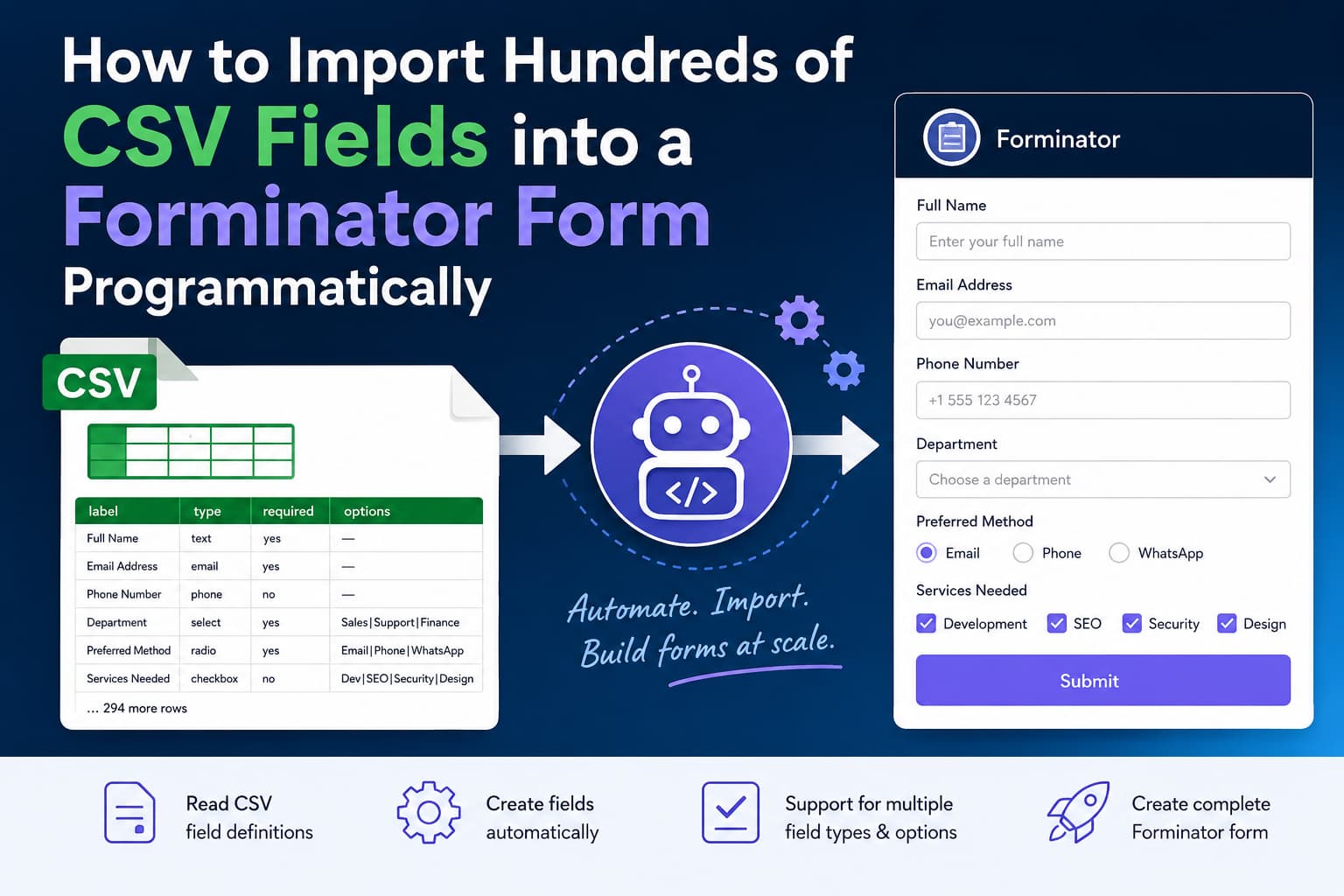
Creating a WordPress form with a few fields is simple. Creating one with 300 fields manually is a completely different task.
Consider this situation:
I have around 300 fields in a CSV file. I can iterate through the CSV, but I want to add every row as a field in a new form programmatically. What is the best way to do it?
The best solution is to parse the CSV, convert every row into a Forminator field definition, place those fields inside Forminator wrappers, and create the complete form through the Forminator API.
Forminator officially provides both add_form() and add_form_field() methods. While it is possible to call add_form_field() hundreds of times, creating the full wrappers array first and calling add_form() once is generally a cleaner bulk-import strategy. It also lets you validate the CSV before creating a partially completed form.
What the Importer Will Do
The solution in this tutorial will:
- Read field definitions from a CSV file.
- Create unique Forminator element IDs.
- Create unique field wrappers.
- Support text, email, phone, textarea, number, URL, dropdown, radio and checkbox fields.
- Support required and optional fields.
- Import placeholders and field descriptions.
- Import pipe-separated choices for dropdowns, radio buttons and checkboxes.
- Create the entire form with one Forminator API request.
- Return a WordPress error if the CSV contains invalid data.
Recommended CSV Format
Use one row for every field.
label,type,required,placeholder,description,options
Full Name,text,yes,Enter your full name,,
Email Address,email,yes,you@example.com,,
Phone Number,phone,no,+1 555 123 4567,,
Company Name,text,no,Enter your company name,Use the registered company name,
Department,select,yes,Choose a department,,Sales|Support|Finance|Operations
Preferred Contact Method,radio,yes,,,Email|Phone|WhatsApp
Services Needed,checkbox,no,,,Development|Maintenance|Security|SEO
Project Details,textarea,no,Tell us about the project,,
Estimated Budget,number,no,5000,,
Website,url,no,https://example.com,,
Supported CSV Columns
label
The visible label for the field. This is required.
type
The Forminator field type.
The importer supports:
text
email
phone
textarea
number
url
select
radio
checkbox
If the type is blank or unsupported, the importer creates a standard text field.
It also recognizes the following aliases:
textfield → text
input → text
tel → phone
telephone → phone
dropdown → select
website → url
numeric → number
required
The following values make a field required:
yes
true
1
y
required
Any other value creates an optional field.
placeholder
Optional placeholder text displayed inside the field.
description
Optional help text displayed with the field.
options
Required for select, radio and checkbox fields.
Separate choices with a pipe character:
Small|Medium|LargeYou can also define separate labels and submitted values using :::
Small Package::small|Medium Package::medium|Large Package::largeIn that example, visitors see “Small Package,” but Forminator stores small.
Complete PHP Import Function
Place the following function inside a small custom plugin or an existing development plugin.
Do not add a large importer like this directly to the parent theme because a theme update could remove it.
<?php
/**
 * Create a Forminator form from a CSV file.
 *
 * CSV columns:
 * label,type,required,placeholder,description,options
 */
function debugnexus_import_forminator_csv(
    $csv_path,
    $form_name = 'Imported CSV Form'
) {
    if ( ! class_exists( 'Forminator_API' ) ) {
        return new WP_Error(
            'forminator_missing',
            'Forminator is not active.'
        );
    }

    if ( ! is_readable( $csv_path ) ) {
        return new WP_Error(
            'csv_unreadable',
            'The CSV file cannot be read.'
        );
    }

    $handle = fopen( $csv_path, 'rb' );

    if ( false === $handle ) {
        return new WP_Error(
            'csv_open_failed',
            'The CSV file could not be opened.'
        );
    }

    $first_row = fgetcsv( $handle );

    if ( false === $first_row ) {
        fclose( $handle );

        return new WP_Error(
            'csv_empty',
            'The CSV file is empty.'
        );
    }

    /*
     * Remove a UTF-8 byte order mark.
     * Microsoft Excel sometimes adds this to CSV files.
     */
    $first_row[0] = preg_replace(
        '/^\xEF\xBB\xBF/',
        '',
        (string) $first_row[0]
    );

    $normalize_header = static function ( $value ) {
        $value = strtolower( trim( (string) $value ) );

        return sanitize_key(
            str_replace(
                array( ' ', '-' ),
                '_',
                $value
            )
        );
    };

    $headers = array_map(
        $normalize_header,
        $first_row
    );

    $known_headers = array(
        'label',
        'field_label',
        'name',
        'type',
        'required',
        'placeholder',
        'description',
        'options',
    );

    $has_header = (bool) array_intersect(
        $headers,
        $known_headers
    );

    $pending_row = null;

    /*
     * A CSV containing only one label per row is also supported.
     * In that format, every imported field becomes a text field.
     */
    if ( ! $has_header ) {
        $headers     = array( 'label' );
        $pending_row = $first_row;
    }

    $allowed_types = array(
        'text',
        'email',
        'phone',
        'textarea',
        'number',
        'url',
        'select',
        'radio',
        'checkbox',
    );

    $aliases = array(
        'textfield' => 'text',
        'input'     => 'text',
        'tel'       => 'phone',
        'telephone' => 'phone',
        'dropdown'  => 'select',
        'website'   => 'url',
        'numeric'   => 'number',
    );

    $type_counts = array();
    $wrappers    = array();
    $field_count = 0;

    while ( true ) {
        if ( null !== $pending_row ) {
            $row         = $pending_row;
            $pending_row = null;
        } else {
            $row = fgetcsv( $handle );
        }

        if ( false === $row ) {
            break;
        }

        /*
         * Ignore completely empty CSV rows.
         */
        $non_empty_values = array_filter(
            $row,
            static function ( $value ) {
                return '' !== trim( (string) $value );
            }
        );

        if ( empty( $non_empty_values ) ) {
            continue;
        }

        /*
         * Prevent an accidental import from creating an
         * unexpectedly large form.
         */
        if ( $field_count >= 500 ) {
            fclose( $handle );

            return new WP_Error(
                'too_many_fields',
                'The safety limit is 500 fields.'
            );
        }

        $row = array_slice(
            array_pad(
                $row,
                count( $headers ),
                ''
            ),
            0,
            count( $headers )
        );

        $data = array_combine(
            $headers,
            $row
        );

        if ( false === $data ) {
            fclose( $handle );

            return new WP_Error(
                'csv_mapping_failed',
                'The CSV columns could not be mapped.'
            );
        }

        $label = sanitize_text_field(
            (string) (
                $data['label']
                ?? $data['field_label']
                ?? $data['name']
                ?? ''
            )
        );

        if ( '' === $label ) {
            fclose( $handle );

            return new WP_Error(
                'missing_label',
                'Every field must have a label.'
            );
        }

        $type = strtolower(
            trim(
                (string) (
                    $data['type']
                    ?? 'text'
                )
            )
        );

        if ( isset( $aliases[ $type ] ) ) {
            $type = $aliases[ $type ];
        }

        if ( ! in_array( $type, $allowed_types, true ) ) {
            $type = 'text';
        }

        /*
         * Forminator element IDs must be unique.
         * Examples: text-1, text-2, email-1.
         */
        $type_counts[ $type ] = isset( $type_counts[ $type ] )
            ? $type_counts[ $type ] + 1
            : 1;

        $element_id = $type . '-' . $type_counts[ $type ];

        $required_value = strtolower(
            trim(
                (string) (
                    $data['required']
                    ?? ''
                )
            )
        );

        $required = in_array(
            $required_value,
            array(
                '1',
                'true',
                'yes',
                'y',
                'required',
            ),
            true
        );

        $field = array(
            'element_id'       => $element_id,
            'type'             => $type,
            'cols'             => '12',
            'required'         => $required,
            'field_label'      => $label,
            'placeholder'      => sanitize_text_field(
                (string) (
                    $data['placeholder']
                    ?? ''
                )
            ),
            'description'      => sanitize_textarea_field(
                (string) (
                    $data['description']
                    ?? ''
                )
            ),
            'options'          => array(),
            'conditions'       => array(),
            'condition_action' => 'show',
            'condition_rule'   => 'any',
        );

        /*
         * Add settings required by individual field types.
         */
        if ( 'email' === $type ) {
            $field['validation'] = true;
        } elseif ( 'phone' === $type ) {
            $field['validation'] = 'none';
        } elseif ( 'textarea' === $type ) {
            $field['input_type'] = 'paragraph';
            $field['limit_type'] = 'characters';
        } elseif (
            in_array(
                $type,
                array( 'select', 'radio', 'checkbox' ),
                true
            )
        ) {
            $raw_options = array_filter(
                array_map(
                    'trim',
                    explode(
                        '|',
                        (string) (
                            $data['options']
                            ?? ''
                        )
                    )
                )
            );

            if ( empty( $raw_options ) ) {
                fclose( $handle );

                return new WP_Error(
                    'missing_options',
                    $label . ' needs at least one option.'
                );
            }

            foreach ( $raw_options as $raw_option ) {
                /*
                 * Label::value is optional.
                 * With no custom value, a sanitized value
                 * is generated from the option label.
                 */
                $pair = array_map(
                    'trim',
                    explode(
                        '::',
                        $raw_option,
                        2
                    )
                );

                $option_label = sanitize_text_field(
                    $pair[0]
                );

                $option_value = isset( $pair[1] )
                    ? sanitize_text_field( $pair[1] )
                    : sanitize_title( $option_label );

                $option_key = function_exists(
                    'forminator_unique_key'
                )
                    ? forminator_unique_key()
                    : wp_generate_uuid4();

                $field['options'][] = array(
                    'label'       => $option_label,
                    'value'       => $option_value,
                    'limit'       => '',
                    'key'         => $option_key,
                    'error'       => '',
                    'calculation' => '0',
                );
            }

            if ( 'select' === $type ) {
                $field['value_type'] = 'single';
            } else {
                $field['value_type'] = $type;
                $field['layout']     = 'vertical';
            }
        }

        $wrapper_key = function_exists(
            'forminator_unique_key'
        )
            ? forminator_unique_key()
            : wp_generate_uuid4();

        /*
         * Each field is placed in its own full-width wrapper.
         */
        $wrappers[] = array(
            'wrapper_id' => 'wrapper-' . $wrapper_key,
            'fields'     => array( $field ),
        );

        ++$field_count;
    }

    fclose( $handle );

    if ( 0 === $field_count ) {
        return new WP_Error(
            'no_fields',
            'No valid fields were found.'
        );
    }

    $settings = array(
        'formName'                    => sanitize_text_field(
            $form_name
        ),
        'thankyou'                    => 'true',
        'thankyou-message'            =>
            'Thank you. Your submission has been received.',
        'use-custom-submit'           => 'true',
        'custom-submit-text'          => 'Submit',
        'use-custom-invalid-form'     => 'true',
        'custom-invalid-form-message' =>
            'Please correct the highlighted fields and try again.',
        'enable-ajax'                 => 'true',
        'form-type'                   => 'default',
    );

    /*
     * Create the entire form after the CSV has been parsed
     * and validated.
     */
    return Forminator_API::add_form(
        $form_name,
        $wrappers,
        $settings
    );
}
How to Run the Import
Upload the CSV file to a temporary private location on your server.
For example:
wp-content/uploads/form-fields.csvThen temporarily call the importer:
$result = debugnexus_import_forminator_csv(
    WP_CONTENT_DIR . '/uploads/form-fields.csv',
    'Customer Intake Form'
);

if ( is_wp_error( $result ) ) {
    error_log(
        'Form import failed: ' .
        $result->get_error_message()
    );
} else {
    error_log(
        'Created Forminator form ID: ' .
        absint( $result )
    );
}
Run the code only once.
After the form has been created:
- Open Forminator → Forms.
- Edit the newly created form.
- Check the field order.
- Configure email notifications.
- Configure submission storage.
- Add any conditional logic.
- Add spam protection.
- Test a complete submission.
- Remove the temporary function call.
- Delete the uploaded CSV if it contains sensitive information.
Do not leave the one-time importer call running on every WordPress request. Doing so could create duplicate forms.
Why Use add_form() Instead of Adding 300 Fields Individually?
The API also provides this method:
Forminator_API::add_form_field(
    $form_id,
    $type,
    $data
);
That method is useful when adding one or a few fields to an existing form.
For a bulk import, however, repeatedly calling it can leave a partially created form if a later CSV row is invalid. Building the wrappers first provides an opportunity to validate the entire CSV before the form is created.
The final operation becomes:
Forminator_API::add_form(
    $form_name,
    $wrappers,
    $settings
);
Official Forminator examples also show that each wrapper_id and element_id must be unique. ortant Considerations for a 300-Field Form
Do Users Really Need to See All 300 Fields?
A technically valid form is not automatically a user-friendly form.
Showing 300 fields on one page can create:
- Long loading times.
- Difficult mobile navigation.
- High abandonment rates.
- Validation confusion.
- Browser performance issues.
- Larger submission payloads.
- More complicated email notifications.
Consider whether the form can be divided into smaller forms or logical steps.
Forminator includes Page Break fields specifically for dividing long forms into multiple pages or steps. tical structure might be:
- Page 1: Contact information
- Page 2: Company information
- Page 3: Product information
- Page 4: Technical requirements
- Page 5: Additional details
- Page 6: Review and submission
Check PHP Limits
Large forms may be affected by server configuration.
Review:
max_input_vars
post_max_size
memory_limit
max_execution_time
max_input_time
A form with 300 basic inputs may still work within typical limits, but checkbox groups, names with multiple subfields, repeated fields and hidden inputs can increase the actual number of submitted values.
Review WordPress Security Rules
Web application firewalls and ModSecurity rules may block unusually large POST requests.
If saving or submitting the form returns a 403 Forbidden response, check:
- Hosting security logs.
- ModSecurity logs.
- Cloudflare WAF events.
- WordPress security plugin logs.
- The PHP error log.
Do not disable the firewall permanently. Identify and whitelist only the specific false-positive rule when appropriate.
Test Email Notifications Carefully
Putting all 300 fields into one email may create an extremely long message.
Consider:
- Sending only non-empty fields.
- Dividing information into sections.
- Saving full entries in WordPress.
- Sending a short notification containing an admin entry link.
- Exporting submissions to a spreadsheet or CRM.
Adding Page Breaks Automatically
The importer above creates only the fields defined in the CSV.
You can add Page Breaks manually after importing, or extend the importer to insert one after every fixed number of fields.
A basic Forminator Page Break definition looks like this:
$page_break = array(
    'element_id' => 'page-break-1',
    'type'       => 'page-break',
    'cols'       => '12',
    'conditions' => array(),
    'btn_left'   => '« Previous Step',
    'btn_right'  => 'Next Step »',
);
It must be added inside its own wrapper, just like a normal field.
For example, it could be inserted after every 25 imported fields.
However, grouping fields according to their meaning is normally better than creating an arbitrary break every 25 rows.
Adding Conditional Logic from the CSV
Conditional logic can also be imported, but the CSV needs additional columns such as:
condition_field
condition_rule
condition_value
condition_action
A field condition may look similar to:
$field['condition_action'] = 'show';
$field['condition_rule']   = 'all';

$field['conditions'] = array(
    array(
        'element_id' => 'radio-1',
        'rule'       => 'is',
        'value'      => 'yes',
    ),
);
The referenced element ID must already be known and unique.
For complex conditional forms, consider adding a separate CSV column containing a stable custom key for each field. The importer can first map those keys to generated Forminator element IDs and then build the conditions during a second processing pass.
Common Errors and Solutions
“Forminator is not active”
The Forminator_API class is unavailable.
Confirm that Forminator is installed and activated before running the importer.
“The CSV file cannot be read”
Check:
- The file path.
- File permissions.
- Whether the file exists.
- Whether WordPress can access the directory.
“Every field must have a label”
One of the CSV rows has an empty label column.
Open the CSV and remove blank rows or provide the missing label.
“Field needs at least one option”
A select, radio or checkbox row has no value in the options column.
Correct example:
Department,select,yes,Choose a department,,Sales|Support|FinanceThe First Label Is Missing
This can happen when a one-column CSV is incorrectly treated as having a header.
The provided importer checks for known header names. A first row such as First Name is treated as a real field, while a first row such as label is treated as the header.
Strange Characters Appear in the First Label
Spreadsheet applications sometimes save CSV files with a UTF-8 byte order mark.
The importer removes that marker from the first cell:
$first_row[0] = preg_replace(
    '/^\xEF\xBB\xBF/',
    '',
    (string) $first_row[0]
);
The Form Was Created but Is Not Ready to Use
Programmatically creating fields does not configure the complete business workflow.
You must still review:
- Form status.
- Email recipients.
- Notification content.
- Confirmation behavior.
- Privacy settings.
- Spam protection.
- Conditional logic.
- Integrations.
- Submission retention.
- Mobile layout.
Frequently Asked Questions
Can Forminator fields be created programmatically?
Yes. The Forminator API includes methods for creating complete forms and adding individual fields. ould I call add_form_field() for every CSV row?
You can, but for hundreds of fields it is usually cleaner to build the complete wrappers array and call add_form() after validating the CSV.
Can I import a CSV containing only field names?
Yes. The importer treats a CSV without recognized headers as a one-column list and creates a text field for every row.
Example:
First Name
Last Name
Company
Job Title
Email Address
Phone Number
Can the importer create dropdown options?
Yes. Put pipe-separated choices in the options column:
Red|Green|BlueCan the option label and submitted value be different?
Yes. Use the Label::value format:
United States::us|United Kingdom::uk|Canada::caCan it import conditional logic?
The base importer does not, but it can be extended with condition columns and a two-pass field-ID mapping process.
Is a 300-field form recommended?
It may be technically possible, but it should usually be divided into logical pages, sections or separate forms. Forminator supports Page Break fields for multi-step forms. al Thoughts
Manually creating hundreds of WordPress form fields is slow, repetitive and error-prone.
Using a CSV and the Forminator API makes the process repeatable:
- Define the fields in a spreadsheet.
- Export the spreadsheet as CSV.
- Parse and validate the CSV.
- Generate unique Forminator fields and wrappers.
- Create the full form through
Forminator_API::add_form(). - Review, configure and test the generated form.
The most important step is not simply generating the fields. It is validating the form afterward, organizing it into manageable steps and testing every possible submission path before using it on a production website.
