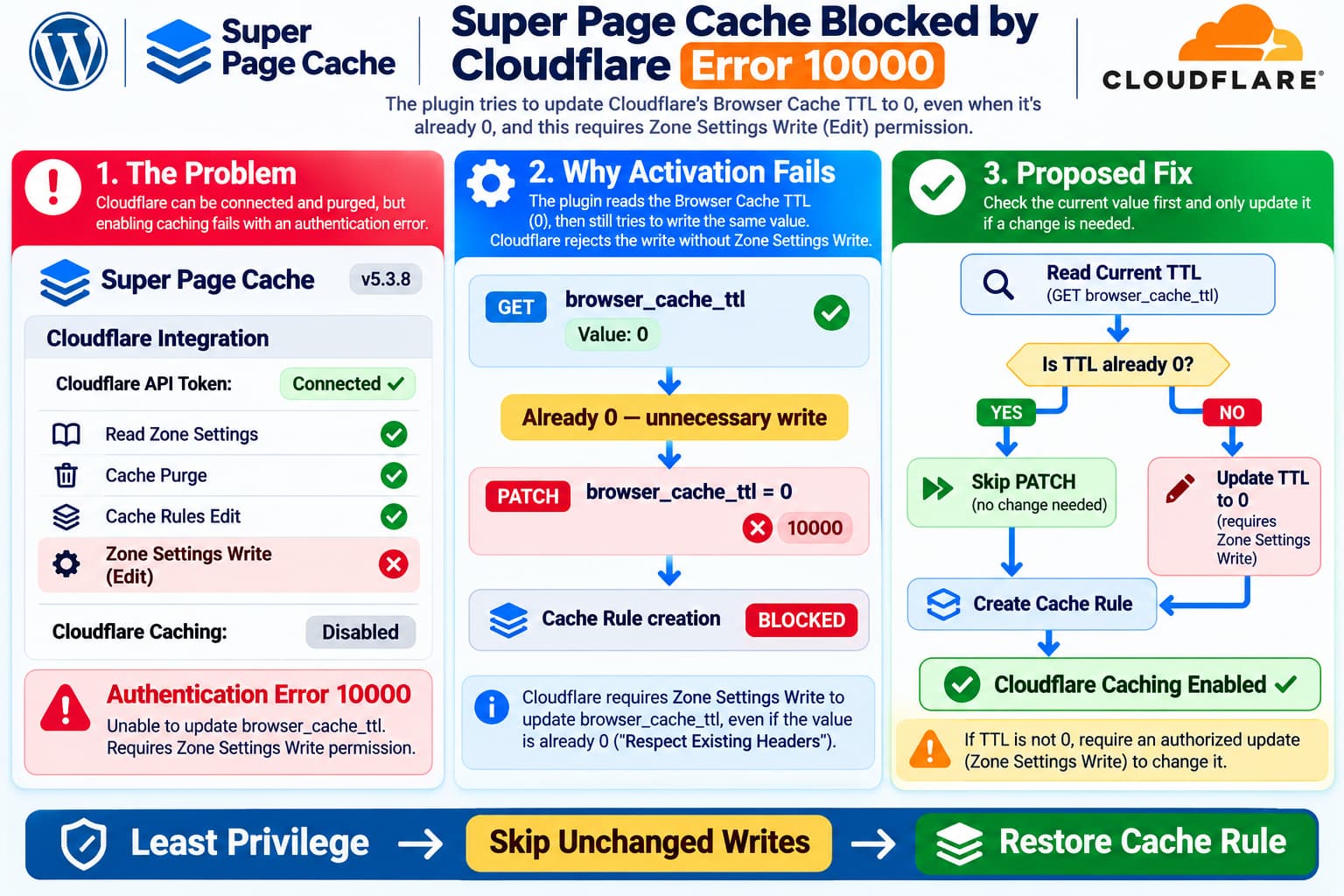
Super Page Cache can successfully connect to Cloudflare and purge its cache while failing to enable Cloudflare page caching or recreate its managed Cache Rule.
One particularly confusing case occurs with Super Page Cache 5.3.8 and a restricted Cloudflare API token.
The token already has permission to:
- Read zone settings.
- Purge cached content.
- Edit Cache Rules.
- Edit Transform Rules.
However, it deliberately does not have:
Zone Settings: Edit / Write
When the plugin tries to enable Cloudflare caching, it fails with:
Authentication error
Error code: 10000
The logs reveal that the failure occurs while attempting to update Cloudflare’s browser_cache_ttl setting.
Even more importantly, the current setting is already the value Super Page Cache wants:
browser_cache_ttl = 0Cloudflare describes this value as Respect Existing Headers.
So why does the plugin need to write the same value again, and can this dependency be eliminated?
What the Logs Reveal
The observed API sequence is:
1. GET browser_cache_ttl
   Response: Success
   Current value: 0

2. PATCH browser_cache_ttl
   Requested value: 0
   Response: Error 10000

3. Cloudflare cache purge
   Response: Success
This information identifies the failing operation much more precisely than the generic authentication error.
The API token is not universally invalid.
It can successfully authenticate for certain Cloudflare operations.
The problem is that Cloudflare authorizes each API operation according to its required permissions.
A token capable of purging cached files does not necessarily have permission to change zone settings.
Why Cloudflare Rejects the Request
Cloudflare exposes Browser Cache TTL through its zone settings API:
GET /client/v4/zones/{zone_id}/settings/browser_cache_ttlTo update the setting, the plugin uses:
PATCH /client/v4/zones/{zone_id}/settings/browser_cache_ttlwith a body equivalent to:
{
  "value": 0
}
Cloudflare’s API documentation identifies the permission required for the update endpoint:
Zone Settings WriteThis is distinct from the permissions used to edit Cache Rules.
The important distinction is:
| Cloudflare operation | Relevant permission |
|---|---|
| Read Browser Cache TTL | Zone Settings Read |
| Modify Browser Cache TTL | Zone Settings Write |
| Purge Cloudflare cache | Cache Purge permission |
| Create or update Cache Rules | Cache Rules Edit |
| Modify Transform Rules | Transform Rules Edit |
A successful cache purge therefore does not demonstrate that the token can update Browser Cache TTL.
Source: Cloudflare API — Edit zone setting
Why Does Super Page Cache Set Browser Cache TTL to Zero?
Super Page Cache relies on caching instructions emitted by WordPress and the web server.
Setting Cloudflare Browser Cache TTL to:
0selects:
Respect Existing Headers
This tells Cloudflare to respect the relevant origin caching headers instead of imposing a conflicting zone-wide browser caching duration.
Cloudflare explicitly documents this behavior.
Source: Cloudflare — Set Browser Cache TTL
The intended configuration is reasonable.
The problem is not the desired setting.
The problem is attempting to update that setting even when it is already correct.
The Unconditional Write Creates an Avoidable Dependency
The reported Super Page Cache 5.3.8 behavior is effectively:
Enable Cloudflare caching
        ↓
Read current Browser Cache TTL
        ↓
Current TTL = 0
        ↓
Write Browser Cache TTL = 0
        ↓
Cloudflare rejects PATCH
        ↓
Plugin disables caching
        ↓
Cache Rule creation is never reached
An independently inspected older public source snapshot of Super Page Cache 5.3.2 contains this same sequence in Cloudflare_Integration::enable_page_cache().
That earlier implementation reads the existing Browser Cache TTL and then unconditionally calls the method that sets it to zero.
If that operation fails, the function returns before reaching Cache Rule creation.
The reporter’s inspection indicates the same behavior remains in 5.3.8, although the complete 5.3.8 source was not independently compared line by line here.
This explains why enabling the required Cache Rules permissions does not resolve the observed failure.
The Missing Cache Rule Makes Recovery More Difficult
There is a second problem.
The Cloudflare audit log indicates that the plugin’s API token deleted the plugin-managed Cache Rule during troubleshooting.
The exact WordPress action that triggered this deletion has not been identified.
However, older Super Page Cache source includes a disable_page_cache() workflow that calls its Cache Rule deletion method.
This makes a cache-disable or configuration-reset action one possible explanation.
It is not proof of what occurred in this particular installation.
The distinction matters because the existing symptoms now involve two separate operations:
Cloudflare Cache Rule:
Deleted

Cloudflare Browser Cache TTL:
Already correct

Plugin:
Unable to finish cache activation
The normal activation flow cannot recreate the rule because the unnecessary Browser Cache TTL write fails first.
Can the Rule Be Recreated Through the Plugin?
According to Super Page Cache’s official documentation, the normal process is:
- Open Super Page Cache → Settings → Cloudflare.
- Select the correct Cloudflare zone.
- Enable Cloudflare CDN & Caching.
- Save the settings.
- Confirm the plugin-managed Cache Rule appears under Cloudflare → Caching → Cache Rules.
The documentation also describes disabling and re-enabling Cloudflare caching to regenerate a missing rule.
However, this assumes that the plugin can complete its full activation process.
In the case described here, that process fails earlier.
Repeating the enable/disable sequence will not fix a consistently rejected zone-setting write.
The plugin documentation does not currently describe a separate supported control that skips the Browser Cache TTL update when the existing value is already zero.
Source: Themeisle — Setting Up Cloudflare With Super Page Cache
Why Granting Zone Settings Write Is Not Always Acceptable
Granting:
Zone Settings Writemay seem like a simple solution.
However, a Cloudflare zone can serve multiple applications, services, and subdomains.
For example:
example.com       WordPress website
app.example.com   SaaS application
api.example.com   API service
admin.example.com Internal dashboard
Changes to zone-wide settings can affect services beyond the WordPress installation.
An organization may therefore deliberately restrict a WordPress caching plugin to the permissions needed for its own caching operations.
That is a legitimate least-privilege security requirement.
Cloudflare API tokens can be scoped to selected zones, but granting Zone Settings Write on a shared zone is still broader than granting Cache Rules Edit alone.
Forcing an unnecessary zone-setting write increases the permissions the plugin needs.
Proposed Fix: Skip the Write When the Value Is Already Zero
A straightforward improvement would be to check the existing Browser Cache TTL before attempting to modify it.
Conceptually:
$current_ttl = get_current_browser_cache_ttl();

if ( $current_ttl === false ) {
    // Read failed. Do not assume the
    // setting is already correct.
    return false;
}

if ( (int) $current_ttl !== 0 ) {
    if ( ! change_browser_cache_ttl( 0 ) ) {
        return false;
    }
}

// Continue to Cache Rule setup.
This is illustrative pseudocode, not a drop-in patch for the plugin.
The revised flow would become:
Enable Cloudflare caching
        ↓
Read Browser Cache TTL
        ↓
Is the current value 0?
        ↓
     Yes
        ↓
Skip unnecessary PATCH
        ↓
Create or update Cache Rule
        ↓
Verify success
        ↓
Enable Cloudflare caching
If the value is different from zero, the plugin should retain its existing behavior and request the necessary permission to update it.
This is important because a least-privilege improvement should not silently disregard an incompatible configuration.
Why Skipping an Unchanged Write Is Safe in Principle
When:
Current value = 0
Desired value = 0
there is no configuration change to make.
An additional write does not improve the configuration.
It merely repeats the existing state.
Skipping that operation would:
- Avoid unnecessary API requests.
- Avoid requiring Zone Settings Write when nothing needs changing.
- Reduce misleading authentication failures.
- Allow the plugin to continue to Cache Rule creation.
- Better support security-conscious Cloudflare deployments.
However, the plugin must verify the current value through a successful API read.
It should not assume that zero is already configured.
What If the Current Browser Cache TTL Is Not Zero?
Consider:
Current Browser Cache TTL = 14400and:
Desired Browser Cache TTL = 0The plugin genuinely needs to change a Cloudflare zone setting.
In that case, the restricted token cannot complete the operation.
The plugin should stop and explain why.
A useful error would be:
Browser Cache TTL is currently configured to override origin headers. Super Page Cache requires Respect Existing Headers. Changing this setting requires Zone Settings Write permission. Ask a Cloudflare administrator to update the setting manually, then retry.
An administrator could manually configure the zone without permanently granting the WordPress plugin that permission.
After the setting is corrected, the revised read-before-write logic would allow activation with the narrower token.
The Fix Must Fail Safely When Reading the Setting Fails
A robust implementation should distinguish three states:
| Current value | Expected behavior |
|---|---|
0 | Skip write and continue |
| Nonzero | Attempt authorized update |
| Read failed or unknown | Stop with an actionable error |
It should not treat an API read failure as:
Assume value is zeroThis would weaken the existing safeguard.
It should also handle numeric and string representations consistently, because an API response may represent the value as a JSON number or numeric string depending on the surrounding implementation.
Should the Plugin Modify Browser TTL at All?
A larger enhancement could offer a setting such as:
Manage Cloudflare Browser Cache TTL automatically
When enabled, Super Page Cache would retain its existing behavior.
When disabled, the plugin could require a verified compatible value without managing the setting.
This would be especially useful for organizations where:
- the Cloudflare zone is shared;
- security policy limits plugin permissions;
- zone settings are managed centrally;
- changes are controlled through infrastructure-as-code;
- individual applications are not permitted to alter global settings.
However, such an option requires a clear support and validation policy.
The read-before-write improvement is smaller and addresses the specific reported failure without introducing an additional settings interface.
Be Careful With the Plugin-Managed Cache Rule
Super Page Cache’s documentation identifies its managed Cloudflare rule using a description beginning with:
[DO NOT EDIT]
WP Super Page Cache Plugin rules for...
The documentation warns that the plugin can overwrite manual changes to this rule the next time settings are saved.
This matters especially after a managed rule has been deleted.
A manually created replacement may not have the same rule ID, expression, cache behavior, or relationship with the plugin’s saved settings.
Therefore, manually recreating a rule is not equivalent to successfully restoring the plugin-managed configuration.
Source: Themeisle — Cloudflare Setup and Rule Regeneration
Can You Create an Independent Cloudflare Cache Rule Instead?
Cloudflare allows cache rules to be managed independently of WordPress plugins.
A qualified Cloudflare administrator could configure a separate, carefully scoped rule.
But that is a separate cache-management approach, not a supported way to restore Super Page Cache’s internal managed rule.
It requires careful consideration of:
- hostname restrictions;
- authenticated cookies;
- session-based content;
- WordPress administrator pages;
- checkout and account pages;
- API endpoints;
- personalized responses;
- cache purge compatibility;
- rule priority and interactions with other applications.
A broad Cache Everything rule covering an entire shared zone is particularly dangerous.
For example, applying HTML caching indiscriminately to:
app.example.comor:
api.example.comcould expose personalized content or interfere with application behavior.
The safer immediate decision is not to create an emergency zone-wide cache rule simply to make the WordPress plugin appear functional.
What About Temporarily Granting Zone Settings Write?
A security administrator could consider a short-lived elevated token for initial configuration.
But this does not eliminate the underlying dependency.
Super Page Cache documentation indicates that saving settings can trigger Cloudflare configuration again.
If a later settings save repeats the Browser Cache TTL write, the problem could return after the privileged token is revoked.
Therefore, temporary elevation may be an operational recovery option in some environments, but it is not a reliable permanent fix for this plugin behavior.
Avoid replacing a restricted API token with a Global API Key merely to bypass the permission failure.
The Global API Key offers substantially broader access.
Do Not Reset All Plugin Settings Yet
Super Page Cache documentation includes a full reset as a last-resort recovery method.
However, a reset can remove:
- Cloudflare credentials;
- zone selection;
- exclusion rules;
- caching preferences;
- advanced settings.
A reset also does not grant the missing API permission.
For an installation where the logs already identify an unchanged Browser Cache TTL write as the failing operation, resetting everything is unlikely to address the root cause.
Preserve the configuration and logs while investigating.
A Better Recovery Workflow
For an installation that must retain least-privilege Cloudflare access:
- Confirm the token has the appropriate zone-level scope and Cache Rules permissions.
- Verify that
browser_cache_ttlis currently0. - Preserve the Cloudflare audit events showing the managed rule deletion.
- Record the old rule ID and description, if available.
- Do not repeatedly toggle caching or reset plugin settings.
- Ask the maintainer whether 5.3.8 has a supported mechanism to bypass the unchanged Browser Cache TTL write.
- If no supported mechanism exists, request the read-before-write improvement.
- Test any proposed change on a non-production environment before restoring the managed rule.
- Confirm Cloudflare caching using response headers.
After recovery, a public page should be checked for:
CF-Cache-Status: HITThe first request after a purge can legitimately return MISS.
Repeated safe, cacheable requests should eventually demonstrate that Cloudflare is serving the response from cache.
Do not interpret a successful purge response as proof that edge caching is active.
What Should the Developer Test?
A future regression test should cover at least four cases.
Case 1 — TTL already zero, restricted token
GET TTL: 0
PATCH permission: Denied
Cache Rules Edit: Allowed

Expected:
No PATCH request.
Cache Rule created.
Cloudflare caching enabled.
Case 2 — TTL nonzero, restricted token
GET TTL: 14400
PATCH permission: Denied

Expected:
Activation stops safely.
No misleading cache-enabled state.
Actionable permission error.
Case 3 — TTL nonzero, authorized token
GET TTL: 14400
PATCH TTL=0: Success

Expected:
TTL updated.
Cache Rule created.
Caching enabled.
Case 4 — TTL read fails
GET TTL: Failed

Expected:
No assumption that TTL=0.
No silent success.
Clear diagnostic error.
It would also be useful to test deletion and recreation of a previously managed Cache Rule, including stale rule IDs and existing shared-zone rulesets.
A Second Improvement: Better Error Messages
Cloudflare error code 10000 is too generic to explain this particular situation to a WordPress administrator.
Instead of displaying only:
Authentication error (10000)the plugin could report:
Cloudflare configuration failed.

Operation:
Update Browser Cache TTL

Endpoint:
PATCH /zones/{zone_id}/settings/browser_cache_ttl

Required permission:
Zone Settings Write

Current TTL:
0

Requested TTL:
0

Suggestion:
The requested setting is already active.
Retrying this write is unnecessary.
The complete diagnostic should be visible only to authorized administrators.
Never include API tokens or sensitive authorization headers in logs.
Is This a Bug or a Feature Request?
It is reasonable to describe this as both.
Operational bug: An unnecessary write blocks Cache Rule creation even though the required Browser Cache TTL state is already present.
Feature enhancement: Support enabling Cloudflare caching under least-privilege API tokens when all required zone settings are already configured.
The key request is not to ignore Cloudflare permission errors.
It is to avoid issuing a privileged operation when no change is required.
That distinction preserves security while improving compatibility with restricted production environments.
Final Answer
For Super Page Cache 5.3.8, there is currently no documented setting that guarantees the plugin will skip the Browser Cache TTL write when the value is already zero.
The logs show why the current activation process fails:
GET browser_cache_ttl = 0
            ↓
PATCH browser_cache_ttl = 0
            ↓
Cloudflare error 10000
            ↓
Cache activation stops
            ↓
Missing Cache Rule is not recreated
Cloudflare correctly requires Zone Settings Write for the PATCH request, regardless of whether the new value differs from the existing one.
The appropriate long-term improvement is:
Read the current TTL, skip the write when it is already zero, and continue with Cache Rule creation using the narrower permissions.
Until such a change is implemented and supported, do not assume that a successful cache purge, a manually created rule, or a temporary permission elevation means the plugin’s Cloudflare integration has been fully restored.
For organizations operating shared Cloudflare zones, this is a worthwhile least-privilege compatibility improvement for the plugin maintainers to consider.
