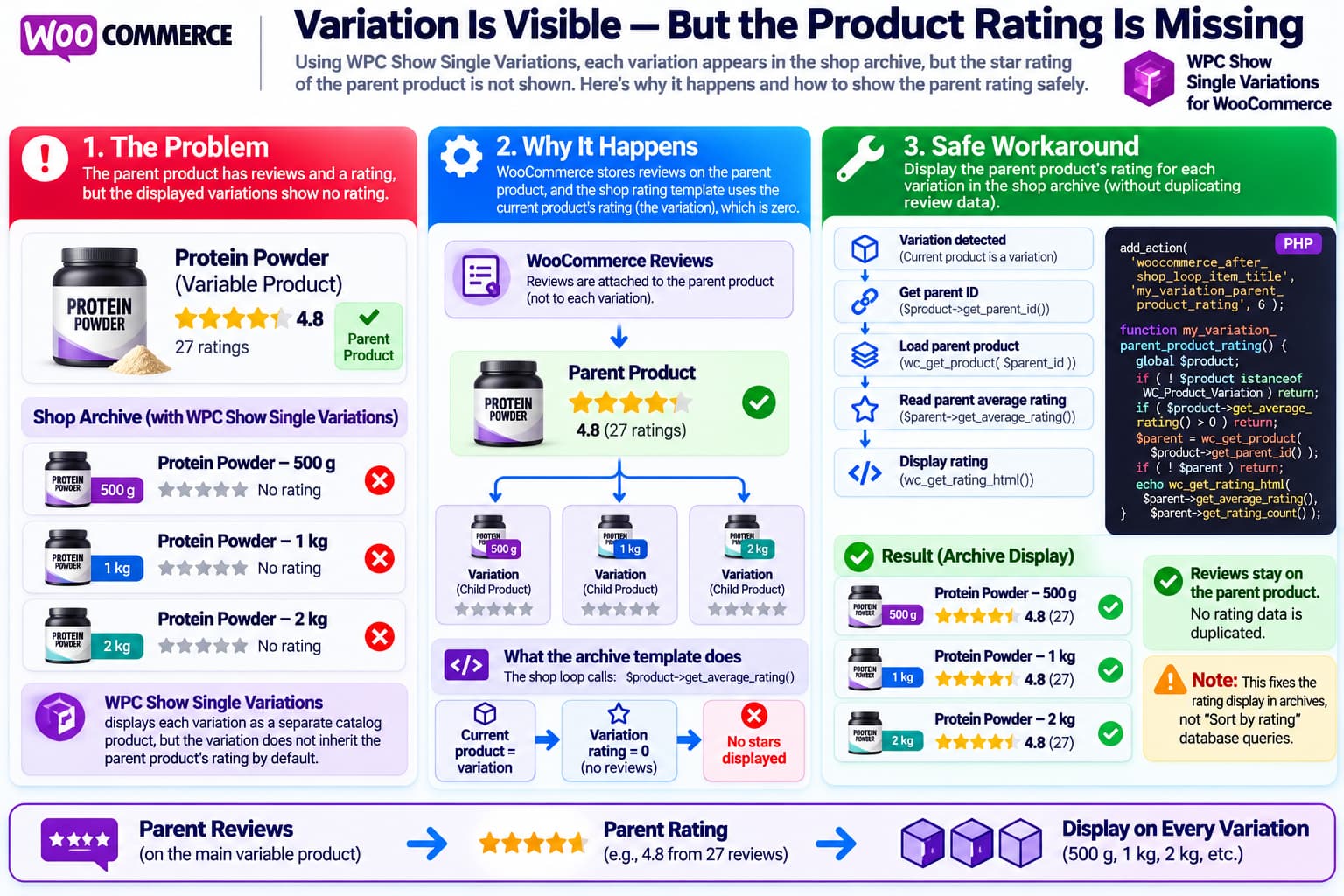
WPC Show Single Variations for WooCommerce is designed to make individual variations appear as separate products in WooCommerce shop, category, tag and search archives.
That works well for stores where customers should immediately see individual choices such as:
Coffee – 250 g
Coffee – 500 g
Coffee – 1 kg
instead of first opening one variable product and choosing the quantity.
There is, however, an important side effect.
The variations may display correctly as separate archive products while the familiar WooCommerce star rating disappears.
The parent product may have:
★★★★★
4.8 from 27 ratings
while each displayed variation shows:
No ratingeven though all variations represent essentially the same product.
A current WordPress.org support report describes exactly this problem with WPC Show Single Variations for WooCommerce.
This is not necessarily a broken WooCommerce review system. It follows from the way WooCommerce stores reviews and the way archive ratings are generated.
Why the Parent Product Has a Rating but the Variation Does Not
WooCommerce normally treats reviews as reviews of the parent product.
For example:
Organic Protein Powder
Product ID: 100
★★★★★ 4.7
32 reviews
may contain:
Variation #101
500 g

Variation #102
1 kg

Variation #103
2 kg
The reviews are associated with:
Product #100rather than independently with:
Variation #101
Variation #102
Variation #103
This distinction normally does not matter because customers see the parent variable product in the shop archive.
But WPC Show Single Variations changes what the archive displays.
Instead of:
Organic Protein Powder
★★★★★
Select options
the archive can contain:
Organic Protein Powder – 500 g
Organic Protein Powder – 1 kg
Organic Protein Powder – 2 kg
Each archive entry is now represented by a WooCommerce variation object.
WPC Show Single Variations explicitly describes its purpose as presenting variations as individual catalog items while they remain children of their variable parent product.
WooCommerce’s Standard Rating Template Explains the Missing Stars
WooCommerce’s standard shop-loop rating template is very simple.
Conceptually it does this:
global $product;

echo wc_get_rating_html(
    $product->get_average_rating()
);
WooCommerce’s current source confirms that the loop rating template takes the currently displayed product object and calls:
$product->get_average_rating()on that object.
That means when the archive product is the parent:
$product = Variable ProductWooCommerce sees the parent’s rating.
But when WPC Show Single Variations changes the archive item into:
$product = Product VariationWooCommerce asks the variation for its rating instead.
If that variation has no independent review history, its average rating is effectively empty or zero.
WooCommerce’s rating HTML function deliberately returns no stars when the rating is zero.
So the result is:
Parent
★★★★★

Variation
[ nothing ]
This is expected from WooCommerce’s standard loop logic unless the variation plugin deliberately inherits the parent rating.
Variations Normally Do Not Have Their Own Review History
WooCommerce’s variation objects technically expose rating methods because they inherit much of the normal product API. For example, WC_Product_Variation has access to get_average_rating().
But that does not mean WooCommerce automatically distributes the parent’s reviews among its variations.
WooCommerce’s own VariantFlow documentation describes this distinction explicitly: variations are separate listing items and normally have no review history of their own. That extension therefore provides functionality to give variations their parent’s rating for listing and sorting purposes.
This is also why simply saying:
The variation should already have the parent’s rating.
would be inaccurate.
It generally does not.
The plugin displaying the variations needs to supply that inheritance behavior.
Does WPC Show Single Variations Currently Include Parent-Rating Inheritance?
The current public feature list for WPC Show Single Variations for WooCommerce 2.5.3 includes separate variation listings, parent-product hiding, custom variation names, archive support and integrations with several other WPC plugins.
It does not document parent-rating inheritance as a feature.
There has also been a separate support topic titled:
“Show parent product rating”
in the plugin’s support forum, indicating that this has already been requested by another user.
The current report therefore appears to be a missing feature or compatibility limitation rather than evidence that the site’s product reviews have disappeared.
The Safest Workaround: Display the Parent Rating for Variations
If variations differ only by something such as:
250 g
500 g
1 kg
and the store considers reviews applicable to the product as a whole, using the parent’s rating for every displayed variation is reasonable.
The important point is to display the parent rating rather than copying the parent’s review data into every variation.
A lightweight WooCommerce hook can do this.
/**
 * Show the parent product rating for variations displayed
 * as individual products in WooCommerce archives.
 */
add_action(
    'woocommerce_after_shop_loop_item_title',
    'my_variation_parent_product_rating',
    6
);

function my_variation_parent_product_rating() {
    global $product;

    if ( ! $product instanceof WC_Product_Variation ) {
        return;
    }

    if ( ! wc_review_ratings_enabled() ) {
        return;
    }

    // If this variation somehow has its own rating, leave it alone.
    if ( (float) $product->get_average_rating() > 0 ) {
        return;
    }

    $parent_id = $product->get_parent_id();

    if ( ! $parent_id ) {
        return;
    }

    $parent = wc_get_product( $parent_id );

    if ( ! $parent ) {
        return;
    }

    $rating = (float) $parent->get_average_rating();

    if ( $rating <= 0 ) {
        return;
    }

    echo wp_kses_post(
        wc_get_rating_html(
            $rating,
            $parent->get_rating_count()
        )
    );
}
This intentionally does not modify the database.
It simply says:
Current archive item is a variation?
        ↓
Yes
        ↓
Does variation already have a rating?
        ↓
No
        ↓
Find parent product
        ↓
Read parent's average rating
        ↓
Render normal WooCommerce star HTML
Why Priority 6 Is Used
WooCommerce normally attaches its archive rating around:
woocommerce_after_shop_loop_item_titleat priority 5.
The custom function uses:
6so WooCommerce’s normal rating code gets its opportunity first.
For ordinary products nothing changes.
For variations with no rating, WooCommerce’s standard rating function outputs nothing, and the custom fallback then displays the parent’s rating.
This is preferable to removing WooCommerce’s normal rating callback globally because the rest of the shop can continue using WooCommerce’s standard behavior.
What the Result Looks Like
Suppose the parent product has:
Product:
Organic Honey

Average:
4.9 / 5

Ratings:
41
and the plugin displays:
Organic Honey – 250 g
Organic Honey – 500 g
Organic Honey – 1 kg
With the workaround, the archive becomes:
Organic Honey – 250 g
★★★★★ 4.9

Organic Honey – 500 g
★★★★★ 4.9

Organic Honey – 1 kg
★★★★★ 4.9
All three ratings still refer to the same underlying parent-product reviews.
No fake variation reviews are created.
Do Not Copy Rating Metadata Into Every Variation
Another possible approach would be to write the parent product’s values into every variation, such as:
_average_rating
_rating_count
_review_count
That is not the recommended solution for this use case.
Doing so creates duplicated state.
For example:
Parent rating changes
4.7 → 4.8
but the variations could still contain:
4.7until something synchronizes them again.
You then have to maintain:
Parent
Variation 1
Variation 2
Variation 3
...
every time a new customer leaves a review.
It is much cleaner to keep the parent as the single source of truth.
This Workaround Does Not Move the Reviews
The PHP snippet does not make reviews variation-specific.
The reviews remain attached to the parent product.
So when a shopper opens:
500 gthey are effectively seeing:
The overall product has a 4.8-star rating.
That matches the use case where the only difference is filling quantity.
If the variations represented materially different products, for example:
Chocolate flavor
Vanilla flavor
Strawberry flavor
and customers could genuinely have very different experiences with each, inheriting the same parent rating might be less appropriate.
In that case, variation-specific review functionality would require a different architecture.
Important: This Only Fixes the Visual Archive Rating
The snippet affects the star rating rendered in the normal WooCommerce product loop.
It does not automatically change WooCommerce’s database-level rating value for the variation.
Therefore it should not be assumed to fix:
Sort by average ratingfor individual variations.
Sorting happens before the archive HTML is rendered.
By the time this function runs, WooCommerce has already decided which products appear and in what order.
If variation products also need to participate correctly in rating-based sorting, a separate solution is required.
This distinction is important:
Show parent's stars on variation
✓ This workaround
versus:
Give variation parent's rating for database queries/sorting
✕ Different problem
WooCommerce’s VariantFlow extension makes this distinction too: it has explicit functionality for assigning the parent’s average rating to variations for sorting while reviews remain on the parent.
What About the Review Count?
The example code passes:
$parent->get_rating_count()into WooCommerce’s rating renderer.
That allows WooCommerce’s accessible star-rating markup to correctly describe the rating count.
The stars themselves are generated by WooCommerce’s existing:
wc_get_rating_html()function rather than manually creating star characters or custom HTML.
WooCommerce documents this function specifically for generating standard rating markup from an average rating and rating count.
This helps keep the result consistent with the active WooCommerce theme.
Where to Add the Code
Do not edit:
wp-content/plugins/wpc-show-single-variations/or:
wp-content/plugins/woocommerce/directly.
The next plugin update would overwrite the modification.
The snippet belongs in a safe customization location such as a child theme’s functions.php, a small site-specific plugin, or a properly managed code-snippets plugin.
Test it on staging first.
What If the Code Does Not Display Anything?
The workaround depends on the theme or builder using WooCommerce’s standard product-loop hook:
woocommerce_after_shop_loop_item_titleMost standard WooCommerce themes do.
However, some builders replace the entire product-card template.
For example, a custom Elementor, Bricks, Breakdance or theme product-grid template may render its own rating widget and never execute WooCommerce’s normal rating hook.
In that case the PHP logic can still be used, but it needs to be connected to the builder’s product-card system instead.
A useful diagnostic is to temporarily test the same page with a standard WooCommerce product-loop template.
If the stars appear there, the parent-rating logic works and the remaining issue is the custom archive template.
Check That WooCommerce Ratings Are Enabled
Before adding custom code, confirm that WooCommerce itself has ratings enabled.
Go to:
WooCommerce
→ Settings
→ Products
→ Reviews
and confirm that product reviews and star ratings are enabled.
WooCommerce documents these controls in its Product Reviews settings.
If parent products already visibly show ratings elsewhere, this setting is almost certainly already correct.
Why Another Variations Plugin Can Show Ratings Automatically
This behavior is not an inherent limitation of displaying variations separately.
It depends on how the variation-listing extension is implemented.
For example, WooCommerce’s current VariantFlow Variations as Single Product documentation explicitly states:
variations show their parent product’s star rating in product listings.
It also documents that variations normally do not have review history of their own.
So a plugin can absolutely implement:
Variation archive item
        ↓
Use parent rating
automatically.
WPC Show Single Variations simply does not currently document such behavior.
That makes parent-rating inheritance a reasonable feature request for WPClever.
Recommended Feature Request to WPClever
The clean plugin-level implementation would behave like this:
Archive item is normal/simple product
→ use own rating

Archive item is variable parent
→ use parent rating

Archive item is variation shown by WPC Show Single Variations
→ use parent product rating
Ideally the plugin could expose a setting such as:
Variation ratings

○ No rating
● Use parent product rating
○ Use variation-specific rating
For most stores using this type of extension, Use parent product rating would probably be the least surprising behavior.
Current Plugin Status
The current WordPress.org release is WPC Show Single Variations for WooCommerce 2.5.3.
Its public feature list confirms that variations can be displayed as normal catalog items on shop, category, tag and search pages, but it does not list inherited ratings as a feature.
The current support report about missing archive ratings is therefore consistent with the plugin’s present documented feature set rather than a setting that the user has obviously overlooked.
Recommended Solution
For the described store, where variations differ only in filling quantity, using the parent’s review score is a sensible solution.
Use the parent product as the authoritative source:
Parent Product
Reviews + Rating
        ↓
250 g variation ─┐
500 g variation ─┼→ Display same parent rating
1 kg variation ──┘
Keep the actual reviews attached to the parent.
Do not duplicate review metadata into each variation.
For a standard WooCommerce archive, the following lightweight fallback is the appropriate starting point:
add_action(
    'woocommerce_after_shop_loop_item_title',
    'my_variation_parent_product_rating',
    6
);

function my_variation_parent_product_rating() {
    global $product;

    if ( ! $product instanceof WC_Product_Variation ) {
        return;
    }

    if ( ! wc_review_ratings_enabled() ) {
        return;
    }

    if ( (float) $product->get_average_rating() > 0 ) {
        return;
    }

    $parent = wc_get_product( $product->get_parent_id() );

    if ( ! $parent ) {
        return;
    }

    $rating = (float) $parent->get_average_rating();

    if ( $rating <= 0 ) {
        return;
    }

    echo wp_kses_post(
        wc_get_rating_html(
            $rating,
            $parent->get_rating_count()
        )
    );
}
This preserves WooCommerce’s review model while giving each displayed variation the rating customers expect to see.
