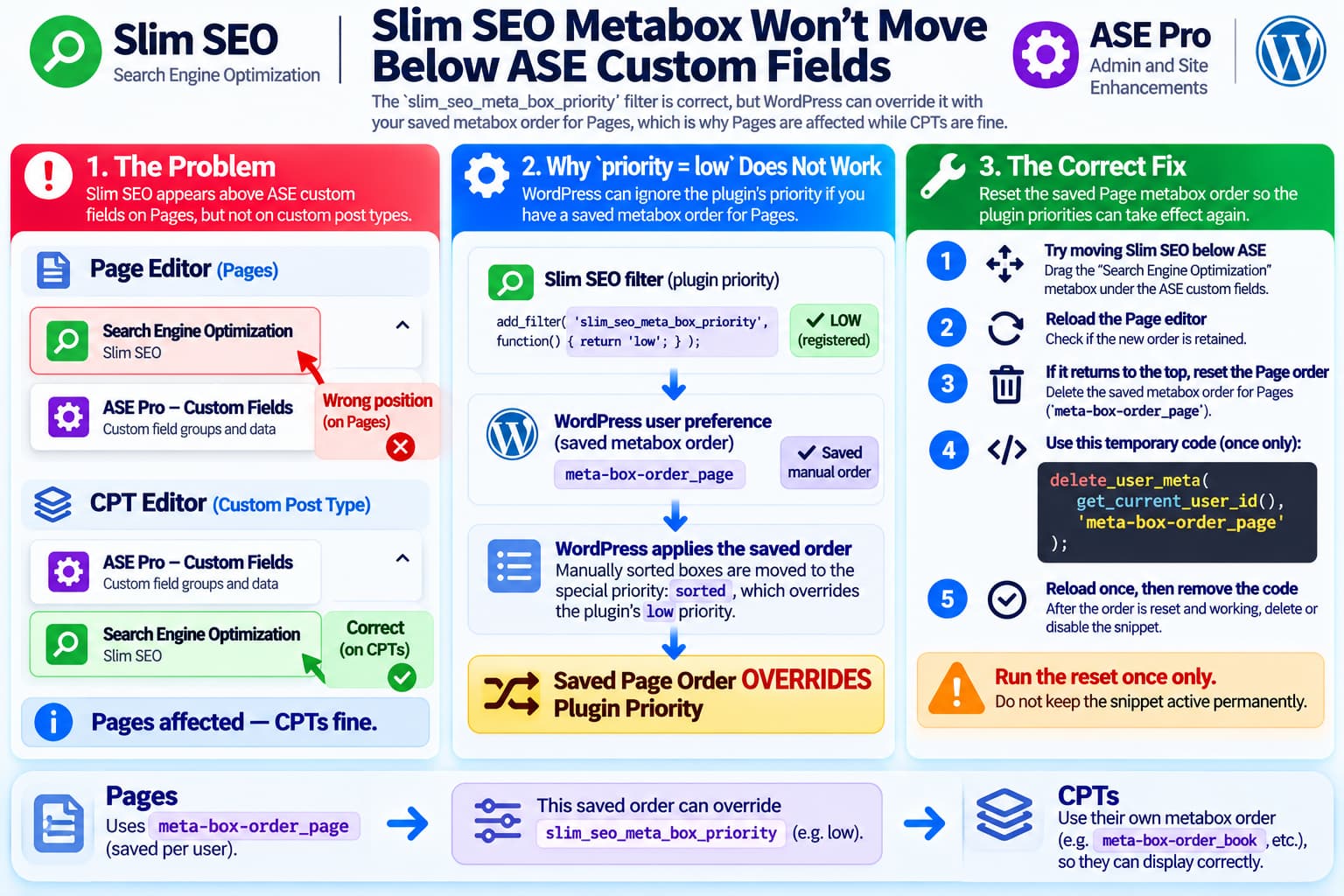
A WordPress site using ASE Pro custom fields may show an unexpected editor layout after installing Slim SEO:
Page editor

Search Engine Optimization — Slim SEO
--------------------------------------

ASE Custom Fields
--------------------------------------
when the preferred order is:
ASE Custom Fields
--------------------------------------

Search Engine Optimization — Slim SEO
--------------------------------------
An obvious solution appears to be Slim SEO’s documented priority filter:
add_filter( 'slim_seo_meta_box_priority', function() {
	return 'low';
} );
But sometimes that snippet appears to do absolutely nothing.
Even more confusingly, the same site may behave correctly on custom post types:
CPT editor

ASE Custom Fields
--------------------------------------

Search Engine Optimization
--------------------------------------
while only normal WordPress Pages have Slim SEO above the custom fields.
That difference is the biggest clue.
The likely cause is not ASE Pro and not a broken Slim SEO filter.
It is WordPress’s saved per-user, per-screen metabox ordering system.
The Slim SEO Filter Is Correct
Slim SEO officially documents:
add_filter( 'slim_seo_meta_box_priority', function() {
	return 'low';
} );
as the way to move its Search Engine Optimization metabox toward the bottom of its editor context.
Slim SEO also exposes:
slim_seo_meta_box_contextfor choosing:
normal
advanced
side
and:
slim_seo_meta_box_priorityfor adjusting its priority.
So there is nothing syntactically wrong with the reported snippet.
The problem is that the priority supplied when a plugin registers a metabox is not always the final ordering WordPress uses.
WordPress Has Two Layers of Metabox Ordering
When a plugin registers a metabox, it supplies a priority.
WordPress’s add_meta_box() supports:
high
core
default
low
within a given context.
Conceptually:
Plugin registration

ASE custom fields → priority X
Slim SEO          → priority low
would normally determine the order.
But WordPress then applies a second layer:
User's previously saved metabox arrangementAnd that layer can override plugin priority.
WordPress Explicitly Overrides Priority for Manually Sorted Boxes
The important code is inside WordPress Core’s do_meta_boxes().
WordPress retrieves:
get_user_option( "meta-box-order_$page" );and then processes the saved metabox IDs.
The Core source even describes what it is doing:
Grab the ones the user has manually sorted. Pull them out of their previous context/priority and into the one the user chose.
Those boxes are re-added using a special priority:
sortedThat means the final process is effectively:
Plugin says:
Slim SEO = low

        ↓

WordPress finds saved user order

        ↓

Slim SEO was previously positioned here

        ↓

WordPress moves it into:
sorted

        ↓

Saved order wins
Once that happens, changing:
slim_seo_meta_box_priorityto low may not visibly change anything.
Why It Happens Only on Pages
This also explains the strange Page-versus-CPT difference perfectly.
WordPress stores metabox layouts separately for different editor screens.
For Pages, the saved user option is:
meta-box-order_pageA custom post type uses its own screen-specific value, conceptually:
meta-box-order_book
meta-box-order_event
meta-box-order_product
depending on the CPT slug.
WordPress Core uses the current screen ID when retrieving:
meta-box-order_$pageSo this is entirely possible:
Page screen
meta-box-order_page

Slim SEO
ASE Fields

        ✕

CPT screen
meta-box-order_my_cpt

ASE Fields
Slim SEO

        ✓
The two screens do not have to share the same ordering.
This is why a problem affecting Pages but not CPTs strongly points toward saved WordPress screen preferences.
WordPress Saves This Per User
The metabox order belongs to the current WordPress user.
It is stored as user metadata rather than as a global site setting.
Historically, WordPress stores keys such as:
meta-box-order_page
meta-box-order_post
meta-box-order_{custom-post-type}
along with corresponding hidden-metabox settings.
Therefore two administrators can theoretically see different metabox arrangements on the same Page editor.
For example:
Administrator A

Slim SEO
ASE Fields
while:
Administrator B

ASE Fields
Slim SEO
can occur on exactly the same website.
First Test: Log In as Another Administrator
Before changing code, a useful diagnostic is to open the same Page editor using another administrator account.
If the second administrator sees:
ASE custom fields
Slim SEO
while the original user sees:
Slim SEO
ASE custom fields
the cause is effectively confirmed.
The plugin configuration is site-wide.
The difference is the user’s stored editor arrangement.
First Fix: Try Reordering the Boxes Manually
If the editor allows the metaboxes to be reordered, simply move:
Search Engine Optimizationbelow the ASE custom field group.
Reload the Page editor.
If it remains there, WordPress has updated:
meta-box-order_pagefor that user.
No PHP code is necessary.
This is preferable when it works because it uses WordPress’s intended metabox-ordering mechanism.
If You Cannot Move It: Reset the Page Metabox Order
If the editor does not allow convenient reordering, or the saved order has become awkward, reset the current user’s Page metabox arrangement.
The value to reset is:
meta-box-order_pageDo not delete unrelated user metadata.
A temporary PHP snippet can reset only that setting:
add_action( 'admin_init', function() {
	if ( ! current_user_can( 'manage_options' ) ) {
		return;
	}

	delete_user_meta(
		get_current_user_id(),
		'meta-box-order_page'
	);
} );
Important
This should be used as a one-time reset.
The procedure is:
1. Add/enable snippet
        ↓
2. Reload wp-admin once
        ↓
3. Confirm Page editor layout
        ↓
4. Disable/remove snippet
Do not leave it permanently active.
Otherwise WordPress would delete the user’s saved Page metabox arrangement every time an administrator loads wp-admin.
Why Resetting the Order Helps
After deleting:
meta-box-order_pageWordPress no longer has a manually sorted Page layout to apply.
The editor goes back to the plugins’ registered contexts and priorities.
Conceptually:
Before

Slim SEO says: low
        ↓
Saved Page order exists
        ↓
Saved order overrides priority
After reset:
Slim SEO says: low
        ↓
No saved Page order
        ↓
Normal plugin priorities apply
If ASE’s custom-field metabox naturally registers ahead of Slim SEO, the expected result becomes:
ASE Custom Fields
--------------------------------

Search Engine Optimization
--------------------------------
This Is Also Why Changing low to Something Else May Appear Useless
Suppose the saved Page order contains:
slim-seo
ase-custom-fields-123
Changing the Slim SEO registration between:
highand:
lowdoes not necessarily move it.
WordPress’s saved sorting process removes manually ordered boxes from their original priority buckets and places them into:
sortedinstead.
The saved sequence then determines their display order.
So repeatedly experimenting with:
return 'low';or:
return 'high';may produce no visible difference.
Why Installing Slim SEO Can Expose an Old Saved Layout
This does not necessarily mean Slim SEO wrote an incorrect Page preference.
The Page screen may already have a saved metabox arrangement from previous editing activity.
When another metabox appears, WordPress combines the current registered boxes with the user’s existing sorted arrangement.
That can produce a layout that is different from what plugin priorities alone would suggest.
The important distinction is:
Metabox registration priority
≠
User's final saved metabox order
Do Not Delete the ASE Custom Field Groups
There is no reason to recreate the ASE custom fields just to change their editor position.
ASE Pro explicitly supports custom field groups as part of its Custom Content Types functionality.
The reported behavior concerns editor presentation, not the stored custom-field data.
Deleting or recreating field groups introduces unnecessary risk.
Do Not Edit Slim SEO Plugin Files
Likewise, do not modify Slim SEO’s plugin code to change its add_meta_box() call.
Even if a hardcoded change appears to work, the next Slim SEO update will overwrite it.
Slim SEO already provides an official filter for priority.
The problem is not that WordPress lacks a priority setting.
It is that the user-specific saved order can take precedence afterwards.
What About Changing the Context?
Slim SEO also offers:
add_filter( 'slim_seo_meta_box_context', function() {
	return 'side';
} );
to move the SEO metabox to the editor sidebar.
That can be useful if placing SEO settings in the sidebar is actually desired.
But it should not be used merely to work around an incorrect order.
If the desired layout is:
Main editor area

ASE Fields
Slim SEO
then changing Slim SEO to:
sidesolves a different problem.
Resetting or rearranging the saved Page order is cleaner.
Gutenberg Adds One More Detail
Slim SEO’s documentation notes that for a post type using Gutenberg:
normaland:
advancedeffectively behave the same for its metabox placement.
So switching between those two contexts may not solve this particular issue either.
WordPress’s Block Editor still supports legacy PHP metaboxes and runs the normal metabox registration/rendering process for them.
The saved screen order therefore remains relevant.
How to Confirm the Saved Value
Developers can inspect the currently logged-in user’s Page layout with:
$order = get_user_option(
	'meta-box-order_page',
	get_current_user_id()
);

error_log( print_r( $order, true ) );
Do this only temporarily on a development or staging environment.
The result may resemble:
Array
(
    [normal] =>
        slim-seo,ase-field-group-example,...

    [side] =>
        submitdiv,pageparentdiv,...
)
If slim-seo appears before the ASE group in that stored sequence, the reason for the visible Page order is confirmed.
WP-CLI Alternative
If WP-CLI is available, an administrator can inspect the relevant user meta before deleting it.
Conceptually:
wp user meta get USER_ID meta-box-order_pageand, after confirming the correct account:
wp user meta delete USER_ID meta-box-order_pageDo not copy an arbitrary user ID from another website.
Identify the correct WordPress administrator first.
The PHP one-time reset is often simpler for users without shell access.
Why CPTs Should Be Left Alone
Since the CPT editors already display:
ASE custom fields
        ↓
Slim SEO
correctly, there is no reason to reset their metabox layouts.
Reset only:
meta-box-order_pagerather than attempting to remove all:
meta-box-order_*preferences.
That preserves the editor layout already working on the rest of the site.
Recommended Troubleshooting Sequence
Use this order:
1. Keep the Slim SEO priority snippet unchanged
        ↓
2. Open another administrator account if available
        ↓
3. Compare the Page metabox order
        ↓
4. Try manually moving Slim SEO below ASE
        ↓
5. Reload Page editor
If the problem remains:
6. Back up the database
        ↓
7. Reset current user's:
   meta-box-order_page
        ↓
8. Remove the reset snippet
        ↓
9. Open Page editor again
Then check:
ASE Custom Fields
        ↓
Search Engine Optimization
Most Likely Explanation
The observation:
Pages:
Slim SEO above ASE ✕

CPT:
Slim SEO below ASE ✓
is exactly the kind of difference WordPress’s per-screen metabox preferences can produce.
WordPress Core retrieves the saved layout using the screen-specific key:
get_user_option( "meta-box-order_$page" );and moves manually sorted boxes into the sorted priority before displaying them.
Therefore:
add_filter( 'slim_seo_meta_box_priority', function() {
	return 'low';
} );
can be working correctly while still appearing ineffective.
The plugin priority is being superseded by WordPress’s saved Page layout.
Final Answer
The Slim SEO filter is valid, so the problem is unlikely to be the snippet itself.
The page-only nature of the issue strongly suggests that the current WordPress user already has a saved:
meta-box-order_pagepreference.
That saved order can override Slim SEO’s low priority. Custom post types maintain separate metabox-order settings, explaining why they can display correctly at the same time.
The first thing to try is simply moving the Slim SEO box underneath the ASE fields and reloading the editor.
If WordPress will not retain the desired arrangement, reset only the current user’s Page metabox order:
add_action( 'admin_init', function() {
	if ( ! current_user_can( 'manage_options' ) ) {
		return;
	}

	delete_user_meta(
		get_current_user_id(),
		'meta-box-order_page'
	);
} );
Enable that snippet for one admin page load only, then remove or disable it.
There should be no need to delete ASE fields, modify Slim SEO plugin files, or change the CPT configuration.
