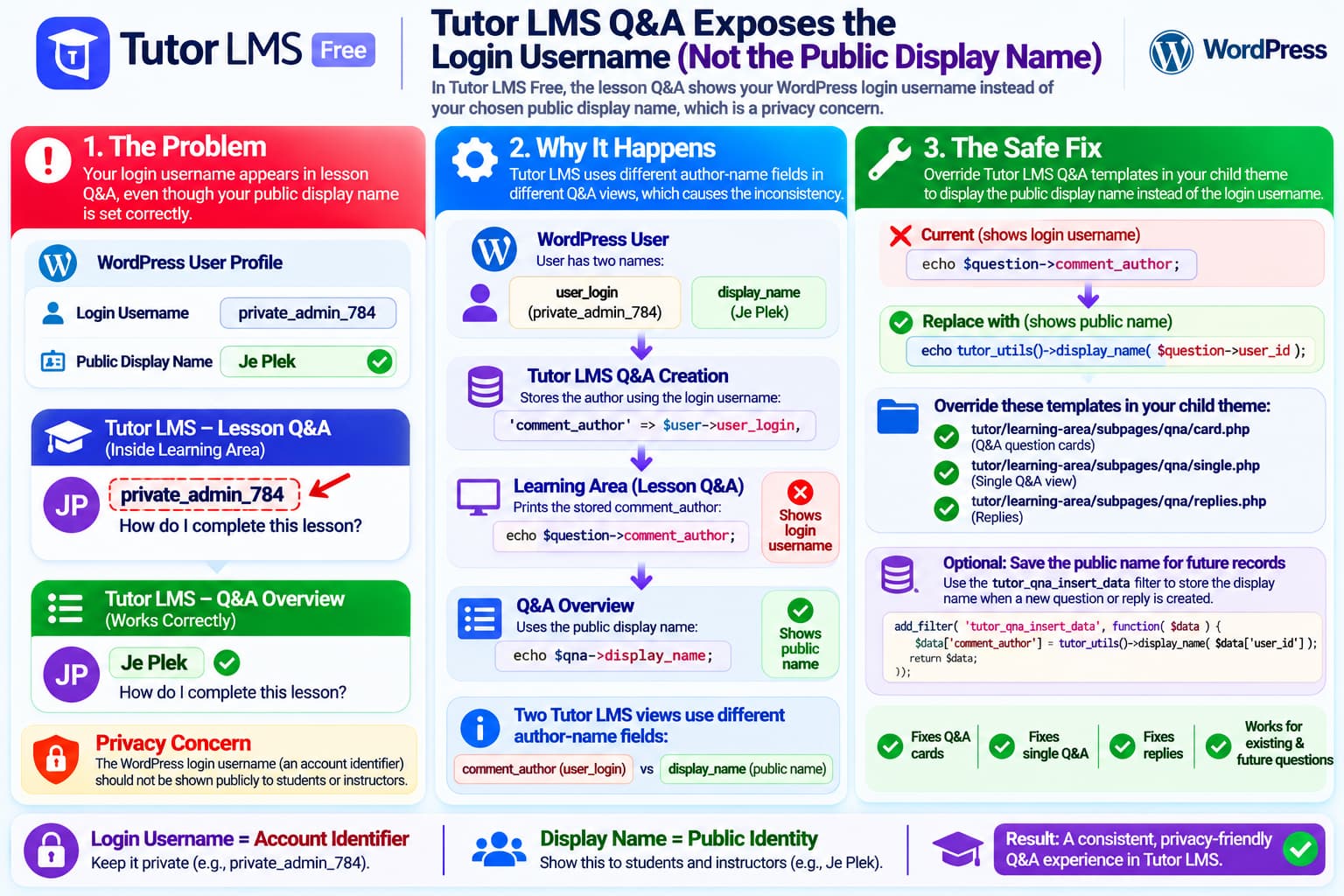
Tutor LMS Free currently has an inconsistent author-name implementation in its Q&A system.
A student or instructor can configure a WordPress account with:
Login username:
private-login-name

Public display name:
Je Plek
and WordPress correctly uses:
Je Plekas the public identity.
However, inside the Tutor LMS Learning Area Q&A, the lesson discussion can instead display:
private-login-namenext to the avatar.
At the same time, the Tutor LMS Q&A overview can correctly show:
Je PlekThis looks like a configuration problem at first, but the current Tutor LMS Free source explains why the two interfaces disagree.
The current WordPress.org support report describing this exact behavior remains unresolved, and Tutor LMS support initially suggested changing the Tutor profile display name and clearing cache. In the reported case, however, the WordPress display name was already configured correctly.
This Is Not Primarily a Cache Problem
Changing:
Users → Profile → Display name publicly as
is normally the correct way to configure a WordPress public identity.
But that does not fix this particular Tutor LMS code path when the display name is already correctly configured.
Tutor LMS currently creates Q&A records with:
'comment_author' => $user->user_login,rather than storing:
$user->display_nameor dynamically resolving the user’s public display name.
That means a question posted by:
WordPress login:
administrator-secret-name

Display name:
Course Team
can have its Q&A comment record created with:
comment_author =
administrator-secret-name
The relevant code is in Tutor LMS Free’s classes/Q_And_A.php.
Tutor LMS Q&A source on GitHub
The Learning Area Then Prints That Login Name Directly
The second half of the problem occurs when Tutor LMS renders Q&A inside the newer Learning Area.
For example, the Q&A card template outputs the stored:
$question->comment_authordirectly.
The single-question template does the same thing.
Replies also use:
$reply->comment_authorSo the flow is effectively:
WordPress user
        ↓
user_login
        ↓
Tutor Q&A comment_author
        ↓
Learning Area template
        ↓
Login username displayed publicly
The relevant templates are:
templates/learning-area/subpages/qna/card.php

templates/learning-area/subpages/qna/single.php

templates/learning-area/subpages/qna/replies.phpWhy the Q&A Overview Shows the Correct Name
This is the strongest evidence that the WordPress profile is not configured incorrectly.
Tutor LMS’s Q&A overview uses:
$qna->display_namerather than:
$qna->comment_authorSo the overview follows the WordPress public name while the Learning Area uses the stored login username.
Conceptually:
Q&A Overview
user.display_name
        ↓
Je Plek ✓
but:
Learning Area Q&A
comment_author
        ↓
WordPress user_login ✕
That is why the same Q&A author can have two different visible names in Tutor LMS.
Tutor LMS Already Has a Proper Display-Name Helper
Tutor LMS contains its own helper:
tutor_utils()->display_name( $user_id )The current implementation retrieves the WordPress user’s public display name.
It first checks:
$user_data->display_nameand can also fall back to the user’s first/last name.
Only when no better public name exists does it fall back to the login username.
This helper is already used elsewhere inside Tutor LMS.
So the Q&A Learning Area could use the existing Tutor function instead of directly printing:
comment_authorIs This a Security Vulnerability?
It is better described as a privacy and information-exposure problem than a direct account-compromise vulnerability.
A WordPress login username is not a password.
Knowing it does not let somebody log into the account by itself.
However, login usernames are authentication identifiers, and administrators often deliberately configure a different:
Display Namefor public use.
If the LMS ignores that choice and exposes user_login, it can:
- reveal administrator login identifiers;
- reveal student account usernames;
- undermine the user’s WordPress privacy choice;
- make username-enumeration or credential-stuffing attempts easier;
- create inconsistent identities across the LMS.
For a learning platform with many students, avoiding unnecessary exposure of account identifiers is sensible.
The Best Temporary Fix: Override the Q&A Templates
For existing and future Q&A entries, the safest display-layer workaround is to make Tutor LMS resolve the author’s public name from the user’s ID.
Do not directly edit:
wp-content/plugins/tutor/because a plugin update will overwrite the change.
Tutor LMS officially supports overriding templates from a child theme. Its documentation says plugin templates can be copied into:
wp-content/themes/your-child-theme/tutor/while maintaining the same internal directory structure.
File 1: Q&A Card
Copy:
wp-content/plugins/tutor/templates/
learning-area/subpages/qna/card.php
to:
wp-content/themes/your-child-theme/tutor/
learning-area/subpages/qna/card.php
Find:
<?php echo esc_html( $question->comment_author ); ?>and replace it with:
<?php
echo esc_html(
    tutor_utils()->display_name( (int) $question->user_id )
);
?>
File 2: Single Q&A View
Copy:
wp-content/plugins/tutor/templates/
learning-area/subpages/qna/single.php
to:
wp-content/themes/your-child-theme/tutor/
learning-area/subpages/qna/single.php
Replace:
<?php echo esc_html( $question->comment_author ); ?>with:
<?php
echo esc_html(
    tutor_utils()->display_name( (int) $question->user_id )
);
?>
File 3: Q&A Replies
Copy:
wp-content/plugins/tutor/templates/
learning-area/subpages/qna/replies.php
to:
wp-content/themes/your-child-theme/tutor/
learning-area/subpages/qna/replies.php
Replace:
<?php echo esc_html( $reply->comment_author ); ?>with:
<?php
echo esc_html(
    tutor_utils()->display_name( (int) $reply->user_id )
);
?>
Now the Learning Area becomes:
Q&A question
        ↓
user_id
        ↓
Tutor display_name()
        ↓
WordPress public display name
instead of:
Q&A question
        ↓
comment_author
        ↓
WordPress login username
Why This Is Better Than Editing Existing Database Records
Existing Q&A records may already contain:
comment_author = login_usernamein the WordPress comments table.
It would be possible to update those database values, but that is not the best first solution.
A template-level fix:
- immediately protects old Q&A entries;
- protects new entries;
- follows future changes to a user’s public display name;
- avoids modifying historical database records;
- avoids direct SQL;
- is easy to remove after Tutor LMS fixes the bug.
For example, if a user changes:
Je Plekto:
Je Plek Academythe template approach can immediately use the new public display name.
A database rewrite would preserve the old name until it was manually updated again.
Optional Hardening for New Q&A Records
Tutor LMS also exposes a filter when inserting Q&A records:
tutor_qna_insert_dataThis allows future Q&A entries to store the public display name instead of the login username.
For example:
add_filter(
    'tutor_qna_insert_data',
    function ( $data ) {

        $user_id = isset( $data['user_id'] )
            ? (int) $data['user_id']
            : 0;

        if ( ! $user_id ) {
            return $data;
        }

        $display_name = tutor_utils()->display_name( $user_id );

        if ( $display_name ) {
            $data['comment_author'] = $display_name;
        }

        return $data;
    }
);
Place this in a child theme’s functions.php or a properly managed snippets/plugin customization layer.
Do not modify Tutor LMS core files.
Important Limitation
This filter affects new Q&A questions and replies.
It does not repair old Q&A rows that already contain the login username.
That is why the template override is the more complete immediate privacy solution.
The Ideal Tutor LMS Fix
The best upstream solution would be for Tutor LMS itself to stop treating:
comment_authoras the authoritative public name in the Learning Area.
Instead, the Q&A templates should resolve:
tutor_utils()->display_name( (int) $question->user_id )and:
tutor_utils()->display_name( (int) $reply->user_id )when rendering author names.
Alternatively, Tutor LMS could ensure its Q&A query always supplies a display_name property and render that consistently.
This would make all Q&A interfaces agree:
WordPress Display Name
        ↓
Q&A Overview ✓
Learning Area ✓
Replies ✓
Tutor LMS Documentation Describes Q&A Authors as Students, Not Login Usernames
Tutor LMS’s Q&A documentation describes the Q&A list’s Student field simply as the name of the student who posted the question.
There is no documented reason for the lesson Q&A interface to intentionally override WordPress’s public display-name preference with the account login name.
Tutor LMS also supports public/private profile presentation settings for students and instructors, reinforcing the expectation that public identity should be managed separately from login credentials.
Why Changing the Tutor Profile May Not Solve This
The initial support suggestion in the current thread was to go to the Tutor dashboard, change the profile display name, clear cache, and disable caching plugins if necessary.
Those are reasonable generic troubleshooting steps.
But when:
WordPress display_name = correctand:
Q&A overview = correctwhile:
Learning Area Q&A = user_logincache is not the most convincing explanation.
The current source directly accounts for that discrepancy.
Changing the WordPress public display name cannot force a template to use it if that template explicitly prints:
$question->comment_authorand that field was stored from:
$user->user_loginThis Affects Replies Too
The issue is not limited to the person who opens the question.
Tutor LMS’s Learning Area reply template also directly outputs:
$reply->comment_authorTherefore instructor replies and student replies can expose the same type of login username.
A proper fix should cover:
Questions
+
Replies
rather than patching only the first Q&A message.
Free vs Pro
The affected source is in the main Tutor LMS Free repository.
This does not appear to be a feature intentionally restricted to Tutor LMS Pro.
The public-display-name behavior is basic WordPress user presentation and should work consistently regardless of whether the LMS installation is Free or Pro.
The WordPress.org listing currently shows Tutor LMS as a very actively maintained plugin with more than 100,000 active installations.
That makes reporting this upstream worthwhile because the behavior could affect a large number of LMS users.
What to Send Tutor LMS Support
A concise reproducible report would be:
Tutor LMS version:
4.x / current installed version

Tutor LMS:
Free

WordPress Display Name:
Je Plek

WordPress Login Username:
[redacted]
Q&A Overview: Je Plek ✓ Learning Area Q&A: login username ✕ Other profile locations: Display name correct Cache cleared: Yes
Then point out the code difference:
classes/Q_And_A.php

comment_author => $user->user_login
and:
templates/learning-area/subpages/qna/*.php

prints comment_author
while:
views/qna/qna-table.php

prints display_name
This provides a reproducible code-level explanation rather than only a screenshot.
Do Not Post the Real Login Username Publicly
When reporting the issue, redact the actual login identifier.
For example:
Public display name:
Je Plek

Login username:
[REDACTED]
The screenshots should also hide:
- login usernames;
- email addresses;
- user IDs if sensitive;
- authentication cookies;
- admin URLs containing tokens/nonces.
Recommended Temporary Fix
For a production LMS concerned about student or administrator privacy:
1. Keep WordPress public display names configured correctly
        ↓
2. Override the three Learning Area Q&A templates
        ↓
3. Replace comment_author with
   tutor_utils()->display_name( user_id )
        ↓
4. Test student questions
        ↓
5. Test instructor replies
        ↓
6. Retest after every Tutor LMS update
Optionally add the:
tutor_qna_insert_datafilter so future Q&A rows also stop storing the login username as the comment author.
Final Diagnosis
The behavior is reproducible from Tutor LMS’s current source:
Q&A creation
→ stores user_login in comment_author
and:
Learning Area
→ prints comment_author directly
while:
Q&A overview
→ prints display_name
That directly explains why a user’s public WordPress name is shown correctly in one Tutor LMS screen while the login username appears inside the lesson Q&A.
So this should be treated as a Tutor LMS Q&A presentation/privacy inconsistency, not simply as an incorrectly configured WordPress profile.
Until Tutor LMS changes the Learning Area templates, the safest workaround is to render:
tutor_utils()->display_name( $user_id )instead of:
comment_authorthrough a child-theme template override.
