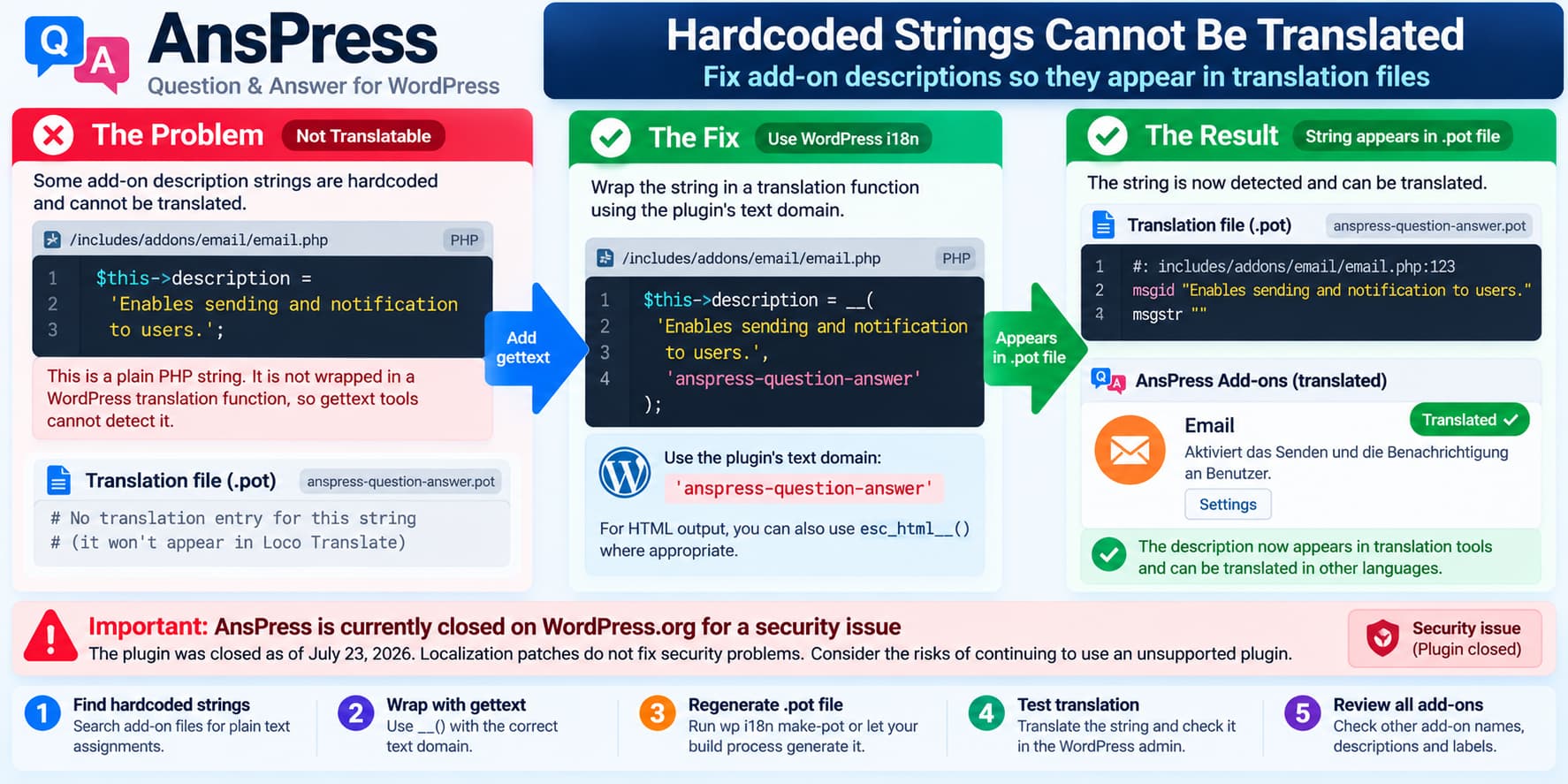
A WordPress plugin can provide .po, .mo, and .pot translation files and still contain interface text that translators cannot access.
An older AnsPress installation, for example, may contain code similar to:
$this->description = 'Enables sending and notification to users.';in an add-on file such as:
/includes/addons/email/email.phpThat string is ordinary PHP text.
It is not passed through one of WordPress’s internationalization functions, so gettext tools cannot reliably discover it and translation plugins such as Loco Translate will not be able to translate it through the normal plugin language catalog.
WordPress’s own plugin-development documentation states that strings must be wrapped in gettext functions such as __() before they can be translated.
The Correct Fix
Instead of:
$this->description = 'Enables sending and notification to users.';the plugin should use:
$this->description = __(
    'Enables sending and notification to users.',
    'anspress-question-answer'
);
If the string will later be output as plain HTML text, escaping should also be performed at output time.
For text that is translated and immediately escaped for HTML, WordPress also provides:
esc_html__()For example:
$this->description = esc_html__(
    'Enables sending and notification to users.',
    'anspress-question-answer'
);
WordPress recommends using its translate-and-escape functions where appropriate rather than outputting unescaped translated strings.
Why Loco Translate Cannot Find the String
Translation tools do not execute the plugin and inspect every value at runtime.
They scan the source code for recognized translation functions.
For example, this is discoverable:
__(
    'Enables sending and notification to users.',
    'anspress-question-answer'
);
This is not:
'Enables sending and notification to users.'The same problem occurs when developers write:
$label = 'Email notifications';instead of:
$label = __(
    'Email notifications',
    'anspress-question-answer'
);
WordPress explicitly explains that a string needs to be wrapped in a gettext function to become available to translators.
The Text Domain Matters Too
The second argument:
anspress-question-answeris the plugin’s text domain.
WordPress requires plugin strings to use the plugin’s own text domain, and that domain should match the plugin slug.
A correct call therefore looks like:
__(
    'Email',
    'anspress-question-answer'
);
rather than:
__( 'Email' );or:
__( 'Email', 'some-other-plugin' );Using the wrong text domain can make a string appear to be internationalized while still preventing the correct translation catalog from resolving it.
WordPress’s Plugin Handbook specifically says that every gettext call should use the plugin’s text domain.
This Was Not Limited to Email Text
The original report mentions files under:
/includes/addons/and uses the Email add-on as one example.
That suggests the right developer response is not simply to correct one sentence.
All add-on metadata and visible descriptions should be reviewed for patterns such as:
$this->name = '...';
$this->description = '...';
$this->title = '...';
$this->label = '...';
or arrays such as:
array(
    'label'       => '...',
    'description' => '...',
);
Any user-facing literal string should be checked to determine whether it belongs inside a gettext function.
A plugin-wide internationalization audit is more useful than correcting strings one at a time as users discover them.
Current AnsPress Source Is Different
The current public AnsPress repository uses a different directory layout.
Its Email add-on is now located at:
/addons/email/email.phprather than the older:
/includes/addons/email/email.phpThe public AnsPress documentation also identifies addons/email/email.php as the Email add-on source.
In the more recent source, many visible Email settings are already wrapped correctly.
Examples include strings equivalent to:
'label' => __(
    'Email',
    'anspress-question-answer'
);
and descriptions for:
Admin Notifications
New question
New answer
New comment
User Notifications
Email subject
Email body
These use WordPress translation functions in the current codebase.
The exact older assignment:
$this->description = 'Enables sending and notification to users.';does not appear in the current Email add-on implementation.
That means this specific report is likely tied to an older AnsPress release or an older add-on architecture.
Add-on Header Descriptions Are a Separate Case
The newer Email add-on contains metadata such as:
Addon Name: Email
Description: Notify admin and users by email.
inside a PHP comment header.
That is not the same as the old runtime assignment:
$this->description = '...';Whether such header metadata is translated depends on how AnsPress reads and presents those headers.
If a custom add-on parser simply displays the raw header value, wrapping the comment itself in __() is not possible because it is not executable PHP.
In that case the plugin’s add-on loader needs to translate the parsed value before displaying it, or the metadata system needs a translation-aware design.
This is why an internationalization audit should check both:
- normal PHP interface strings; and
- metadata values parsed from file headers.
How to Check for Other Hardcoded Strings
Developers maintaining a fork can search the plugin for likely user-facing assignments.
For example:
grep -RIn \
    "\->description\s*=" \
    wp-content/plugins/anspress-question-answer/
You can also search for labels:
grep -RIn \
    "\->title\s*=\|\->label\s*=" \
    wp-content/plugins/anspress-question-answer/
These commands only identify candidates.
Not every PHP string requires translation.
Strings such as:
database keys
CSS classes
hook names
option names
URLs
internal identifiers
should generally remain unchanged.
Only text presented to users should be localized.
Use WP-CLI to Generate a POT File During Development
After fixing internationalization calls, plugin developers can regenerate a POT file using WordPress’s official WP-CLI i18n tools.
For example:
wp i18n make-pot \
    wp-content/plugins/anspress-question-answer \
    wp-content/plugins/anspress-question-answer/languages/anspress-question-answer.pot
Then search the generated POT file for the corrected string:
grep -n \
    "Enables sending and notification to users" \
    wp-content/plugins/anspress-question-answer/languages/anspress-question-answer.pot
If the string appears, gettext is now detecting it.
If it does not, inspect:
- the gettext function used;
- the text domain;
- whether the string is a literal;
- whether it is generated dynamically;
- whether the source path is excluded from the POT build.
Avoid Dynamic Gettext Strings
This is also incorrect for translation extraction:
$this->description = __(
    $description,
    'anspress-question-answer'
);
Even though it calls __(), the translation scanner cannot know the contents of $description when scanning the source.
WordPress specifically warns against using variables as the text argument to gettext functions.
Use a literal:
$this->description = __(
    'Enables sending and notification to users.',
    'anspress-question-answer'
);
The same rule applies to the text domain.
Do not use:
__( 'Email', $this->text_domain );when building a plugin intended for WordPress.org translation tooling.
Use the literal domain:
__( 'Email', 'anspress-question-answer' );WordPress explains that translation parsers read the source without executing PHP, which is why both the original string and text domain should be literal strings.
Do Not Patch the Plugin Directly on a Production Site
Although replacing:
$this->description = 'Enables sending and notification to users.';with:
$this->description = __(
    'Enables sending and notification to users.',
    'anspress-question-answer'
);
is technically straightforward, editing a third-party plugin directly is not a durable production fix.
A later plugin update can overwrite the modification.
For actively maintained plugins, the proper approach is to submit the fix upstream and update when the maintainer releases it.
For AnsPress there is now an additional concern.
Important: AnsPress Is Currently Closed for a Security Issue
As of October 2026, WordPress.org states:
This plugin has been closed as of July 23, 2026
and is not available for download.

Reason: Security Issue.
WordPress.org lists the most recent directory version as:
4.4.4and notes that it was last updated roughly two years ago.
The official GitHub repository was also archived by its owner on July 28, 2026 and is now read-only.
That changes the recommendation significantly.
If you are running AnsPress today, the translation defect should not be the only concern.
Before spending time maintaining custom translation patches, review whether continuing to run the closed plugin is appropriate for the site.
At minimum:
- confirm the installed AnsPress version;
- review the reason for the WordPress.org closure;
- make a complete backup;
- assess whether the site can migrate to a maintained Q&A solution;
- avoid treating an unofficial translation patch as a security update.
A localization fix does not address whatever security issue caused WordPress.org to close the plugin.
If You Maintain a Private Fork
For a controlled private fork, the appropriate internationalization change is still straightforward.
Old:
$this->description =
    'Enables sending and notification to users.';
Correct:
$this->description = __(
    'Enables sending and notification to users.',
    'anspress-question-answer'
);
For strings rendered as HTML text:
echo esc_html(
    $this->description
);
or translate and escape at the point where appropriate.
After making the change:
- regenerate the POT file;
- confirm the string appears;
- add a test translation;
- switch the WordPress Site Language;
- verify the add-on screen displays the translation;
- search the remaining add-on files for the same pattern.
How to Verify the Translation Fix
A complete test should include more than simply editing the PHP line.
1. Regenerate the Translation Catalog
Confirm the string appears as a msgid.
Example:
msgid "Enables sending and notification to users."
msgstr ""
2. Add a Test Translation
For example, create a translation in the target locale using the WordPress translation system or your translation tool.
3. Change the WordPress Language
Navigate to:
Settings → General → Site Language
Choose the test language.
4. Reload the AnsPress Add-ons Screen
The description should now appear in the translated language.
5. Check Other Add-ons
Repeat the test for all add-on titles and descriptions.
If some still remain in English, search their source for raw strings or metadata that bypasses gettext.
Recommended Developer Fix
For an affected legacy AnsPress codebase, the appropriate report to the developer would be:
Several user-facing add-on descriptions are assigned as raw PHP strings
and therefore are not extracted into the translation catalog.

For example:

$this->description =
    'Enables sending and notification to users.';

should use the plugin's gettext domain:

$this->description = __(
    'Enables sending and notification to users.',
    'anspress-question-answer'
);

Please audit the remaining add-on names/descriptions for the same issue
and regenerate the POT file afterward.
That describes the actual cause and requests the more useful plugin-wide fix rather than only correcting one sentence.
The underlying rule is simple: if a WordPress plugin displays text to a user, that text generally needs to pass through the WordPress internationalization system before translators can access it.
