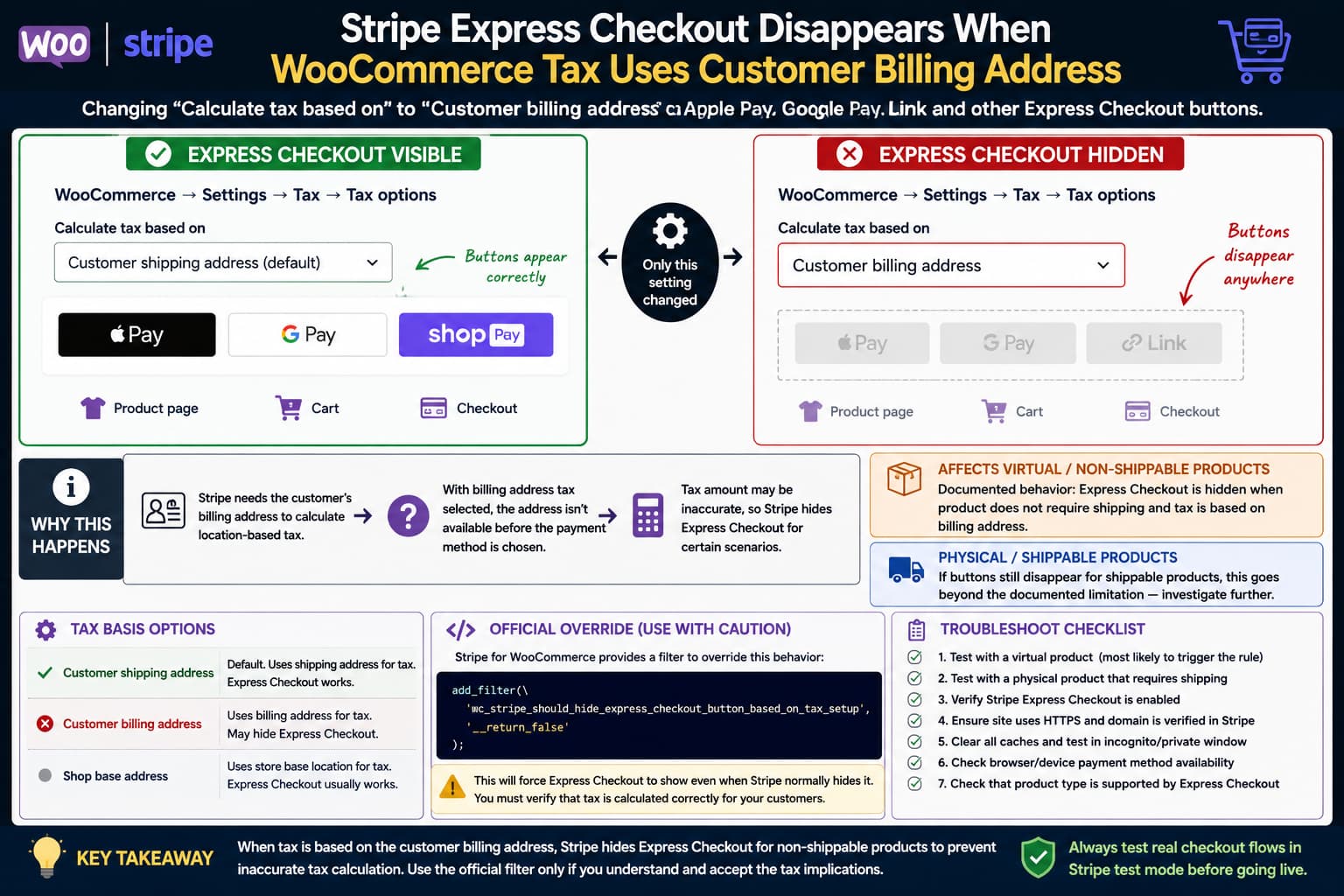
If Apple Pay, Google Pay, Link, or other Stripe Express Checkout buttons disappear immediately after changing WooCommerce’s Calculate tax based on setting from Customer shipping address to Customer billing address, the Stripe configuration itself may still be working correctly.
Stripe for WooCommerce intentionally hides Express Checkout in one documented situation: when the product does not require shipping and taxes are calculated from the customer’s billing address. The reason is that Stripe does not have the customer’s billing address early enough to calculate location-dependent taxes reliably before the shopper selects the express payment method.
That explains the behavior for virtual and other non-shippable products. However, if Express Checkout also disappears for genuinely shippable products, that goes beyond the limitation described in WooCommerce’s documentation and deserves additional investigation.
The Setting That Triggers the Problem
The relevant WooCommerce setting is:
WooCommerce → Settings → Tax → Tax options → Calculate tax based on
WooCommerce provides three choices:
- Customer shipping address
- Customer billing address
- Shop base address
The default is the customer’s shipping address. WooCommerce uses whichever address is selected here to determine the taxable location.
A useful diagnostic sequence is therefore:
Calculate tax based on:
Customer shipping address
        ↓
Express Checkout visible

Calculate tax based on:
Customer billing address
        ↓
Express Checkout disappears
If changing only that setting reliably controls whether the buttons are rendered, do not waste time initially troubleshooting Stripe domain verification, CSS, caching, or button-location settings.
The tax configuration is directly involved.
Why Stripe Hides Express Checkout
Express Checkout is designed to start the payment process before the customer completes the normal WooCommerce checkout form.
That creates a problem for stores where tax depends on the billing address.
Before a customer selects Apple Pay, Google Pay, or another wallet, WooCommerce may not yet know the billing country, state, or postal code required to determine the correct tax.
WooCommerce’s Stripe documentation specifically states that Express Checkout is hidden by default when both of these conditions apply:
Product does not require shipping
+
Tax is calculated from customer billing address
The stated reason is to prevent inaccurate tax calculations.
This is therefore not automatically evidence that Stripe initialization failed.
For a virtual product, it can be deliberate behavior.
Why Shipping Settings May Not Change the Result
Changing:
WooCommerce → Settings → General → Shipping location(s)
is not the same thing as changing whether an individual product requires shipping.
For example, a product marked Virtual remains a non-shippable product from WooCommerce’s perspective.
So testing:
Shipping enabled
Shipping disabled
Shipping calculations changed
may produce no difference if the actual product still does not require shipping.
When troubleshooting this problem, inspect the product itself.
Go to:
Products → Edit Product
and check whether Virtual is enabled.
A good test is to compare:
Physical product requiring shippingagainst:
Virtual productwhile leaving all other Stripe and WooCommerce settings unchanged.
Price-Inclusive vs. Price-Exclusive Tax Is Not the Main Trigger
Another useful finding is that changing whether catalog prices are entered including or excluding tax does not necessarily restore the Express Checkout button.
The key setting in the documented Stripe restriction is the address used to calculate tax, not simply whether the product price was entered tax-inclusive or tax-exclusive.
WooCommerce treats these as separate settings:
Prices entered with taxand:
Calculate tax based onSo repeatedly switching between inclusive and exclusive pricing is unlikely to solve this specific visibility condition.
Having No Tax Rates Does Not Necessarily Avoid the Check
A store can have taxes enabled and select:
Calculate tax based on:
Customer billing address
without currently having a meaningful matching tax table.
The Stripe integration’s safety behavior is based on the tax configuration and its ability to determine the appropriate taxable location before Express Checkout begins.
That means testing with an empty or simplified tax table does not necessarily prove that billing-address-based Express Checkout is safe.
The important question is whether the payment flow can determine the final taxable amount accurately before the customer’s billing location is known.
Confirm That This Is the Tax-Safety Condition
Before changing code, perform a controlled test.
Use the same:
- product;
- browser;
- device;
- Stripe account;
- express-payment configuration;
- theme;
- plugins.
Then change only:
WooCommerce → Settings → Tax → Calculate tax based on
Test A
Set:
Customer shipping addressReload the product, cart, and checkout pages.
Record where Express Checkout appears.
Test B
Set:
Customer billing addressReload the same pages.
If the buttons disappear immediately, you have isolated the tax-basis setting as the trigger.
Next, determine whether the test product requires shipping.
That distinction decides whether you are seeing documented behavior or something broader.
If the Product Is Virtual or Non-Shippable
For a non-shippable product, the behavior is documented by WooCommerce.
Stripe for WooCommerce deliberately hides Express Checkout when billing-address-based taxes are selected because the customer’s billing address is not available before the express method is selected.
This commonly affects:
- digital downloads;
- online courses;
- software licenses;
- memberships;
- other products marked Virtual.
In this situation, reinstalling WooCommerce, Stripe, or WordPress is unlikely to change the underlying result.
If the Product Is Shippable
The situation is different if the product genuinely requires shipping.
WooCommerce’s current Stripe documentation describes this tax-related hiding behavior specifically for products that do not require shipping.
Therefore, if a normal physical product produces:
Product requires shipping: YES
Tax based on billing address: YES
Express Checkout: completely hidden
do not assume the documented virtual-product restriction fully explains it.
Test with:
- a simple physical product;
- no special product add-ons;
- a default WooCommerce-compatible theme;
- only WooCommerce and WooCommerce Stripe active where practical;
- the latest supported Stripe version.
If the problem remains, report it as a separate Stripe compatibility issue and include the System Status Report and exact reproduction steps.
Current Stripe Version
At the time of writing, WordPress.org lists WooCommerce Stripe Payment Gateway 10.9.0 as the current release.
Because payment plugins receive security and compatibility fixes regularly, do not downgrade Stripe casually while troubleshooting this display condition.
WooCommerce published security updates for the Stripe extension during August 2026 and explicitly recommends keeping affected installations on patched supported builds.
Test fixes on staging rather than reverting a production payment gateway to an old version.
WooCommerce Provides an Official Override
Stripe for WooCommerce added a filter in version 9.5.0 that allows developers to bypass this tax-based visibility restriction.
WooCommerce documents this filter:
add_filter(
    'wc_stripe_should_hide_express_checkout_button_based_on_tax_setup',
    '__return_false'
);
This forces Stripe not to hide the Express Checkout buttons solely because of the billing-address tax configuration.
Where to Add the Override
Prefer an update-safe location such as:
- a small custom plugin;
- an MU plugin;
- Code Snippets;
- the
functions.phpfile of a child theme.
Do not edit:
wp-content/plugins/woocommerce-gateway-stripe/directly.
A Stripe update will overwrite those changes.
For Code Snippets, create a new PHP snippet containing:
add_filter(
    'wc_stripe_should_hide_express_checkout_button_based_on_tax_setup',
    '__return_false'
);
Activate it and clear any relevant page cache.
Then check the product, cart, and checkout pages again.
The Override Has a Real Tax Risk
Do not treat this filter as a harmless visual fix.
WooCommerce explicitly warns that enabling Express Checkout for non-shippable products under billing-address-based tax calculation can result in inaccurate tax calculation.
The reason is fundamental to the payment flow:
Need billing address to calculate tax
        ↓
Billing address not yet available
        ↓
Express Checkout needs a total
        ↓
Possible incorrect pre-payment tax
So forcing the buttons to display may solve:
Apple Pay / Google Pay not visiblewhile creating a more serious problem:
Customer charged incorrect taxUse the override only after confirming that the resulting tax behavior is correct for your store.
Do Not Change Your Tax Basis Just to Restore Apple Pay
Switching from:
Customer billing addressto:
Customer shipping addressmay make Express Checkout reappear.
But that does not mean it is the correct permanent solution.
WooCommerce describes the setting as determining which customer location is used to calculate tax, and the correct choice depends on the store’s tax requirements.
For example, billing-address taxation may be intentional for certain digital-product or jurisdictional setups.
Do not change tax rules solely for payment-button visibility without confirming that the resulting tax calculation remains legally and commercially correct.
Tax obligations depend on jurisdiction, so consult an appropriate accountant or tax professional when necessary.
Check Whether Stripe Is Actually Rendering the Block
On a Block Checkout page, WooCommerce includes an Express Checkout block.
That block displays content only when a compatible payment gateway exposes an available express checkout method.
If the Stripe integration decides Express Checkout is unavailable because of its tax-safety check, the block can remain structurally present while displaying nothing.
That explains why editing the Checkout page and seeing the Express Checkout block does not guarantee customers will see Apple Pay or Google Pay.
The front-end result depends on gateway availability.
A Better Troubleshooting Matrix
Use four controlled scenarios.
Scenario 1
Physical product
Tax based on shipping address
Expected: Express Checkout should be evaluated normally.
Scenario 2
Physical product
Tax based on billing address
If the buttons disappear here, investigate further because the documented restriction specifically targets non-shippable products.
Scenario 3
Virtual product
Tax based on shipping address
Check whether the button appears with the normal eligibility requirements satisfied.
Scenario 4
Virtual product
Tax based on billing address
Stripe may intentionally hide Express Checkout.
This matrix is more useful than repeatedly changing unrelated checkout settings.
Other Reasons Express Checkout Can Be Hidden
Do not attribute every missing Apple Pay or Google Pay button to tax configuration.
WooCommerce lists several other cases where Stripe Express Checkout may not appear, including unsupported product configurations, certain pre-orders, composite products, file-upload fields, free products, and some subscription configurations.
Also verify:
- Express Checkout is enabled in Stripe settings.
- The desired product/cart/checkout locations are enabled.
- The site uses HTTPS.
- The browser and device support the requested wallet.
- The customer has an eligible payment method configured.
- The product type itself is supported.
If switching only the tax basis consistently toggles visibility, however, investigate the tax condition before these more generic possibilities.
How to Verify the Override Safely
If you decide the official filter is appropriate, do not stop after seeing the buttons reappear.
Test an actual Stripe test-mode transaction.
Verify:
- The Express Checkout button appears.
- The wallet opens successfully.
- The correct billing country is returned.
- The correct tax rate is ultimately applied.
- The order total in WooCommerce matches the payment total.
- The Stripe transaction amount matches WooCommerce.
- Refund calculations remain correct.
- Test several taxable customer locations if your rates vary geographically.
For digital products, test customers from more than one tax jurisdiction.
If the amount displayed before selecting the wallet differs from the final amount after the billing address becomes available, the override may not be appropriate for the store.
What to Report if Shippable Products Are Also Affected
If billing-address taxation hides Express Checkout even for simple physical products that definitely require shipping, prepare a minimal reproduction.
Include:
WooCommerce version:
Stripe for WooCommerce version:
WordPress version:
PHP version:

Product type:
Simple physical product
Virtual: No
Shipping required: Yes

Taxes enabled: Yes
Calculate tax based on: Customer billing address

Express Checkout locations:
Product: Enabled
Cart: Enabled
Checkout: Enabled
Then document:
Shipping-address taxation → buttons visible
Billing-address taxation → buttons hidden
Also state whether the official override filter restores them.
That isolates the problem far more clearly than a general report that Apple Pay is missing.
The Practical Fix
For virtual or other non-shippable products, Stripe Express Checkout disappearing when WooCommerce calculates taxes from the customer billing address is documented behavior rather than simply a broken checkout block. Stripe hides the buttons because the billing address required for an accurate location-based tax calculation is not available early enough in the express flow.
Stripe for WooCommerce provides an official override:
add_filter(
    'wc_stripe_should_hide_express_checkout_button_based_on_tax_setup',
    '__return_false'
);
but WooCommerce warns that forcing the buttons to display can produce inaccurate taxes for non-shippable products.
If the same disappearance occurs with ordinary shippable products, reproduce it separately before applying the virtual-product explanation. That behavior is broader than the condition currently documented by WooCommerce and should be reported with a minimal physical-product test case.
