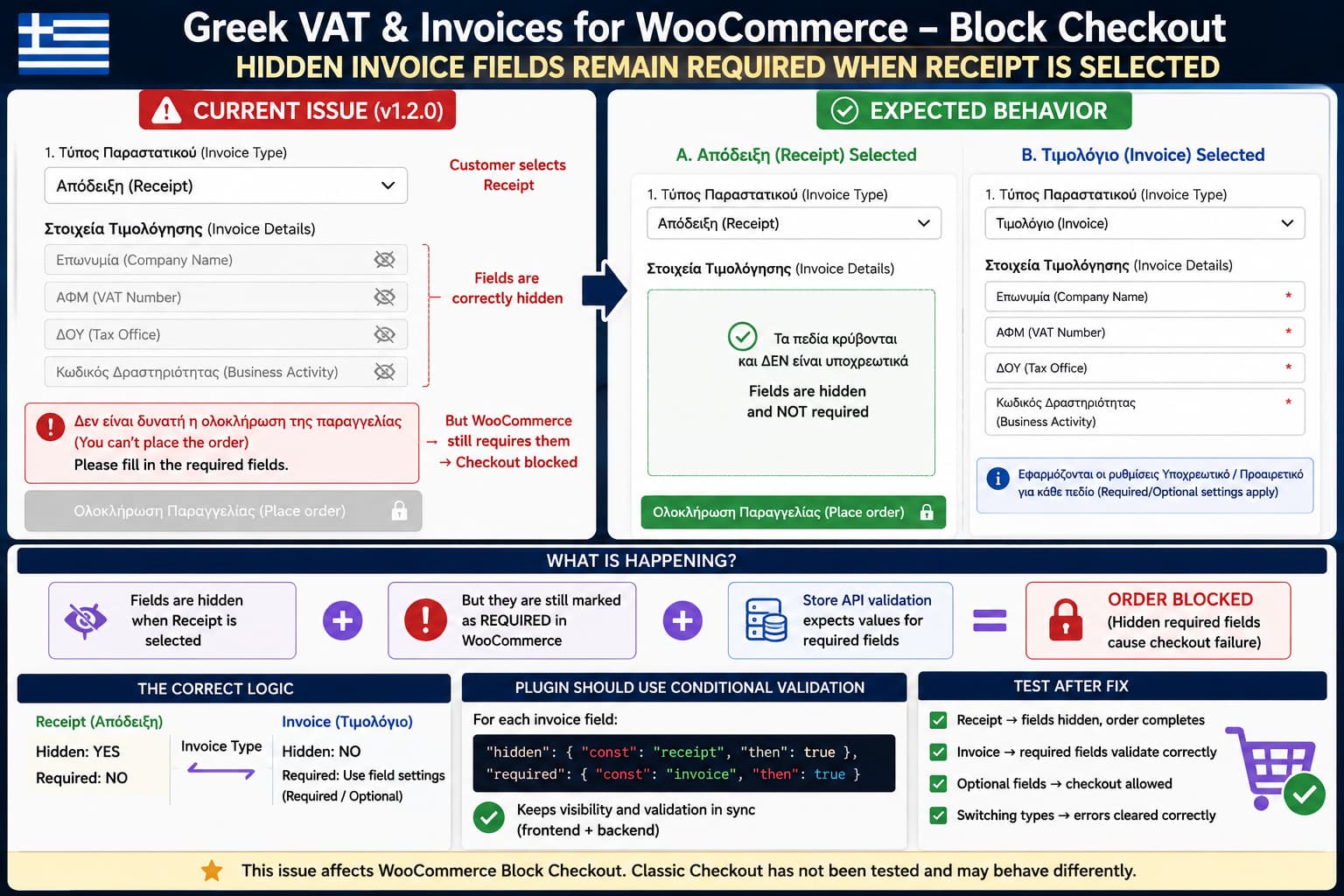
If Greek VAT & Invoices for WooCommerce hides Company Name, VAT Number, Tax Office, and Business Activity when the customer selects Receipt (Απόδειξη) but WooCommerce still refuses to place the order because those fields are empty, the problem is not simply visual.
The fields are being hidden correctly, but their required validation is still active.
That creates an invalid checkout state:
Receipt selected
      ↓
Invoice fields hidden
      ↓
Fields still marked required
      ↓
Checkout blocked
This is particularly important with WooCommerce Block Checkout because field visibility and field validation can be handled independently. Hiding an input with JavaScript or conditional rendering does not automatically make a separately registered required rule disappear.
Greek VAT & Invoices 1.2.0 is the current release, and that version specifically introduced configurable required/optional settings for the four invoice fields.
Why Version 1.2.0 Is Relevant
The plugin added WooCommerce Block Checkout support in version 1.1.0 using WooCommerce’s official Additional Checkout Fields API.
That release included:
- Block Checkout support;
- Invoice/Receipt selection;
- conditional invoice-field visibility;
- server-side invoice validation.
Version 1.2.0 then changed how required fields work by adding separate required/optional settings for:
- Company Name;
- VAT Number;
- Tax Office (ΔΟΥ);
- Business Activity.
The 1.2.0 changelog also says it fixed a Block Checkout problem where several fields appeared as Optional even though the server actually required them.
That change makes the required-state logic especially relevant to this problem.
The public changelog does not identify the exact internal cause of the Receipt issue, so it would be premature to say a specific function or line of plugin code is definitely responsible. However, the observed behavior strongly indicates that the required status and visibility status are no longer being evaluated together.
Hiding a Required Field Does Not Automatically Make It Optional
WooCommerce’s Block Checkout Additional Checkout Fields API treats these as separate properties:
hidden
required
validation
WooCommerce currently allows both hidden and required to use conditional JSON Schema rules.
Those rules are evaluated:
- in the browser as checkout changes;
- on the server when checkout data is processed.
WooCommerce specifically documents this approach for fields that should become visible and required only when another checkout value matches a condition.
That is exactly the model an Invoice/Receipt selector needs.
Conceptually, the behavior should be:
Invoice Type = Receipt
    Hidden: YES
    Required: NO

Invoice Type = Invoice
    Hidden: NO
    Required: use plugin setting
If the plugin instead registers a field approximately as:
Required: YESand then separately hides it when Receipt is selected, WooCommerce can still reject the empty value.
The customer cannot fill the field because it is invisible, but the validation system still expects it.
The Expected Validation Matrix
There are two independent conditions to consider:
- Is the customer requesting a Receipt or Invoice?
- Is that particular invoice field configured as required?
A correct implementation should behave like this:
| Checkout choice | Field setting | Visible? | Required? |
|---|---|---|---|
| Receipt | Required | No | No |
| Receipt | Optional | No | No |
| Invoice | Required | Yes | Yes |
| Invoice | Optional | Yes | No |
This distinction is important.
Selecting Receipt should override invoice-field requirement because those invoice details are not being requested.
Selecting Invoice should restore each individual field’s configured required/optional setting.
Fastest Safe Diagnostic
Do this on a staging site rather than changing production checkout requirements.
Go to:
WooCommerce → Settings → Ελληνικά Τιμολόγια
Temporarily configure the affected invoice fields as optional.
Then place a test order with:
Invoice Type: ReceiptIf the checkout immediately succeeds once the fields are optional, that strongly confirms that the failure is coming from their required-state validation rather than:
- the payment gateway;
- shipping;
- the theme;
- another required billing field;
- the visibility JavaScript itself.
Do not leave legally or operationally required invoice fields optional on a production store merely to work around this issue.
This test is for diagnosis.
Check the Actual Checkout Validation Error
Block Checkout processes checkout through WooCommerce’s Store API.
Open the checkout page and then open your browser’s Developer Tools.
Go to:
Network
Try placing an order after selecting Receipt.
Look for the checkout request, normally involving:
/wc/store/v1/checkoutWooCommerce documents POST /wc/store/v1/checkout as the endpoint that processes the final checkout and payment request.
Inspect its response.
If you see validation errors identifying one or more hidden invoice fields as required, you have direct evidence that the failure is occurring in Block Checkout validation rather than simply in the visible form.
This is much more useful than trying random CSS or JavaScript changes.
Check Whether the Problem Affects All Four Fields
Version 1.2.0 allows the following fields to be configured independently:
Company Name
VAT Number
Tax Office
Business Activity
Test each required setting separately on staging.
For example:
Company Name: Required
VAT Number: Optional
Tax Office: Optional
Business Activity: Optional
Select Receipt and try checkout.
Then move the Required setting to the next field.
This can reveal whether:
- every required invoice field is affected;
- only one field has incorrect validation;
- VAT Number has separate validation behavior.
That distinction is useful because VAT Number also has its own numeric and nine-digit validation rules.
The Correct Plugin-Side Fix
For current WooCommerce Block Checkout, the clean solution is not simply to hide the fields using front-end JavaScript.
The plugin should make the required condition depend on Invoice being selected.
WooCommerce provides conditional logic directly in the Additional Checkout Fields API.
Since WooCommerce 9.9.0, required and hidden can both be conditional JSON Schema definitions. WooCommerce evaluates those conditions on both the frontend and backend.
For each invoice field, the logic should effectively be:
hidden:
    invoice_type != invoice

required:
    invoice_type == invoice
    AND
    this field is configured as required
An optional invoice field should instead use:
hidden:
    invoice_type != invoice

required:
    false
This keeps WooCommerce’s visual state and server validation synchronized.
Why the Field Location Matters
Greek VAT & Invoices allows Block Checkout fields to be positioned in either:
- Contact Information;
- Order information.
That matters when building WooCommerce conditional rules.
WooCommerce stores additional field values under different parts of its checkout document depending on their registered location.
For fields registered at:
contactWooCommerce documents the source path as:
customer.additional_fieldsFor fields registered at:
orderthe corresponding values live under:
checkout.additional_fieldsThis means the plugin cannot blindly use the same conditional schema path if its Invoice/Receipt selector can exist in different locations.
WooCommerce explicitly warns that referencing the wrong subtree can cause a conditional rule to silently have no effect.
That is an important point for the plugin developer to verify.
If the field visually disappears because custom JavaScript sees the Receipt selection, but WooCommerce’s registered required condition points to the wrong checkout-data path, the frontend can look correct while server validation remains wrong.
Why JavaScript Alone Is Not the Permanent Fix
It may be tempting to write JavaScript that finds the hidden fields and removes:
requiredfrom their HTML inputs.
That is not sufficient for Block Checkout.
WooCommerce does not rely only on the browser’s HTML required attribute.
Additional checkout fields can also be validated by WooCommerce itself and by the Store API on the server. WooCommerce’s CheckoutFields implementation includes required-field validation for registered additional fields.
So this approach:
Hide input
Remove HTML required attribute
may make the browser look correct while the Store API still rejects checkout.
The requirement needs to be conditional in the WooCommerce field registration or its corresponding server-side validation logic.
Do Not Fix This With CSS
CSS such as:
.invoice-fields {
    display: none;
}
only changes presentation.
It does not change:
- required-field registration;
- Store API validation;
- PHP validation callbacks;
- checkout state.
The result can still be:
Invisible field
+
Required server validation
=
Impossible checkout
CSS is therefore not a valid fix for this problem.
Test Whether Classic Checkout Is Affected
The reported behavior has only been confirmed with WooCommerce Block Checkout.
Do not assume Classic Checkout has the same bug.
On a staging site, create or restore a page containing the classic checkout shortcode:
[woocommerce_checkout]Configure the plugin for Classic Checkout according to its settings and repeat the same tests.
Test:
Receipt
Invoice
If Receipt works correctly in Classic Checkout but fails in Block Checkout, that isolates the problem to the plugin’s Block Checkout implementation.
Classic Checkout could then be considered a temporary compatibility workaround if switching checkout implementations is acceptable for the store.
Do not change a production checkout page without thoroughly testing:
- payment gateways;
- shipping;
- coupons;
- taxes;
- custom checkout fields;
- analytics;
- conversion tracking.
A Version Rollback Can Also Help Confirm the Regression
Because version 1.2.0 specifically changed required/optional behavior, a controlled comparison with 1.1.0 can provide useful diagnostic information.
Do this only on staging or after creating a full backup.
Compare:
Version 1.1.0
Receipt checkout

Version 1.2.0
Receipt checkout
using otherwise identical settings.
If 1.1.0 allows Receipt orders but 1.2.0 blocks them, that would provide stronger evidence that the regression was introduced by the new per-field required logic.
However, do not automatically downgrade a production store.
Version 1.2.0 also fixed other required-field inconsistencies in Block Checkout, so returning to 1.1.0 may reintroduce those problems.
A rollback is therefore primarily a diagnostic test unless the older version is fully validated on staging.
WooCommerce Version Also Matters
WooCommerce’s native conditional visibility and conditional required rules for additional checkout fields require WooCommerce 9.9.0 or later.
Check:
WooCommerce → Status
and confirm the installed WooCommerce version.
If the store is running an older WooCommerce version, the plugin cannot rely on the newer conditional Additional Checkout Fields behavior in the same way.
In that case, the plugin would need to implement equivalent conditional validation itself.
For an up-to-date store using WooCommerce 9.9 or newer, the native conditional API is the preferred implementation.
How to Verify the Permanent Fix
After the plugin is updated or patched, perform a complete test matrix.
Test 1: Receipt
Select:
ΑπόδειξηVerify that:
- Company Name disappears;
- VAT Number disappears;
- Tax Office disappears;
- Business Activity disappears;
- no hidden-field validation errors occur;
- checkout completes successfully.
Test 2: Invoice With Required Fields Empty
Select:
ΤιμολόγιοIf all four fields are configured as required, leave them empty.
Checkout should be blocked.
The customer should receive useful validation messages for the visible fields.
Test 3: Invoice With Valid Fields
Fill every required field.
Checkout should succeed.
Test 4: Optional Field
Configure one invoice field as optional.
Select Invoice.
The field should remain visible but checkout should succeed without filling that particular field.
Test 5: Switch Between Invoice and Receipt
Start with Invoice.
Leave the required fields empty.
Then change to Receipt.
The validation errors associated with the now-hidden invoice fields should disappear and checkout should become possible.
This test is especially important because stale validation state can remain in Block Checkout even after a field changes visibility.
Check the WooCommerce Validation Store if Errors Persist
WooCommerce Blocks maintains a client-side validation data store.
WooCommerce’s documentation states that entries in the validation store can prevent checkout from proceeding even when the corresponding error is marked hidden.
Therefore, if the developer fixes server-side required conditions but customers remain blocked after switching from Invoice to Receipt, the plugin should also verify that old validation errors are being cleared correctly when those fields become irrelevant.
A proper fix must keep three states synchronized:
Field visibility
      +
Field required status
      +
Existing validation errors
Changing only one of them can leave the checkout unusable.
What the Plugin Developer Should Review
For version 1.2.0, the most useful code review areas are:
Block field registration
Invoice/Receipt conditional visibility
Per-field required settings
Store API/server validation
Client-side validation state
Contact vs Order field location
The intended behavior should be explicit:
Receipt
→ hide invoice fields
→ mark them non-required
→ clear their validation errors

Invoice
→ show invoice fields
→ apply each saved required/optional setting
→ validate required fields normally
That behavior matches WooCommerce’s current conditional-field architecture and avoids maintaining separate visual and server validation states.
Current Status
As of August 30, 2026, WordPress.org lists Greek VAT & Invoices for WooCommerce 1.2.0 as the current release. Its changelog documents the new per-field required settings but does not yet list a later release fixing hidden fields remaining required for Receipt.
Until a patched release is available, the safest approach is to:
- reproduce the issue on staging;
- verify the hidden field names in the Store API validation response;
- test the required/optional settings;
- compare Classic Checkout if practical;
- report the Block Checkout validation details to the plugin developer.
Do not permanently make legally required invoice information optional merely to allow Receipt orders through.
The permanent solution is for invoice fields to use conditional required validation, so their required state exists only when the customer selects Invoice.
