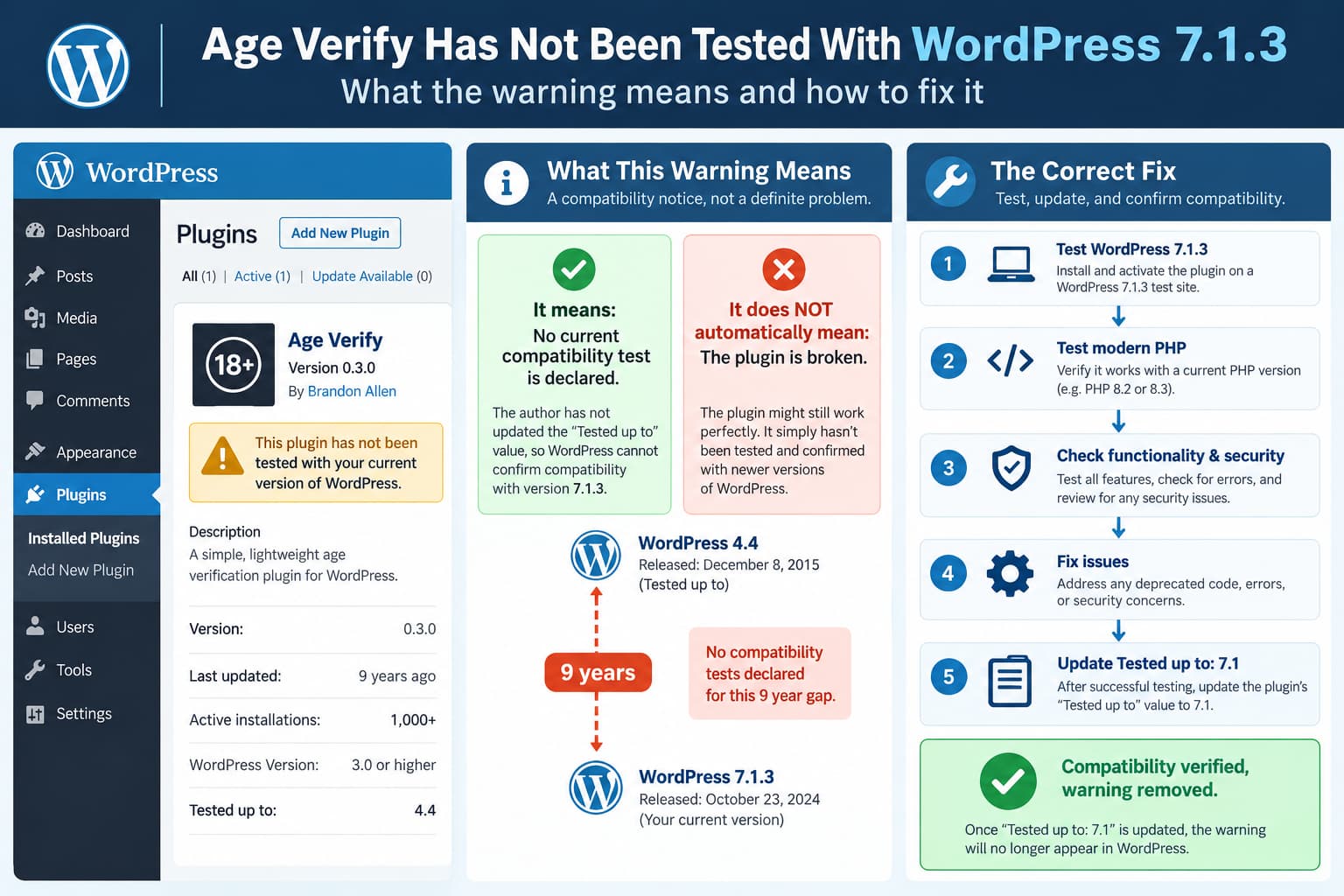
When running Age Verify on WordPress 7.1.3, WordPress currently displays a warning similar to:
Warning: This plugin has not been tested with your current version of WordPress.
The warning is expected with the current Age Verify release.
As of October 14, 2026, WordPress.org lists:
Age Verify
Version: 0.3.0
Last updated: 9 years ago
Active installations: 1,000+
Tested up to: WordPress 4.4.34
WordPress.org also displays:
This plugin hasn’t been tested with the latest 3 major releases of WordPress. It may no longer be maintained or supported and may have compatibility issues when used with more recent versions of WordPress.
WordPress 7.1.3 was released on October 6, 2026, so there is now a very large gap between the version Age Verify officially declares as tested and the current WordPress release.
Does the Warning Mean Age Verify Is Broken?
No.
The warning means:
The plugin developer has not declared
that this plugin was tested against
your current WordPress release.
It does not mean WordPress ran a compatibility test and detected an error.
WordPress derives this information primarily from the plugin’s:
Tested up to:metadata.
The WordPress Plugin Handbook explains that this value should represent the most recent WordPress release against which the plugin has actually been tested.
So these are very different statements:
Not tested with WordPress 7.1and:
Known to be incompatible with WordPress 7.1Age Verify currently falls into the first category.
Why Does Age Verify Still Say WordPress 4.4?
The current public source contains this in readme.txt:
Requires at least: 3.2
Tested up to: 4.4.1
Stable tag: 0.3.0
The plugin source has not been pushed to its original GitHub repository since August 2017.
WordPress.org currently displays the compatible branch as:
Tested up to: 4.4.34because WordPress.org treats Tested up to primarily at the major/minor branch level and can display the current maintenance release in that branch.
The important value here is effectively:
4.4not whether the original file said 4.4.1 or the directory currently displays 4.4.34.
Either way, it is far behind WordPress 7.1.
Why WordPress Shows the Warning
WordPress.org automatically displays its out-of-date compatibility notice when a plugin has not declared support for the recent major WordPress releases.
The Plugin Handbook explains:
Plugins that do not support the last 3 major releases of WordPress have the following notice.
It also notes that developers can avoid this notice by properly testing against new WordPress releases and updating the Tested up to value.
Age Verify’s current situation is extreme:
Declared tested version:
WordPress 4.4

Current version:
WordPress 7.1.3
So WordPress is behaving correctly by warning users.
Would Changing “Tested up to” Fix the Warning?
Technically, yes.
If a maintainer verifies Age Verify against WordPress 7.1 and updates:
Tested up to: 4.4.1to:
Tested up to: 7.1the compatibility notice should disappear once WordPress.org processes the updated metadata.
The WordPress Plugin Handbook specifically says that plugin developers don’t necessarily need to publish a new functional plugin version merely to update compatibility metadata.
They can update the readme.txt after testing.
However, Age Verify should not simply change that number without actually being tested.
WordPress explicitly defines Tested up to as the latest version against which the plugin was genuinely tested.
Changing:
4.4to:
7.1without performing compatibility testing would remove the warning without establishing compatibility.
That would give users false confidence.
Does It Need to Say 7.1.3?
No.
WordPress’s Plugin Handbook explains that the Tested up to field ignores maintenance/minor releases for this purpose.
For example, a plugin can declare:
Tested up to: 7.1rather than:
Tested up to: 7.1.3WordPress.org can associate that declaration with the current 7.1 maintenance release.
So the correct update after testing would generally be:
Tested up to: 7.1not necessarily:
Tested up to: 7.1.3What Should Be Tested Before Updating the Compatibility Flag?
Age Verify has not received a release since version 0.3.0.
Because the code is nearly a decade old, a responsible compatibility test should cover more than simply activating the plugin.
At minimum, test the following.
Plugin Activation
Activate Age Verify on:
WordPress 7.1.3using supported modern PHP versions.
Check for:
- PHP fatal errors;
- warnings;
- notices;
- deprecation messages;
- WordPress
_doing_it_wrong()warnings.
Settings Page
Open:
Settings → Age Verify
Verify that existing controls still work, including:
- minimum age;
- age verification method;
- cookie duration;
- styling;
- site-wide versus individual content restrictions;
- membership verification settings.
Save each setting and reload the page.
Frontend Age Gate
Test all available verification modes.
Date dropdowns
Enter:
- valid adult date;
- valid underage date;
- invalid date.
Date text fields
Repeat the same tests.
Confirmation checkbox
Verify that both checked and unchecked submissions behave correctly.
Remember Me Cookie
Age Verify supports a:
Remember meoption.
Test that:
- the age gate appears;
- the visitor verifies successfully;
- the cookie is created;
- the gate stays hidden for the configured period;
- deleting the cookie causes the gate to return.
Logged-In Users
If the configuration exempts authenticated users, test:
Logged-out visitor
Logged-in subscriber
Logged-in administrator
and confirm the expected behavior.
Content-Specific Restrictions
Age Verify can restrict either:
Entire siteor:
Selected contentTest both modes.
For content-specific mode, verify:
- restricted posts;
- unrestricted posts;
- pages;
- archives;
- search results;
- homepage behavior.
User Registration
The plugin can add an age-confirmation checkbox to the WordPress registration form.
Test:
- registration without checking the box;
- registration with the box checked;
- validation errors;
- successful user creation.
Caching
Caching deserves special attention.
Existing Age Verify reviews specifically report problems involving PHP-based age verification and full-page caching.
WordPress.org reviews mention issues involving caching setups such as W3 Total Cache and WP Engine.
A modern compatibility test should therefore include at least one cached environment.
For example:
No cache
LiteSpeed Cache
Cloudflare
Managed hosting cache
The plugin loading successfully is not enough if cached pages bypass or repeatedly display the age gate.
PHP Compatibility
The original plugin was written when PHP 5.x was common.
Its changelog even contains an old entry:
Fixed support for PHP 5.2 and greaterModern testing should focus on currently supported PHP releases rather than preserving PHP 5.2 compatibility.
A maintenance release should check for:
- deprecated language behavior;
- unsafe assumptions about request variables;
- current WordPress coding practices;
- compatibility with modern cookie handling;
- PHP 8.x warnings and type errors.
Security Review
Because Age Verify processes public form submissions and sets cookies, compatibility testing should include a security review.
Its historical changelog shows that security fixes have been required before.
For example, version 0.2.9 fixed:
add/remove_query_arg XSS vulnerabilityand version 0.2 introduced nonce-related security improvements.
That does not prove the current release has an exploitable vulnerability.
It simply means that a nine-year-old plugin should receive a modern security audit before a maintainer declares it fully supported again.
Existing Settings Must Be Preserved
Any compatibility update should be tested as an upgrade, not only as a clean installation.
A staging test should start with Age Verify 0.3.0 configured with real settings.
Then install the maintenance build.
Verify that settings such as:
minimum age
cookie duration
verification mode
colors
restricted content
membership behavior
remain unchanged.
Existing users should not lose their configuration just because the plugin is being modernized.
Updating the Readme Is the Last Step, Not the First
A responsible workflow would be:
1. Clone current Age Verify 0.3.0
        ↓
2. Install WordPress 7.1.3
        ↓
3. Test supported PHP versions
        ↓
4. Run functional tests
        ↓
5. Run security/code review
        ↓
6. Fix compatibility problems
        ↓
7. Retest upgrade from 0.3.0
        ↓
8. Update Tested up to: 7.1
Only after those tests pass should the WordPress.org compatibility metadata be updated.
Can the Warning Be Removed Without Publishing Version 0.3.1?
Yes.
WordPress’s documentation says the developer can update:
Tested up to:in the plugin’s WordPress.org readme without necessarily releasing new plugin code.
For example, if unmodified Age Verify 0.3.0 passes every required test, the maintainer could update the compatibility metadata.
But because this particular plugin has gone nine years without maintenance, a small maintenance release would probably be more useful.
For example:
Age Verify 0.3.1

- Tested with WordPress 7.1
- Modern PHP compatibility fixes
- Security hardening
- Documentation updates
The exact version and changes would be up to the maintainer.
What About the New Maintenance Offer?
A prospective developer has recently offered to resume maintenance of Age Verify.
If the original developer grants WordPress.org committer access or transfers the plugin, testing against current WordPress should be one of the first tasks.
That would allow the compatibility notice to be removed after actual verification, rather than simply changing the readme number.
Until that happens, users should assume the current WordPress.org warning accurately reflects the plugin’s maintenance status.
Should You Keep Using Age Verify on WordPress 7.1.3?
The compatibility warning by itself does not tell us that the plugin is broken.
But it does tell us something important:
there has been no official current compatibility declaration from the plugin maintainer.
For a low-risk test site, you can evaluate it on staging.
For a production site, especially one where age gating is important to the business, do not rely only on the absence of obvious frontend errors.
Test:
- verification behavior;
- caching;
- cookies;
- mobile browsers;
- logged-in/logged-out behavior;
- PHP logs;
- current WordPress;
- your actual hosting environment.
If the age gate has legal or regulatory importance, remember that a simple self-declared age gate should not automatically be assumed to satisfy every jurisdiction’s age-verification requirements.
Final Answer
The warning appears because Age Verify has not had its compatibility metadata updated since the WordPress 4.4 era.
WordPress.org currently lists:
Age Verify 0.3.0
Last updated: 9 years ago
Tested up to: WordPress 4.4.34
while the current WordPress release is:
WordPress 7.1.3
Released October 6, 2026
There is currently no published date from the original maintainer for when WordPress 7.1 compatibility testing will be completed.
The warning can ultimately be removed by changing:
Tested up to: 4.4to:
Tested up to: 7.1but that should happen only after the plugin has actually been tested against current WordPress and modern PHP.
WordPress itself explicitly says the field should contain the most recent version the developer has genuinely tested.
For a plugin that has not been updated in nine years, proper compatibility and security testing is more important than simply suppressing the warning.
