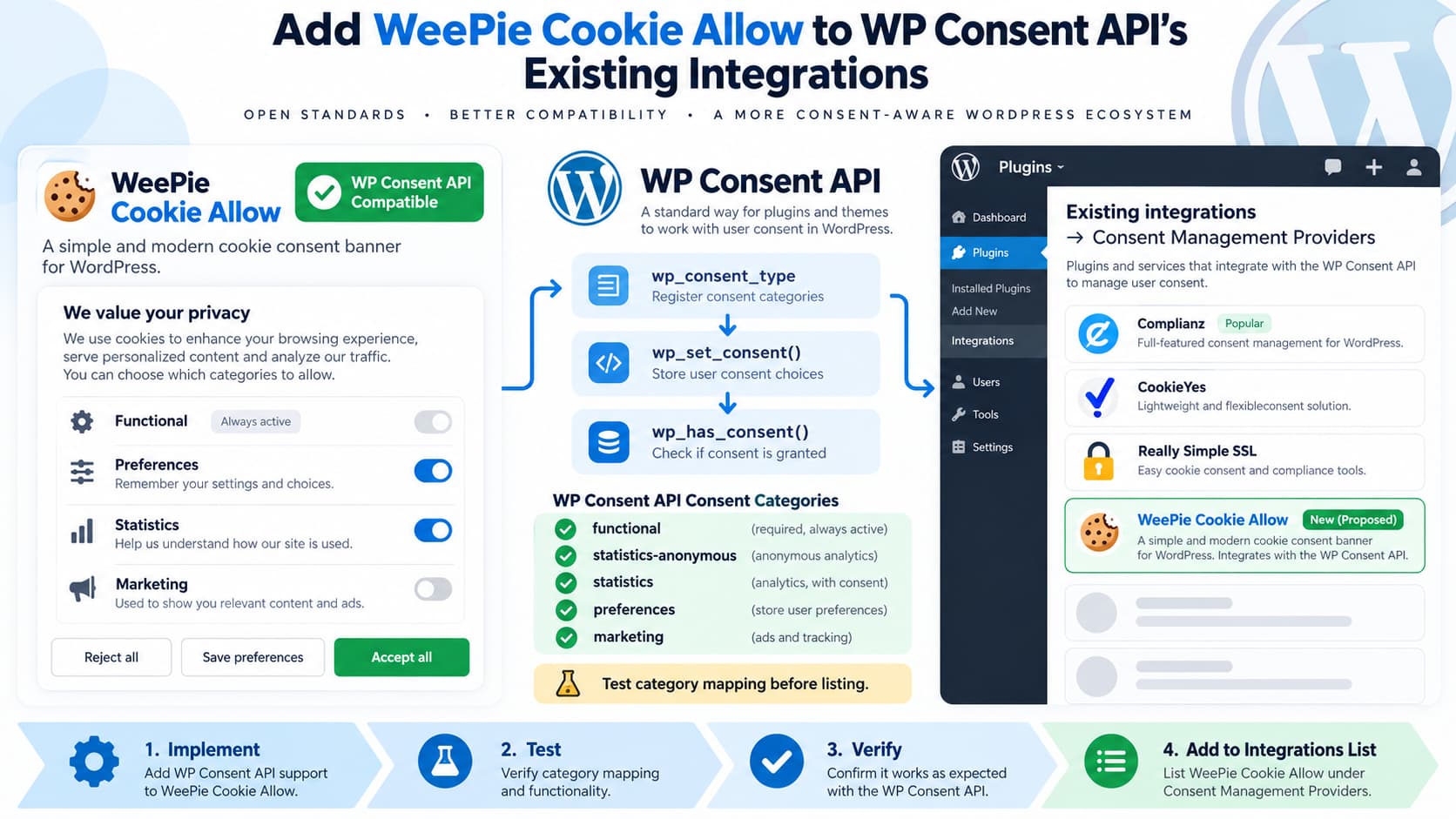
The developers of WeePie Cookie Allow report that they have implemented compatibility with the WP Consent API and would like their plugin added to:
Existing integrations → Consent Management Providers
That is the correct section for a cookie-consent plugin that communicates visitors’ consent choices to the WP Consent API.
At the time of writing, WP Consent API 2.1.0 lists many consent management providers, including Cookiebot, CookieFirst, CookieHub, CookieYes, Complianz, iubenda, TrustArc, and others, but WeePie Cookie Allow is not currently included in the published list.
If WeePie Cookie Allow’s integration has been tested against the API’s expected behavior, adding it to the list is a straightforward documentation change.
What WP Consent API Does
WP Consent API does not itself display a cookie banner.
Its purpose is to provide a standardized communication layer between:
- a consent-management plugin; and
- WordPress plugins that need to know whether they are allowed to store cookies or perform tracking.
The API defines consent categories including:
functional
statistics-anonymous
statistics
preferences
marketing
Plugins can then ask whether consent exists for a category rather than implementing separate integrations for every cookie-banner plugin.
That is why interoperability between cookie-consent plugins such as WeePie Cookie Allow and WP Consent API is useful.
Where WeePie Cookie Allow Should Be Listed
The WP Consent API readme currently contains:
Existing integrations

Consent Management Providers
and states that integrations are categorized and sorted alphabetically.
If compatibility is confirmed, the appropriate new entry would be:
- [WeePie Cookie Allow](https://weepie-plugins.com/).Because the list is alphabetical, it would currently fit after:
TrustArc Cookie Consent ManagerThe WP Consent API list already contains both WordPress.org-hosted plugins and integrations linking to external vendor websites, so using the official WeePie Plugins site would be consistent with the existing format.
Verify the Integration Before Adding It
The fact that a cookie banner can block scripts does not by itself establish WP Consent API compatibility.
A Consent Management Provider should communicate consent state through the API.
WP Consent API’s documented JavaScript example sets the site’s consent model:
window.wp_consent_type = 'optin';If the consent type is determined dynamically, the documentation also dispatches:
const event = new CustomEvent(
    'wp_consent_type_defined'
);

document.dispatchEvent(event);
The CMP then reports individual choices using calls such as:
wp_set_consent(
    'marketing',
    'allow'
);
Therefore, before adding any CMP to the integrations list, it is worth confirming that its implementation performs the equivalent operations correctly.
Test the Initial Consent Type
Install:
- WP Consent API
- WeePie Cookie Allow
on a staging WordPress site.
Open the frontend in a fresh private browser session before making a consent choice.
In the browser console, inspect:
window.wp_consent_typeFor a normal opt-in jurisdiction/configuration, an integration may expose:
optinThe exact value can depend on the CMP’s regional policy.
WP Consent API explains that the consent type is one of the inputs used when determining whether a particular category has consent.
Test Accepting Consent
Accept the relevant categories in WeePie Cookie Allow.
Then test the WP Consent API directly in the browser console.
For example:
wp_has_consent('marketing')If marketing consent was accepted, this should return:
trueLikewise:
wp_has_consent('statistics')should reflect the visitor’s statistics choice.
WP Consent API documents wp_has_consent() as the normal way for dependent plugins to determine whether the applicable consent level has been granted.
Test Rejecting Consent
Start another clean browser session.
Reject optional cookies.
Then test:
wp_has_consent('marketing')For an opt-in setup where marketing was rejected, it should return:
falseTest the other categories as well.
The integration should not map every user choice to allow.
Test Changing Preferences
A complete CMP integration should also handle changes after the initial choice.
For example:
- Accept statistics.
- Reject marketing.
- Save.
- Reopen cookie preferences.
- Enable marketing.
- Save again.
Then confirm:
wp_has_consent('marketing')changes appropriately.
WP Consent API provides browser-side consent-change events specifically so other plugins can react when the visitor changes a category.
A robust integration should therefore work without requiring dependent plugins to invent special WeePie-specific handling.
Check All Five Consent Categories
One common integration mistake is testing only analytics and marketing.
The full API currently recognizes:
functional
statistics-anonymous
statistics
preferences
marketing
WeePie Cookie Allow’s own category model may use different terminology.
That is fine, but the mapping to WP Consent API must be deliberate.
For example, a CMP’s internal:
Analyticscategory should not accidentally map to:
marketingThe safest implementation maintains one explicit mapping between WeePie categories and the WP Consent API categories.
Confirm That the Plugin Declares API Compatibility
WP Consent API also documents a PHP integration declaration:
$plugin = plugin_basename(__FILE__);

add_filter(
    "wp_consent_api_registered_{$plugin}",
    '__return_true'
);
This is how a plugin can declare that it supports the API.
For a production plugin, the actual basename must correspond to that plugin’s main file.
The developers should confirm that the declaration is present and detected correctly when both plugins are active.
Confirm Compatibility With Dependent Plugins
A particularly valuable integration test is to install a plugin that consumes WP Consent API state.
The current official integration list contains consent-requiring plugins such as:
- Google Site Kit
- Burst Statistics
- WooCommerce
- WP Statistics
- Pixel Manager for WooCommerce
- AddToAny
Choose one appropriate test plugin and verify that its behavior follows consent received through WeePie Cookie Allow.
For example:
Visitor rejects statistics
        ↓
WeePie Cookie Allow
        ↓
WP Consent API = statistics denied
        ↓
Consent-aware analytics plugin does not track
Then test the positive case:
Visitor accepts statistics
        ↓
WeePie Cookie Allow
        ↓
WP Consent API = statistics allowed
        ↓
Consent-aware analytics plugin may activate
That tests actual interoperability rather than only checking that API functions exist.
WeePie Cookie Allow Already Provides Extensive Third-Party Controls
WeePie Cookie Allow’s current documentation shows support for a broad range of third-party services, including Google Analytics, Google Ads, Meta/Facebook services, Microsoft Clarity, Hotjar, Matomo, TikTok, YouTube and many others.
Its April 2026 changelog also shows that the plugin remains under active development, including compatibility fixes and security-related maintenance.
However, support for third-party blocking and support for WP Consent API are separate concepts.
The former controls external services.
The latter lets other WordPress plugins read the visitor’s standardized consent state.
Both can coexist and complement each other.
What Cannot Be Independently Verified From Public Sources
WeePie Cookie Allow is distributed commercially, and its current public website does not expose the complete plugin source code.
The developers’ request states that WP Consent API compatibility has been implemented, but I could not independently inspect the integration code from a public repository.
That does not mean the integration is incorrect.
It simply means the safest maintenance process is:
- obtain the current WeePie Cookie Allow release;
- test the integration;
- verify its API registration and category mapping;
- then add it to the WP Consent API readme.
This avoids treating a documentation request as the compatibility test itself.
How to Add WeePie Cookie Allow to the Official List
The WP Consent API project is maintained publicly on GitHub, and its readme explicitly invites code suggestions through the repository.
The integration-list change itself is minimal.
In:
readme.txtunder:
Consent Management Providersadd:
- [WeePie Cookie Allow](https://weepie-plugins.com/).If the project maintains equivalent integration documentation elsewhere, update that copy as well so the GitHub readme and WordPress.org plugin page do not drift apart.
A pull request or maintainer commit should ideally mention:
Add WeePie Cookie Allow to existing Consent Management Providers.

The WeePie developers confirmed WP Consent API compatibility.
Compatibility was verified against consent type and category updates.
What Evidence to Include With the Request
To make the request easier for maintainers to review, the WeePie team can provide:
- WeePie Cookie Allow version containing the integration
- release/changelog entry
- integration code location
- category-mapping table
- screenshot of WP Consent API recognizing the integration
- test results for Accept All
- test results for Reject All
- test results for granular consent
- confirmation that changing preferences updates consent state
- confirmation that
wp_consent_typeis set appropriately
If possible, include a small code excerpt showing the WP Consent API bridge.
That gives maintainers something concrete to validate.
Suggested Category Mapping Documentation
The WeePie documentation would benefit from a small compatibility section such as:
WP Consent API Compatibility

WeePie Cookie Allow integrates with WP Consent API.

Visitor consent choices are synchronized with the
following WP Consent API categories:

- functional
- preferences
- statistics-anonymous
- statistics
- marketing
If WeePie combines or omits any categories, document that explicitly rather than implying a one-to-one mapping.
Do Not Claim Legal Compliance From the Integration Alone
WP Consent API itself cautions that it is a communication framework.
It does not automatically block all third-party scripts and does not make a site legally compliant merely because it is active.
WeePie Cookie Allow may separately provide blocking and consent-management functionality, but inclusion on the WP Consent API integrations list should mean:
compatible with the APInot:
guarantees GDPR or privacy-law complianceActual compliance depends on site configuration, services used, jurisdiction, consent design, and other factors.
Recommended Resolution
The request is reasonable.
At the time of writing:
- WP Consent API 2.1.0 maintains a public list of Consent Management Providers.
- WeePie Cookie Allow is not currently on that list.
- WeePie Cookie Allow’s developers report that compatibility has now been implemented.
- The WP Consent API documentation explicitly supports external CMP integrations.
- The appropriate list entry would be:
- [WeePie Cookie Allow](https://weepie-plugins.com/).The only step that should come before publishing the listing is verifying that the released WeePie version correctly sets the WP Consent API consent type and synchronizes relevant consent categories.
Once that is confirmed, adding WeePie Cookie Allow under Existing integrations → Consent Management Providers is consistent with the purpose and structure of the current WP Consent API documentation.
