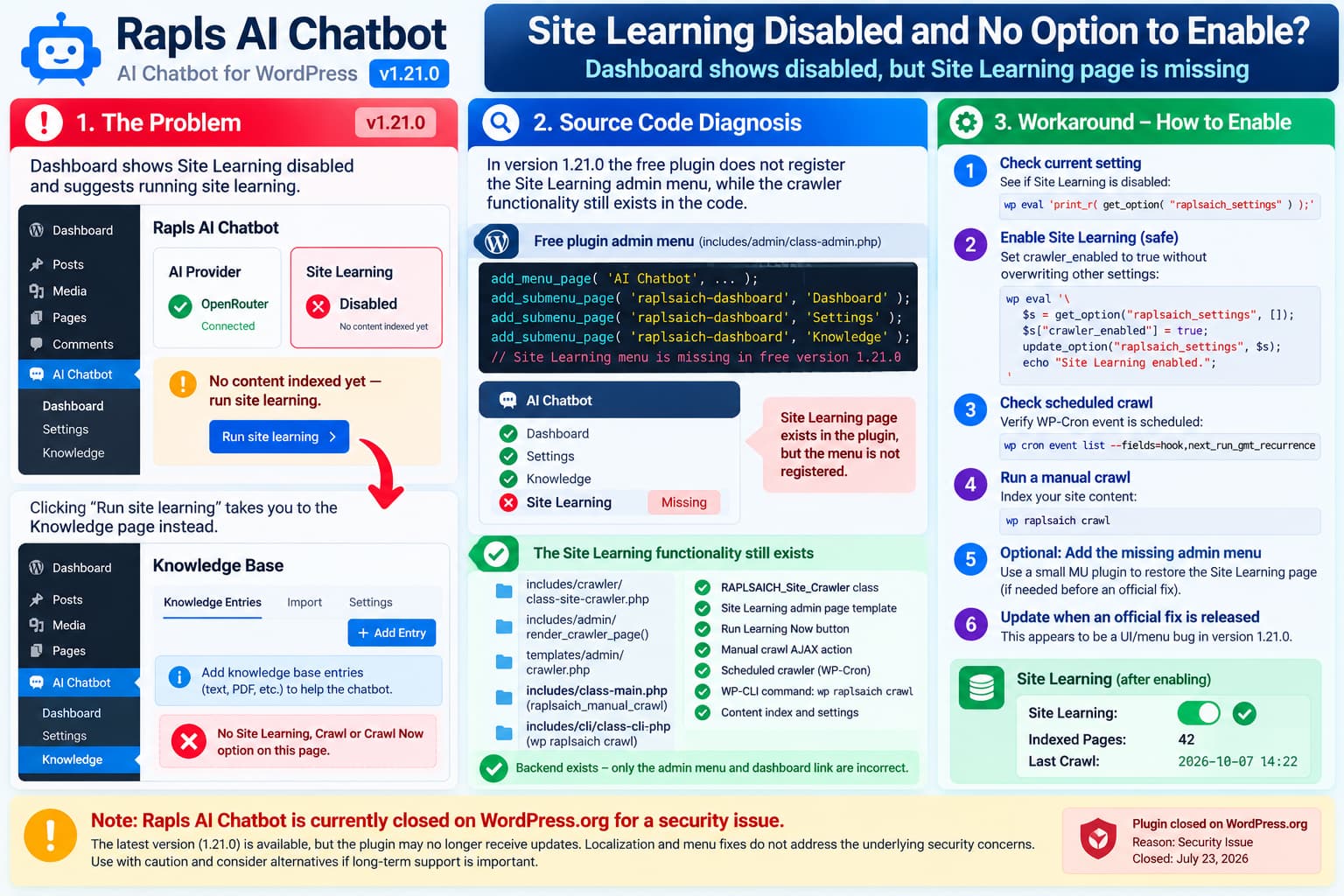
If Rapls AI Chatbot 1.21.0 shows:
Site Learning: Disabledand System Health reports:
No content indexed yet — run site learning.but clicking Run site learning sends you to the Knowledge page where there is no crawler or Site Learning control, you are not overlooking a hidden setting.
A review of the current Rapls AI Chatbot 1.21.0 source shows a real interface inconsistency.
The free plugin still contains:
- the Site Learning crawler;
- the crawler settings;
- the Site Learning admin-page renderer;
- the Site Learning template;
- the manual crawl AJAX action;
- the scheduled crawler;
- the content index;
- and the
wp raplsaich crawlWP-CLI command.
However, its free-version admin menu does not register the Site Learning page.
At the same time, the setup checklist’s Run site learning button points to the ordinary Knowledge page instead of the crawler page.
That combination explains exactly why the dashboard tells you to run Site Learning while providing no usable interface for doing so.
This looks like a 1.21.0 admin/menu regression or Free/Pro UI mismatch, not a problem with OpenRouter, REST API access, or WP-Cron.
Site Learning Is Still Advertised as a Free Feature
The current WordPress.org listing for Rapls AI Chatbot explicitly says:
Free — not a trial. The free version is the full product: chatbot, site learning, knowledge base, RAG hybrid search…
The same listing describes Site Learning as indexing posts and pages so the chatbot can answer from the site’s own content.
Its installation instructions also tell users to:
Enable site learning or create knowledge base entriesand the FAQ states that Site Learning can crawl published posts, pages, custom post types, and WooCommerce products.
So the missing controls should not be interpreted as Site Learning suddenly becoming a Pro-only feature.
The public product description and the free-plugin backend both still treat Site Learning as available.
What Is Wrong in Version 1.21.0?
The important code is in:
includes/admin/class-admin.phpRapls 1.21.0’s add_admin_menu() method registers these free admin screens:
Dashboard
Settings
Knowledge
Pro Features
It does not register:
Site LearningThe same source contains a comment indicating that when Pro is active, the Pro plugin adds menus such as Site Learning and Conversations.
That conflicts with both the current free-plugin feature description and other free-plugin code.
The free code still contains:
public function render_crawler_page()which loads:
templates/admin/crawler.phpThat crawler template includes:
AI Chatbot - Site Learningand the button:
Run Learning NowSo the page itself has not been removed.
The menu entry that makes the page reachable is what is missing.
The “Run Site Learning” Dashboard Link Is Also Wrong
The setup checklist contains a separate issue.
The free plugin builds the Site Learning checklist step using:
Let the AI learn your siteand:
Run site learningbut the URL assigned to that step is:
admin.php?page=raplsaich-knowledgeThat is the Knowledge page.
It is not the Site Learning crawler page.
This explains why clicking the dashboard prompt leads to a page where there is:
- no Site Learning toggle;
- no Crawl button;
- no Crawl Now option;
- and no crawler schedule.
So the redirect itself is behaving as coded. It is simply pointing at the wrong admin page.
The Actual Site Learning Page Still Exists
The current free plugin includes:
templates/admin/crawler.phpThat template contains the controls the administrator would expect to see.
Among them are:
Learning Status
Site Learning
Indexed Pages
Last Crawl
Run Learning Now
The crawler interface also contains configuration for things such as crawl scope and embedding status.
That confirms the functionality was not removed from the package.
The missing UI appears to be primarily an admin-menu registration issue.
The Crawler Backend Is Still Loaded in Free
There is further evidence that this is unintended.
Inside:
includes/class-main.phpRapls registers its crawler hooks with a source comment stating:
Site Learning available in all versionsThe free plugin creates:
RAPLSAICH_Site_Crawlerand registers:
raplsaich_crawl_siteas well as automatic indexing hooks for:
save_post
delete_post
The free plugin also registers AJAX actions including:
raplsaich_manual_crawland contains the actual manual crawl handler.
So there is no technical indication that the crawler itself was intentionally removed from Free.
Why the Dashboard Can Say “Disabled”
Rapls stores the Site Learning status in its main settings option using:
crawler_enabledThe crawler status code effectively treats Site Learning as enabled when:
! empty( $settings['crawler_enabled'] )Rapls 1.21.0 defines the default setting as:
'crawler_enabled' => truefor a new configuration.
However, plugin upgrades preserve existing stored values.
If an older installation already has:
crawler_enabled = falsethat value takes precedence over the newer default.
Because the Site Learning settings screen is currently inaccessible in the free admin UI, an affected site can become stuck in this state:
crawler_enabled = falsewith no normal checkbox available to switch it back on.
That fits the reported symptoms very closely.
OpenRouter Is Not the Cause
If OpenRouter connects successfully, this particular problem occurs before provider communication becomes relevant.
The missing Site Learning menu is built by WordPress admin-menu registration.
It does not depend on:
- OpenRouter authentication;
- model selection;
- embedding requests;
- REST API reachability;
- browser JavaScript;
- or WP-Cron.
A failed provider can make embeddings or AI responses fail later, but it cannot explain why the Site Learning administration page is absent from version 1.21.0’s menu.
WP-Cron Is Also Not the Main Problem
WP-Cron matters for scheduled crawling, but it does not determine whether the Site Learning menu appears.
Rapls schedules:
raplsaich_crawl_siteand the crawler checks crawler_enabled before running.
If Site Learning is disabled in the stored settings, the scheduled job returns without indexing content.
Therefore:
WP-Cron = workingdoes not automatically mean:
Site Learning = enabledThose are separate conditions.
You can inspect WordPress cron events safely with:
wp cron event listWordPress officially documents that command as a read-only way to list scheduled events.
Look for:
raplsaich_crawl_siteDo not repeatedly force crawl events while troubleshooting API-backed indexing, because Site Learning may generate embedding requests depending on the configuration.
Safest Temporary Workaround: Check the Stored Setting
If you have SSH and WP-CLI access, first inspect the current crawler settings without changing anything.
Run:
wp eval '
$settings = get_option( "raplsaich_settings", [] );

echo "crawler_enabled: ";
var_export( $settings["crawler_enabled"] ?? null );
echo PHP_EOL;

echo "crawler_post_types: ";
var_export( $settings["crawler_post_types"] ?? null );
echo PHP_EOL;

echo "crawler_interval: ";
var_export( $settings["crawler_interval"] ?? null );
echo PHP_EOL;
'
This is read-only.
An affected installation may show:
crawler_enabled: falseor:
crawler_enabled: NULLThe latter means the setting does not currently exist.
Enable Site Learning Without Destroying Other Settings
Before changing WordPress options directly, create a database backup.
Do not replace the entire raplsaich_settings option with a new array.
That option contains many unrelated chatbot settings, API configuration values, security settings, display settings, and other configuration.
Instead, modify only:
crawler_enabledUse:
wp eval '
$settings = get_option( "raplsaich_settings", [] );

if ( ! is_array( $settings ) ) {
    $settings = [];
}

$settings["crawler_enabled"] = true;

update_option(
    "raplsaich_settings",
    $settings
);

echo "Site Learning enabled." . PHP_EOL;
'
Then verify:
wp eval '
$settings = get_option( "raplsaich_settings", [] );

var_export(
    $settings["crawler_enabled"] ?? null
);

echo PHP_EOL;
'
Expected output:
trueReload the Rapls dashboard.
The Site Learning status should now report:
Enabledeven though the missing Site Learning menu itself may still be absent.
Check the Scheduled Crawl
Next run:
wp cron event list \
  --fields=hook,next_run_gmt,recurrence
Look for:
raplsaich_crawl_sitewp cron event list can filter or display scheduled event fields without executing them.
If the event is present and crawler_enabled is true, the scheduled crawler can process content when WordPress cron runs.
If the event is absent, deactivating and reactivating Rapls should recreate its scheduled events according to the plugin’s current activation code.
Take a backup first and verify that you are not relying on temporary plugin state before doing that.
Run Site Learning From WP-CLI
Rapls 1.21.0 includes its own command:
wp raplsaich crawlThis is part of the free plugin.
It triggers the same:
raplsaich_crawl_siteaction used by the scheduled crawler.
Because that crawler respects:
crawler_enabledenable Site Learning first if it currently reports disabled.
Then run:
wp raplsaich crawlAfterward:
wp raplsaich statusRapls’ status command reports values including:
version
provider
model
indexed_pages
knowledge_entries
conversations
If indexing succeeds, indexed_pages should increase above zero.
Important Limitation
The normal scheduled crawler is incremental.
A large site may not index every post during one execution.
So do not conclude that the crawler failed merely because the first command indexed fewer pages than the site contains.
Check the content-index count and allow subsequent scheduled runs to continue processing the site.
A Manual Full Crawl Is Also Present in the Code
The crawler class contains a separate method:
crawl_all_manual()Unlike the scheduled incremental crawler, this processes all selected content in one manual run.
The hidden Site Learning page uses that method through its Run Learning Now AJAX action.
Developers who urgently need a one-time full crawl can technically call it through WP-CLI:
wp eval '
$crawler = new RAPLSAICH_Site_Crawler();
$result  = $crawler->crawl_all_manual();

print_r( $result );
'
Use this cautiously.
A large WordPress site can require significant processing time, and if vector embeddings are enabled the crawl may also involve external AI-provider requests.
The Rapls WordPress.org disclosure notes that Site Learning content can be sent to the configured provider when that feature is enabled.
For a large production site, letting the incremental crawler operate normally is safer than forcing everything through one long request.
Do Not Edit class-admin.php Directly
An obvious workaround would be to edit:
includes/admin/class-admin.phpand re-add the missing submenu.
Avoid doing that on production.
A plugin update will overwrite the modification.
It also becomes harder to distinguish your local changes from the developer’s eventual fix.
If you absolutely need the admin interface before an official update, use a small site-specific or must-use plugin instead of modifying Rapls directly.
Advanced Temporary Fix: Restore the Site Learning Menu
For experienced WordPress developers, a temporary MU plugin can expose the crawler page that already exists in Rapls 1.21.0.
Create:
wp-content/mu-plugins/
rapls-site-learning-menu.php
with:
<?php
/**
 * Temporary workaround for Rapls AI Chatbot 1.21.0.
 * Remove after Rapls restores the free Site Learning menu.
 */

add_action(
    'admin_menu',
    static function () {

        if (
            ! class_exists( 'RAPLSAICH_Admin' )
            || ! function_exists( 'raplsaich_is_pro_active' )
        ) {
            return;
        }

        // Pro already supplies its own menu.
        if ( raplsaich_is_pro_active() ) {
            return;
        }

        $admin = new RAPLSAICH_Admin();

        add_submenu_page(
            'raplsaich-dashboard',
            __( 'Site Learning', 'rapls-ai-chatbot' ),
            __( 'Site Learning', 'rapls-ai-chatbot' ),
            RAPLSAICH_Admin::get_manage_cap(),
            'raplsaich-crawler',
            [ $admin, 'render_crawler_page' ]
        );
    },
    99
);
This does not duplicate the crawler.
It exposes Rapls’ existing:
render_crawler_page()method through the WordPress admin menu.
After installing it, look under:
AI Chatbot → Site Learning
You should see the existing crawler interface, including:
Run Learning NowRemove this MU plugin after Rapls publishes an official fix.
Do not keep a compatibility patch indefinitely unless you are prepared to maintain it.
Why the Knowledge Page Is Not the Same Thing
Rapls has two distinct data sources.
Knowledge Base
The Knowledge page is for manually supplied information such as:
- Q&A;
- custom text;
- TXT;
- Markdown;
- CSV;
- PDF;
- DOCX.
Site Learning
Site Learning indexes existing WordPress content such as:
- posts;
- pages;
- public custom post types;
- WooCommerce products when applicable.
That distinction is part of Rapls’ current product description.
So adding Knowledge Base entries manually is not equivalent to enabling the site crawler.
The chatbot can still use manually added Knowledge entries without Site Learning, but it will not automatically build an index of the site’s published content.
Vector Embeddings Are a Separate Setting
Do not confuse:
Site Learningwith:
Vector EmbeddingSite Learning controls whether site content is indexed.
Vector Embedding controls whether semantic vectors are generated for RAG search.
A site can still create a content index without necessarily enabling vector embeddings.
Likewise, successfully connecting OpenRouter does not automatically start a crawl.
The current plugin describes RAG as combining site learning/knowledge content with keyword and optional vector retrieval.
Version 1.21.0 Did Not Announce Removal of Site Learning
The published 1.21.0 changelog focuses on replacing retired Gemini models.
It does not announce:
- removal of Site Learning from Free;
- migration of Site Learning to Pro;
- removal of the crawler admin page;
- or a deliberate change to Site Learning availability.
That makes an accidental UI regression substantially more plausible than an intentional feature removal.
The WordPress.org description for the same release still markets Site Learning as part of Free.
What the Developer Should Fix
There are at least two clear interface issues in 1.21.0.
1. Restore the Site Learning submenu
The free admin menu should register:
raplsaich-crawlerusing the existing:
render_crawler_page()callback.
2. Correct the setup-checklist URL
The current checklist step:
Run site learningshould link to the Site Learning crawler page, not:
raplsaich-knowledge3. Ensure Existing Disabled Sites Can Reach the Toggle
Sites with:
crawler_enabled = falseneed access to the crawler settings screen so they can enable it without manually editing WordPress options.
4. Add a Regression Test
A useful automated test would assert that when Pro is inactive and Site Learning remains a Free feature:
AI Chatbot → Site Learningis registered and accessible to a user with the plugin’s management capability.
It should also assert that the dashboard setup action points to that same page.
How to Verify the Fix
After applying an official update or temporary workaround, confirm all of the following.
Admin Interface
The menu should contain:
AI Chatbot
├── Dashboard
├── Settings
├── Knowledge
└── Site Learning
Open Site Learning.
You should see:
Learning Status
Site Learning: Enabled
Indexed Pages
Last Crawl
Run Learning Now
Stored Setting
Run:
wp eval '
$s = get_option( "raplsaich_settings", [] );

echo ! empty( $s["crawler_enabled"] )
    ? "enabled"
    : "disabled";

echo PHP_EOL;
'
Expected:
enabledCron
Run:
wp cron event list \
  --fields=hook,next_run_gmt,recurrence
Confirm:
raplsaich_crawl_siteis scheduled.
Index
Run:
wp raplsaich statusConfirm:
indexed_pagesis greater than zero after crawling.
Dashboard
The previous System Health warning:
No content indexed yet — run site learning.should disappear once the index contains content.
The Dashboard Site Learning badge should also show:
EnabledFinal Diagnosis
For Rapls AI Chatbot 1.21.0, this behavior is best classified as a confirmed admin-UI inconsistency / likely regression.
The user is not missing a Site Learning switch under AI Settings.
The free plugin still ships its Site Learning backend, crawler page, settings, AJAX action, cron hook, and WP-CLI functionality.
But the 1.21.0 free admin menu does not expose the crawler page, and the dashboard’s Run site learning action incorrectly directs users to the Knowledge page.
The current official listing still says Site Learning belongs to the free version.
Until an official update fixes the interface, the safest options are:
- verify and enable
crawler_enabledthrough WP-CLI if you are comfortable doing so; - let the existing scheduled crawler run;
- use the included
wp raplsaich crawlcommand for a controlled manual run; - optionally restore the missing menu through a temporary MU plugin;
- remove any workaround once Rapls publishes a corrected release.
There is no reason to change OpenRouter, REST API settings, or WP-Cron merely because the Site Learning page is missing.
