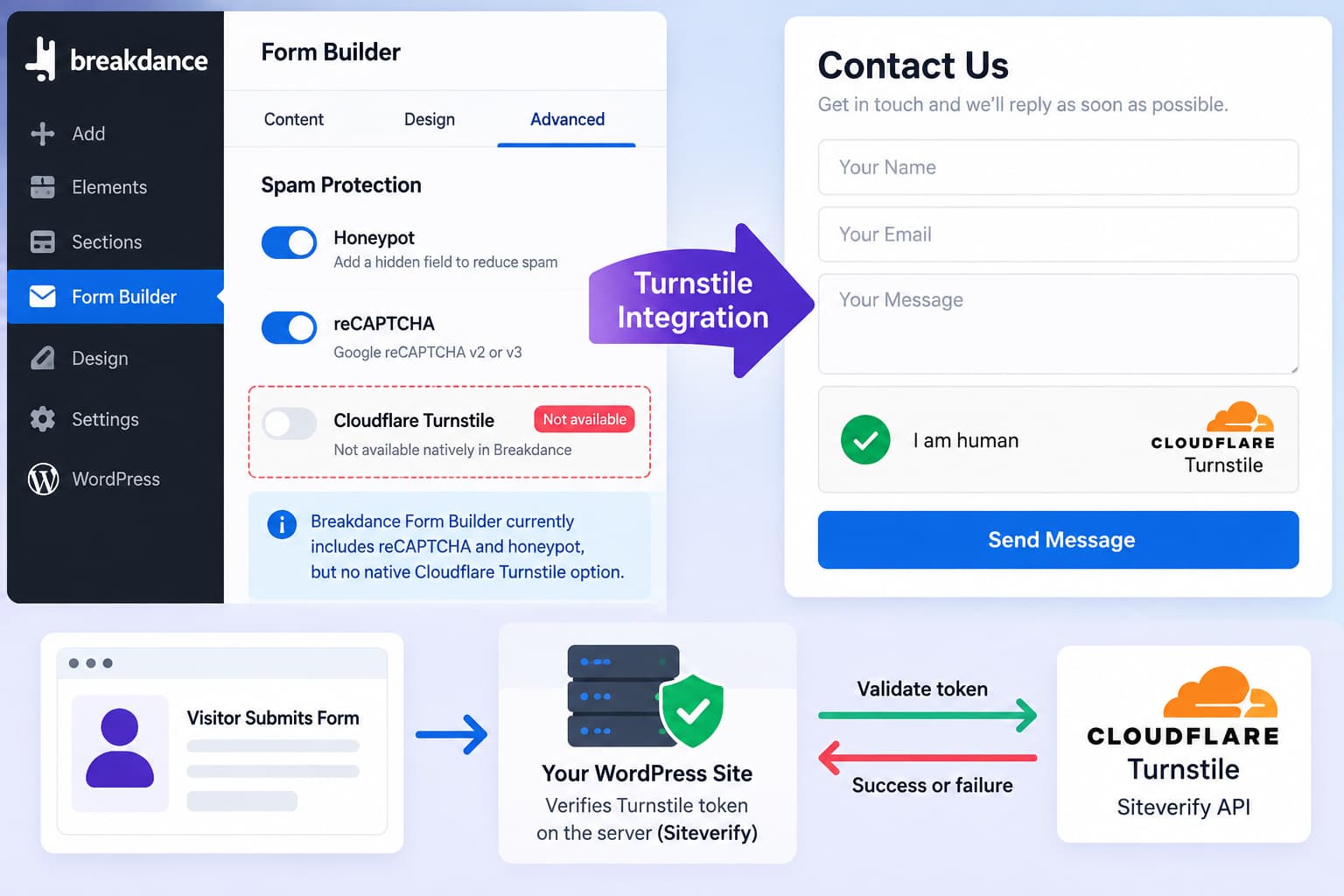
Breakdance’s built-in Form Builder currently provides reCAPTCHA and honeypot protection, but its documented form settings do not include a native Cloudflare Turnstile option.
That does not mean custom PHP and JavaScript are your only choices.
Breakdance itself now features a tutorial demonstrating a third-party Cloudflare Turnstile integration for its Form Builder using a free plugin from Phox Elements. This is generally a safer and more maintainable option than manually injecting a Turnstile widget and trying to intercept Breakdance submissions yourself.
The important security detail is that Turnstile must be validated server-side. Simply placing the visible Turnstile widget above a Breakdance submit button does not protect the form.
Does Breakdance Support Cloudflare Turnstile Natively?
Not according to its current Form Builder documentation.
Under the Form Builder’s Advanced controls, Breakdance currently documents:
- reCAPTCHA
- honeypot protection
- CSRF protection
- form and submit-button HTML IDs
Its dedicated anti-spam documentation likewise covers reCAPTCHA and honeypot protection, but not a built-in Turnstile setting.
Breakdance’s public Form Builder feature page also advertises:
Anti-Spam with ReCAPTCHA & Honeypot
rather than native Turnstile support.
So a request for first-party Turnstile support is still reasonable.
However, there is now a practical third-party route for sites that need Turnstile immediately.
The Easiest Current Option: Use the Breakdance Turnstile Integration
Breakdance has published an official tutorial page titled “Integrate Cloudflare Turnstile into Breakdance forms.”
The tutorial uses a free plugin supplied by Phox Elements.
Phox Elements also currently lists Cloudflare Turnstile among its free Breakdance Form integrations and describes it as an integration designed to protect Breakdance form submissions.
This has an important advantage over dropping arbitrary HTML into the form:
the integration can participate in Breakdance’s actual form-submission process instead of merely displaying a challenge in the browser.
Basic Setup Process
The overall setup is:
- Create a Turnstile widget in Cloudflare.
- Obtain its site key and secret key.
- Install the Breakdance-compatible Turnstile integration.
- Configure the integration with the Cloudflare credentials.
- Enable Turnstile for the relevant Breakdance forms.
- Submit both successful and failed verification tests.
- Confirm spam protection occurs before the form’s normal actions are processed.
The exact plugin interface may change between releases, so use the current integration instructions rather than relying on screenshots from an older tutorial.
Create a Cloudflare Turnstile Widget
Sign in to Cloudflare and create a Turnstile widget for the domain containing your Breakdance form.
Cloudflare gives each widget two important credentials:
Site key
This is the public identifier used by the browser when rendering or executing Turnstile.
Secret key
This remains on the server and is used to verify the visitor’s Turnstile token.
Cloudflare supports several widget modes, including Managed, Non-Interactive, and Invisible.
Managed mode is usually a sensible starting point unless the integration recommends otherwise.
You do not need to proxy your website through Cloudflare to use Turnstile. Cloudflare documents Turnstile as an independent service that can be used on websites regardless of whether their traffic passes through Cloudflare’s CDN.
Why Adding the Widget With HTML Alone Is Not Enough
This is the most important implementation detail.
A common custom-code attempt looks roughly like this:
<div class="cf-turnstile" data-sitekey="YOUR_SITE_KEY"></div>The widget may render correctly.
The visitor may even complete it successfully.
But the form is not securely protected unless the generated token is sent to the server and verified before Breakdance accepts the submission.
Cloudflare explicitly requires server-side validation through its Siteverify API.
The correct flow is:
Visitor
   ↓
Turnstile challenge
   ↓
Turnstile token generated
   ↓
Breakdance form submitted
   ↓
Server receives Turnstile token
   ↓
Server sends token to Cloudflare Siteverify
   ↓
Validation succeeds?
   ├── Yes → Continue Breakdance form actions
   └── No  → Reject submission
Without that last server-side verification step, an automated bot can bypass the visible widget and submit directly to the form endpoint.
Cloudflare describes server-side validation as mandatory.
Do Not Expose the Turnstile Secret Key
The site key belongs in frontend code.
The secret key does not.
Never place the secret key in:
const turnstileSecret = 'YOUR_SECRET_KEY';or:
<input type="hidden" value="YOUR_SECRET_KEY">Anyone visiting the site could retrieve it.
The secret must only be used by server-side code when communicating with Cloudflare’s Siteverify endpoint.
Cloudflare specifically warns against exposing the secret in frontend code.
A properly designed Breakdance integration should handle this separation for you.
Should You Disable Breakdance reCAPTCHA?
If Turnstile is successfully protecting the form, running both Turnstile and reCAPTCHA is normally unnecessary unless you have a specific reason to layer both systems.
Having both can:
- load additional third-party JavaScript;
- add more external requests;
- make troubleshooting harder;
- introduce two independent verification processes;
- increase the chance that a legitimate submission encounters an anti-spam failure.
For a Breakdance form protected by a functioning Turnstile integration, consider disabling its built-in reCAPTCHA after verifying Turnstile thoroughly.
The Breakdance honeypot can still be used as an additional lightweight spam signal if it does not conflict with your setup.
Keep Breakdance’s CSRF Protection Enabled
Turnstile and CSRF protection solve different problems.
Turnstile attempts to determine whether a form submission should be trusted as human rather than automated abuse.
CSRF protection helps prevent another website from causing requests to be submitted through a user’s browser.
Breakdance documents its CSRF setting separately from its spam-protection mechanisms.
Do not disable CSRF protection merely because Turnstile has been enabled unless you are diagnosing a specific issue and understand the security implications.
Test Turnstile Before Using It on a Production Form
Cloudflare provides dedicated test credentials specifically for development and automated testing.
For example, its documented always-pass visible-widget test site key is:
1x00000000000000000000AAwith the corresponding test secret:
1x0000000000000000000000000000000AACloudflare also provides keys that deliberately fail verification, making it possible to test whether the Breakdance form actually rejects an invalid Turnstile response.
Do not use Cloudflare’s testing credentials on a production form.
They are designed for predictable development behavior, not real spam protection.
Verify That Failed Turnstile Validation Actually Blocks the Form
Seeing a Turnstile widget is not sufficient verification.
You need to confirm that failed validation prevents Breakdance’s submission actions from running.
A useful test sequence is:
- Submit the form with valid Turnstile verification.
- Confirm the expected Breakdance action runs.
- Test with Cloudflare’s failure credentials on staging.
- Confirm the form is rejected.
- Confirm no email is sent.
- Confirm no submission is stored if storage is enabled.
- Confirm webhook, CRM, and other actions do not run.
- Restore the production credentials.
- Submit another legitimate test.
The critical test is step 4.
If a deliberately failed Turnstile response still allows the Breakdance form to submit, the integration is not providing meaningful protection.
Check the Browser When Turnstile Does Not Appear
If Turnstile is enabled but no challenge appears on the frontend, open your browser’s developer tools.
Check the Console and Network panels.
Cloudflare hosts the Turnstile client resources under:
challenges.cloudflare.comIf the requests are missing or blocked, investigate:
- Content Security Policy;
- JavaScript optimization;
- delayed JavaScript execution;
- consent-management tools;
- ad blockers;
- caching;
- CDN script rewriting;
- security plugins.
Cloudflare notes that sites using Content Security Policy must permit the required Turnstile origin.
Do not weaken an entire CSP simply to make Turnstile work. Add only the directives required by the implementation.
What About Writing a Custom Breakdance Integration?
It is technically possible, but it is more involved than adding a widget to the page.
A secure custom implementation needs to handle both sides of the workflow:
Frontend
It must:
- load Turnstile;
- render or execute the widget;
- collect the resulting token;
- associate that token with the Breakdance submission.
Backend
It must:
- receive the token;
- send it to Cloudflare’s Siteverify endpoint;
- validate the response;
- reject invalid or missing tokens;
- prevent Breakdance submission actions from continuing when validation fails;
- handle expired and duplicate tokens;
- avoid exposing the secret key.
Cloudflare notes that tokens can be invalid, expired, or already redeemed, which is why client-side success alone cannot be trusted.
Breakdance does provide developer APIs for extending its Form Builder, including a Form Actions API, but those APIs are intended for developers and should be implemented against the current Breakdance developer documentation rather than by modifying builder core files.
For most WordPress site owners, using a maintained integration is preferable.
Do Not Modify Breakdance Core Files
Avoid adding Turnstile by editing files inside the Breakdance plugin itself.
Any changes may be overwritten when Breakdance is updated.
They can also make future form problems much harder to diagnose.
Prefer, in order:
- native Breakdance functionality when available;
- a maintained Breakdance integration;
- a small custom plugin using documented Breakdance APIs;
- carefully managed site-specific code.
Direct modification of the Breakdance plugin should not be the normal solution.
Is Native Breakdance Turnstile Support Still Worth Adding?
Yes.
The existence of a third-party integration solves the immediate problem, but native support would still simplify the experience.
Breakdance already exposes reCAPTCHA configuration directly in the Form Builder’s Advanced settings. A first-party Turnstile implementation could provide a similar workflow:
Advanced
└── Spam Protection
    ├── Honeypot
    ├── reCAPTCHA
    └── Cloudflare Turnstile
         ├── Enable
         ├── Site Key
         ├── Secret Key
         └── Widget Mode
Native integration would also allow Breakdance to coordinate token validation directly with its own submission lifecycle.
Until that exists, the current third-party integration provides a practical alternative to maintaining custom code.
Recommended Approach
For an existing Breakdance site that wants to replace reCAPTCHA with Turnstile, the safest order is:
- Create a Cloudflare Turnstile widget.
- Keep the production secret key private.
- Install the Breakdance-compatible Turnstile integration referenced by Breakdance.
- Configure it on a staging site first.
- Test both successful and deliberately failed validation.
- Confirm failed verification prevents all Breakdance form actions.
- Test email, stored submissions, webhooks, and other configured actions.
- Disable reCAPTCHA if Turnstile is now the chosen CAPTCHA layer.
- Keep Breakdance’s CSRF protection enabled.
- Deploy the tested configuration to production.
The key point is that Breakdance still does not document native Turnstile as a built-in Form Builder option, but custom code is no longer the only practical route. Breakdance now links to a third-party Turnstile integration specifically designed for its forms.
