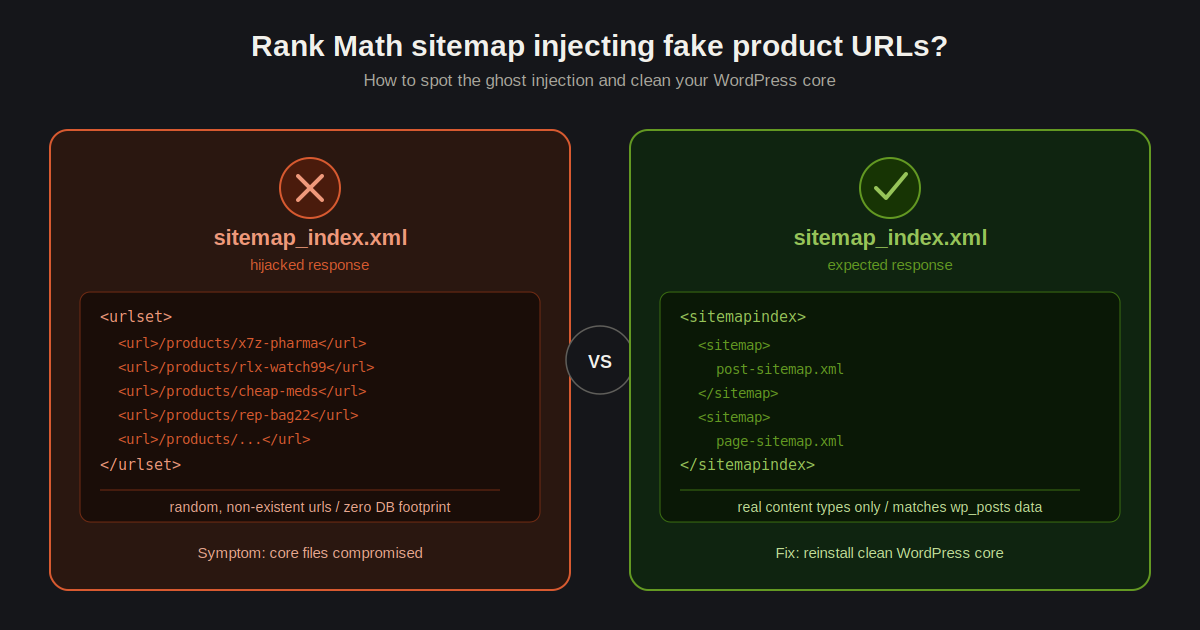
If your WordPress site is returning a <urlset> full of random, non-existent /products/ URLs when you try to access sitemap_index.xml, you are likely dealing with a sophisticated SEO spam injection.
When tools like Rank Math stop functioning as expected—and your database shows zero evidence of these products—it is easy to lose hours chasing phantom rewrite rules. This guide explains why this happens and how to isolate the infection.
The Symptoms
- The Sitemaps are Hijacked: Visiting
sitemap_index.xmlreturns a massive list of product URLs, often related to electronics, pharmaceuticals, or apparel. - Zero Database Footprint: Queries like
SELECT post_type, COUNT(*) FROM wp_posts GROUP BY post_type;return no “product” post types. - Dynamic URLs: The links change periodically, indicating the spam is being dynamically generated to poison search engine results.
Why This Happens: The “Ghost” Injection
This is rarely a plugin bug. It is a common signature of a WordPress Spam Injection.
Malicious actors inject code directly into core files (like index.php, wp-config.php, or theme functions.php). When a bot (or sitemap requester) hits your site, the injected code intercepts the request before Rank Math can render your legitimate sitemap, forcing the server to output spam URLs instead.
How to Audit and Clean Your Site
1. Check Core Entry Files
The first place to look is the entry point of your site. Use your terminal to inspect the top of your files for obfuscated code or strange includes.
# Check the first 20 lines of your index.php
head -n 20 /var/www/yourdomain.com/public_html/index.php
What to look for: Look for eval(), base64_decode(), or unfamiliar include statements. If you see code that looks like a jumble of random characters at the top of a core file, it is 100% malicious.
2. Scan for Hidden Payload Files
Attackers often hide payloads in wp-includes or wp-content/uploads. Run a scan for recently modified files:
# List files modified in the last 7 days
find /var/www/yourdomain.com/public_html -mtime -7 -ls
3. Verify Theme Hooks
Since you are likely using a theme like Avada or Astra, audit your functions.php file. Hackers often inject their hooks here because these files load on every page request.
# Search for suspicious function triggers
grep -rnw '/var/www/yourdomain.com/public_html/wp-content/themes/' -e 'wp_remote_get' -e 'eval('
The Permanent Fix
Do not attempt to patch individual files if you find an infection. A compromised core environment is inherently untrustworthy.
- Backup your
wp-config.phpandwp-contentdirectory (excluding theuploadsfolder for a moment if you want to be extra safe). - Delete the
wp-adminandwp-includesfolders. - Download a fresh version of WordPress from WordPress.org and re-upload the core folders.
- Replace your root
index.phpwith the original file from the WordPress package. - Scan your
uploadsdirectory for.phpfiles (there should be almost none).
# Find and delete any PHP files hiding in your uploads folder
find /var/www/yourdomain.com/public_html/wp-content/uploads -name "*.php" -type f -delete
Final Thoughts
Once the site is cleaned, change all passwords (WP Admin, Database, FTP/SSH) immediately. Attackers likely have your credentials if they managed to inject code into your core files.
Have you encountered a weird sitemap injection like this before? Drop a comment below with the error codes you found!
